Lab Customer Portal: What It Is and What It Should Do
A lab customer portal is a secure, client-facing web layer that sits between your clients and your laboratory's internal systems. Clients use it to submit test requests, track sample and order status, review quotes, approve contracts, and access results or certificates - without calling or emailing your front desk. It is not a LIMS, not an ELN, and not a simple results viewer.
What a lab customer portal is (and what it is not)
Most labs hit a point where email threads and phone calls become the bottleneck. Customers ring to ask where their sample is. Staff pause real work to answer. A lab customer portal removes that loop by giving clients a named, authenticated space to interact with the lab's workflows directly.
Where the boundary sits between a portal and a LIMS
A Laboratory Information Management System (LIMS) manages the lab's internal world: sample registration, instrument assignments, test results, and analytical records. It is built for bench scientists and lab managers - not for the client sitting in a different building or country.
A laboratory client portal is the outward-facing layer that connects to the LIMS through an API. It reads status events, surfaces them to the customer, and writes new requests back into the registration workflow. The two systems serve different audiences and should be designed separately. You can read more about the gaps LIMS systems leave uncovered in Sandorian's guide to 8 workflow gaps a LIMS does not cover.
Note: A lab customer portal is not a LIMS module - it is the customer-facing workflow layer that sits in front of your LIMS.
A results viewer shows a PDF. A portal manages a relationship.
That distinction matters enormously for accredited labs operating under ISO 17025:2017 or ISO 15189:2022, where every customer interaction - request, approval, result access - must be traceable and auditable.
Here is a direct comparison:
| Dimension | Lab customer portal | LIMS (or LIMS client module) |
|---|---|---|
| Primary audience | Client contacts (ordering, reviewing, billing) | Lab staff (analysts, managers, QA) |
| Request submission | Yes - intake form, scope, attachments | Rarely; usually manual entry by staff |
| Quote and contract review | Yes - online approval workflow | No |
| Sample and order status | Real-time, customer-visible dashboard | Internal only |
| Certificate / results access | Yes, with access control per role | Usually internal report only |
| Role-based access per client | Yes - multiple contacts, different permissions | Rarely; one generic login if any |
| Audit log of customer actions | Yes - required for ISO compliance | Internal actions only |
| Integration mechanism | API to LIMS, webhooks for status push | Native data store |
The core features every lab portal must include
A portal that only serves PDF downloads is not doing its job. Here is what a full laboratory client portal must cover:
- Online test request submission - a structured intake form that captures sample type, test scope, turnaround requirements, and attachments, feeding directly into lab registration
- Order and sample status visibility - a real-time customer-facing dashboard showing where each sample sits in the lab's workflow
- Quote review and contract approval - the customer reviews the lab's commercial terms and signs off online before work begins
- Results and certificate access - secure download or viewing of reports and certificates of analysis (CoA), with proper access control
- Role-based account management - multiple named contacts per client organisation, each with appropriate permissions
- Audit log - a timestamped record of every customer action for ISO 17025 and ISO 15189 compliance
- Secure authentication - SSO, MFA, and session management for enterprise client accounts
Online test request and order submission
The online test request form is usually the portal's entry point. When designed well, it replaces unstructured email submissions with a validated intake object that maps directly to the lab's internal work order fields. That mapping is what makes automatic registration possible. The form itself is one feature; the portal is the entire client-interaction system built around it.
Order and sample status visibility
The customer-facing dashboard is the most-used screen in any lab order tracking portal. Clients want to see, at a glance, which samples have arrived, which are in analysis, which have results ready, and what the estimated completion date is. Each status event should push from the LIMS to the portal in real time via webhooks or a polling API, so the customer never has to ask.
Results and certificate access
Result delivery ranges from a simple PDF report to a qualified electronic seal applied under eIDAS. The lab results portal for customers needs to control who can download what - an analyst contact should not necessarily see billing records, and a finance contact should not see raw result data. We cover the full delivery-and-sealing workflow on our eIDAS-sealed certificate portals page.
Customer account management and contact roles
Large client organisations send multiple people to interact with the lab: a project manager who orders, a QA lead who reviews results, and a finance contact who handles invoices. The portal must model that structure - one client account, multiple named contacts, each with a role that defines what they can see and do.
Self-service status visibility: how it removes phone and email load
Here is the core business case for a customer portal for testing labs, stated plainly: when customers can answer their own questions, they stop calling.
What customers are actually calling about
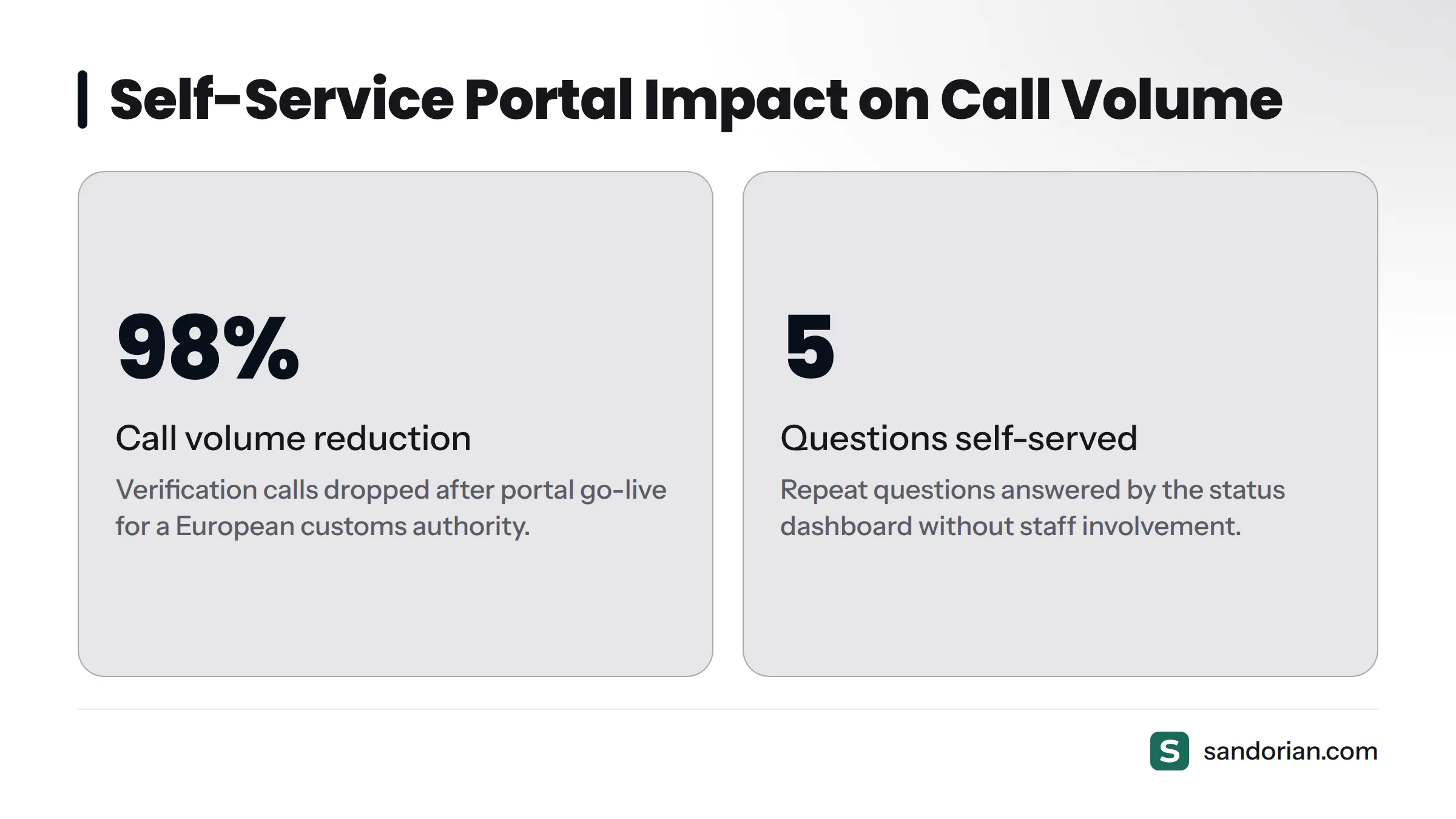
In most labs without a portal, the front desk fields the same five questions on repeat: Has my sample arrived? When will results be ready? Can you send me the certificate again? Who approved my quote? Is there a problem with my order? Every one of those questions is answerable by a well-built status dashboard - no human required.
The 98% call-reduction outcome
Sandorian built a customer-facing portal for a European customs authority. After go-live, verification phone calls to the lab dropped by 98%. That figure comes from our own first-party measurement of call volume before and after the portal launched. We cover the full case in our forthcoming article on the customs portal that cut calls by 98%, but the mechanism is straightforward: clients who can see real-time status, turnaround estimates, and certificate availability themselves simply do not need to call.
"When customers can see sample status, turnaround estimates, and certificate availability themselves, the lab's front desk stops being a tracking hotline."
The administrative time released by that shift flows back to analytical work, quality management, and actual customer service - the kind that requires human judgment.
Request intake and contract review inside the portal
A portal that only shows status is a read-only tool. A self-service lab portal that manages the full customer workflow - from first request through commercial approval to sample receipt - becomes a revenue-enabling system.
Moving quote approval and scope agreement online
The traditional lab intake process runs through email: a customer emails a request, the lab replies with a quote, the customer confirms, and someone manually registers the sample. That chain breaks down when emails get missed, quotes expire, or the wrong scope gets registered.
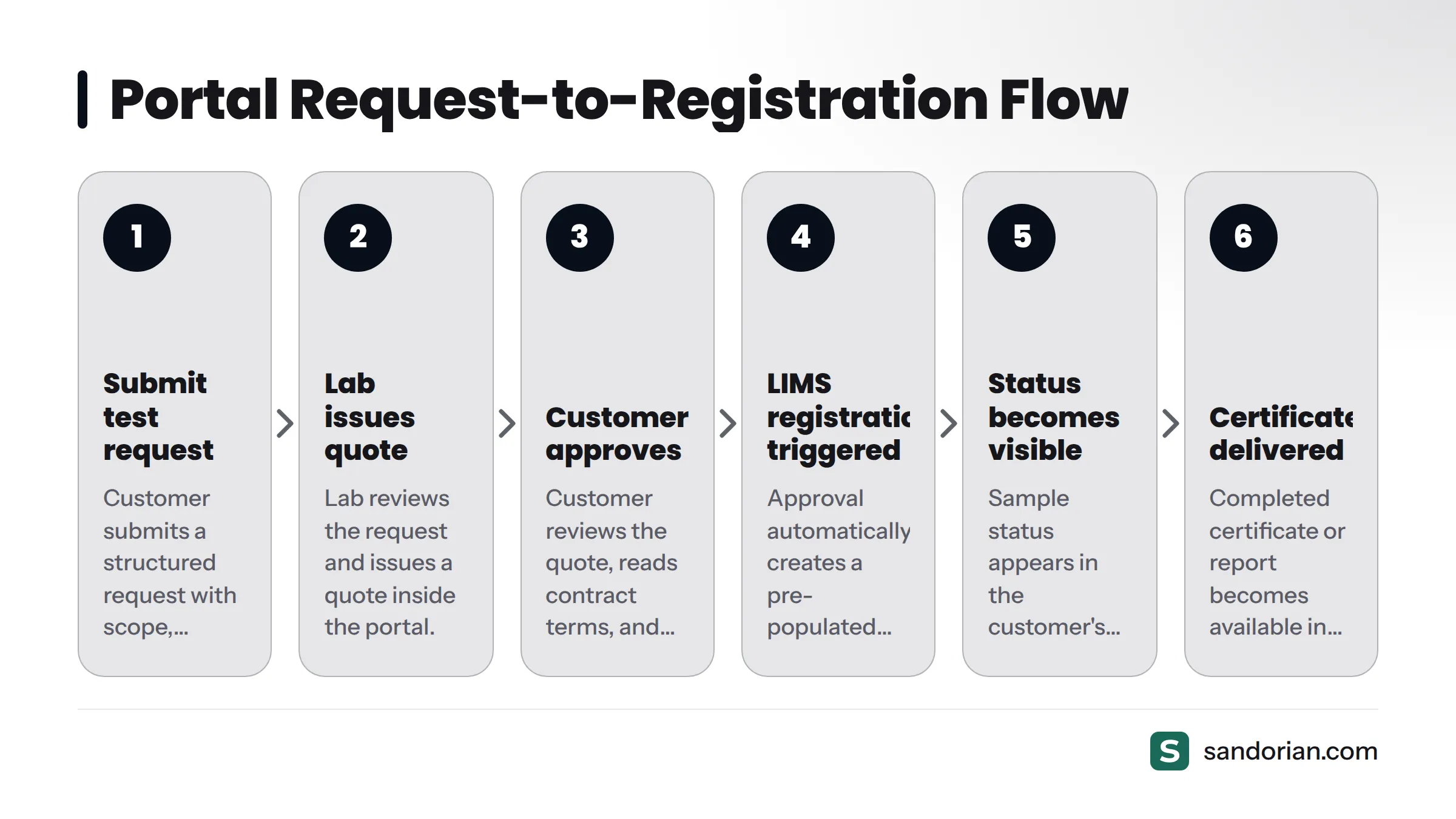
Inside a portal, the same process looks like this:
- Customer submits a structured test request with scope, sample details, and deadline requirements
- Lab reviews the request and issues a quote inside the portal
- Customer reviews the quote, reads the contract terms, and approves online
- Approval triggers automatic sample registration in the LIMS
- Sample status becomes visible in the customer's dashboard immediately
- Completed certificate or report becomes available in the portal once results are released
That six-step flow eliminates three email exchanges and one manual registration step. It also creates a clean, timestamped record of commercial agreement - which matters for dispute resolution and ALCOA+ data integrity compliance.
Connecting the intake form to the lab's internal registration workflow
The intake form should map directly to the LIMS's work order schema. When the mapping is clean, approval of a quote in the portal triggers a pre-populated work order in the LIMS - no re-keying, no transcription errors. We cover the mechanics of that connection in our forthcoming article on the request intake workflow.
Access control, audit logging, and data security requirements
Role-based access control for multi-contact client accounts
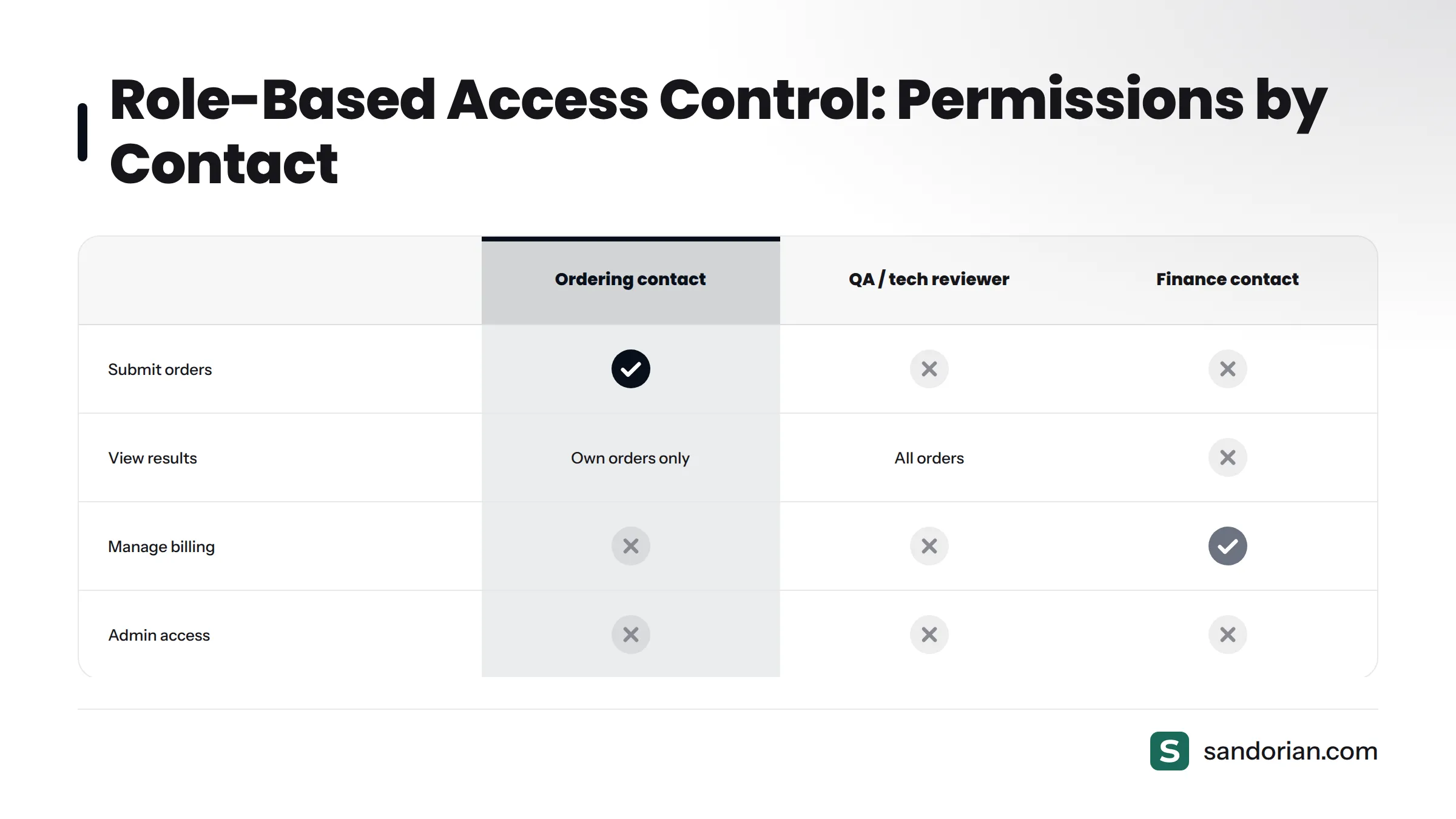
Role-based access control (RBAC) means each portal user gets exactly the permissions their role requires - no more, no less. Here is a practical permission map for a typical lab client account:
| Role | Submit orders | View results | Manage billing | Admin (add/remove users) |
|---|---|---|---|---|
| Ordering contact | Yes | Own orders only | No | No |
| QA / technical reviewer | No | All orders | No | No |
| Finance contact | No | No | Yes | No |
| Account administrator | Yes | All orders | Yes | Yes |
Without RBAC, a single shared login is the alternative - which means one departing employee invalidates access for the whole organisation, and a junior contact can download sensitive results they were never meant to see.
Audit logging as an ISO 17025 and ISO 15189 requirement
Both ISO 17025:2017 and ISO 15189:2022 require labs to maintain records of all activities that affect result integrity. When a customer action - submitting a request, approving a scope change, downloading a certificate - is part of that chain, it must appear in an immutable audit log. The log should capture who performed the action, what they did, and when, with timestamps that cannot be altered after the fact.
Authentication: SSO, MFA, and session management
Enterprise clients expect to authenticate through their own identity provider via Single Sign-On (SSO). Multi-Factor Authentication (MFA) should be mandatory for any role that can approve orders or download signed certificates. Session management policies - idle timeouts, re-authentication on sensitive actions - are baseline requirements for a portal handling regulated lab data under GDPR.
How a lab customer portal connects to your LIMS and intake workflow
API-based integration: what the portal should read and write
The portal talks to the LIMS through a REST API. At minimum, the integration should:
- Read from the LIMS: sample status events, analytical progress stages, result release flags, certificate availability
- Write to the LIMS: new work orders (from approved portal requests), scope amendments, customer-approved attachments
For a closer look at structuring that connection without creating fragile, failure-prone integrations, our LIMS API integration guide walks through the step-by-step patterns we use.
Status synchronisation: pushing LIMS events to the customer dashboard
Real-time status requires an event-push mechanism - either webhooks fired by the LIMS on status changes, or a short-interval polling API that the portal calls. Webhooks are preferred because they eliminate polling lag and reduce unnecessary API calls. Each event (sample received, analysis started, result released) should update the customer dashboard within seconds of the LIMS recording it.
What happens when the integration is missing or shallow
"A portal that isn't connected to your LIMS in real time is just a contact form with extra steps."
A shallow integration - one where status is updated manually by a lab coordinator pasting data into a portal CMS - reintroduces exactly the human bottleneck the portal was supposed to remove. It also creates a data consistency risk: the portal shows one status, the LIMS holds another, and the customer calls to ask which is correct. For more on where lab integrations tend to break down, see our article on why lab integrations fail.
What to look for when building or commissioning a lab customer portal
LIMS client portal limitations: why the native module usually falls short
Most LIMS vendors offer a client-facing module. Those modules cover the basics - result download, maybe a request form - but rarely include RBAC, audit logging, contract review, or deep API integration. If your lab is ISO 17025 or ISO 15189 accredited and serves business clients with multiple contacts, the native LIMS client portal almost always falls short. Our build vs. buy guide for lab software covers the decision framework in detail.
Seven questions to ask any vendor or development partner
Before committing to a portal solution, ask these:
- Does the portal support role-based access control at the individual contact level, not just per organisation?
- Does it maintain an immutable audit log of all customer actions, with timestamps?
- How does it integrate with the LIMS - API, file transfer, or manual export?
- Can status updates push to the customer dashboard in real time (webhooks or sub-minute sync)?
- Does it support SSO and MFA for client authentication?
- Can it handle the contract review and quote approval workflow without leaving the portal?
- Is certificate delivery compliant with eIDAS qualified electronic seal requirements if you operate in the EU?
If a vendor cannot answer all seven cleanly, the portal will create new problems rather than solve existing ones.
If you are ready to move from evaluation to build, the team at Sandorian specialises in exactly this layer. Reach out to discuss custom intake and portal development for labs for your specific accreditation context, LIMS environment, and client base.
Frequently asked questions
What is the difference between a lab customer portal and a LIMS?
A LIMS manages internal lab operations - sample registration, analysis tracking, and result storage - for lab staff. A customer portal is the external-facing layer that lets client contacts submit requests, track orders, review quotes, and access results through a secure web interface. The two systems serve different audiences and connect through an API.
Do I need a separate portal if my LIMS already has a client view?
Probably yes, if you serve multiple contacts per client organisation, need RBAC, require audit logging of customer actions, or want online contract and quote approval. Most LIMS client views offer result download and basic status - they rarely cover the full client-interaction workflow that an ISO 17025 or ISO 15189 accredited lab needs.
What compliance requirements apply to a lab customer portal?
ISO 17025:2017 and ISO 15189:2022 both require auditable records of activities affecting result integrity, which includes customer approvals and certificate access. GDPR applies to any personal data processed through the portal for EU-based labs. If you deliver electronically signed certificates, the eIDAS regulation governs the validity of qualified electronic seals used in that delivery.
How does a lab portal connect to a LIMS?
Through a REST API. The portal reads status events, result release flags, and certificate availability from the LIMS, and writes approved work orders and scope amendments back to it. Status synchronisation typically uses webhooks so that LIMS events push to the customer dashboard in near real time.
What is role-based access control in a lab portal context?
RBAC means each named user within a client account holds a role - such as ordering contact, QA reviewer, finance contact, or administrator - and can only perform the actions that role permits. An ordering contact can submit samples but not view another team's results. A finance contact can manage invoices but not download analytical data. This prevents data leakage and maintains a clean access record.
Can a lab portal reduce administrative workload?
Yes, measurably. Sandorian's portal built for a European customs authority reduced verification phone calls by 98% after launch. The mechanism is straightforward: when customers can check sample status, certificate availability, and turnaround estimates themselves, they have no reason to call.
Sources
- ISO 17025:2017 - General requirements for the competence of testing and calibration laboratories, ISO
- ISO 15189:2022 - Medical laboratories: requirements for quality and competence, ISO
- Regulation (EU) No 910/2014 on electronic identification and trust services (eIDAS), EUR-Lex
- Regulation (EU) 2016/679 - General Data Protection Regulation (GDPR), EUR-Lex
Let's talk
We build the systems that power your business. Let us know how we can help.
Book a 30-min Call