LIMS API Integration: Step-by-Step Guide
To integrate with a LIMS through its API, you work through a fixed sequence: obtain credentials, map your data model to the LIMS schema, implement authentication, write idempotent requests with retry logic, handle undocumented API behaviour, set up structured logging for your audit trail, then validate end-to-end in staging before going live.
Here is the full guide, step by step.
What LIMS API integration actually involves
LIMS API integration means connecting an external system - an instrument driver, an ERP connector, a customer portal - to a Laboratory Information Management System so that data flows between them without manual re-entry. A result recorded in an analyser appears in the LIMS automatically. A sample registered in the LIMS appears in the ordering system automatically. No copy-paste, no CSV drops, no nightly batch files.
This guide covers REST-based integration from the perspective of the system connecting to the LIMS. Most modern LIMS platforms - including LabVantage, LabWare, and Clarity LIMS (Illumina/BaseSpace) - expose a LIMS REST API as their primary integration surface, though older platforms may use SOAP or proprietary web services. In clinical and diagnostic contexts, HL7 and FHIR protocols apply on top of or instead of REST.
One distinction worth drawing clearly: LIMS API integration is not the same as instrument middleware, which handles lower-level translation between instrument serial protocols and the LIMS. If you are trying to connect a physical analyser, start with connecting lab instruments to your LIMS instead. This guide picks up where middleware ends: at the HTTP layer.
What you will need before you start
- API documentation URL (request from the LIMS vendor if not publicly available)
- Sandbox or test environment access
- Data model specification from both sides (your system and the LIMS)
- Compliance requirements in scope: ISO 17025, ISO 15189, 21 CFR Part 11, or IVDR
- A secrets manager or environment variable store for credentials
Step 1 - Obtain API credentials and review the documentation
The first practical step is getting credentials issued and reading the documentation critically - not skimming it.
API key vs. OAuth token: your LIMS uses one or the other.
| Credential type | How to identify it | When it applies | How to store it |
|---|---|---|---|
| API key | Docs show a static token in an X-API-Key or Authorization: Bearer header |
Server-to-server integrations without user delegation; simpler LIMS platforms | Environment variable or secrets manager; never in source code |
| OAuth 2.0 client credentials | Docs reference a token endpoint, grant_type=client_credentials, and token expiry |
Enterprise LIMS platforms; integrations that need short-lived tokens and automatic rotation | Store client ID and secret in secrets manager; cache the access token with its expires_in value |
Request credentials through the LIMS admin panel or via a vendor support ticket. Store them immediately in an environment variable or a dedicated secrets manager - AWS Secrets Manager, HashiCorp Vault, Azure Key Vault, whichever your stack uses. Hardcoding credentials in source code is the single most common security mistake in LIMS integrations.
When you read the API documentation, look specifically for: the base URL and versioning scheme (e.g., /api/v2/), the authentication method, rate limit headers, pagination style (cursor vs. page-offset), and the error response format. If the documentation omits any of these, treat that as a warning sign - not a reason to stop, but a reason to test empirically before writing production code.
Incomplete documentation is normal. We address it directly in Step 5.
Step 2 - Map your data model to the LIMS schema
LIMS data mapping is the process of aligning every field your system produces with the corresponding field the LIMS expects, for every record type you need to exchange.
In integrations we have delivered for ISO 17025 accredited testing labs, this step consistently takes longer than teams expect. The LIMS schema is usually more constrained than it looks: required fields listed as optional in the docs, enumeration values that are undocumented, date format expectations that differ from ISO 8601.
Build a field mapping table before you write any code:
| Source field (your system) | LIMS field | Data type | Transformation required | Validation rule |
|---|---|---|---|---|
order.sample_code |
SampleID |
String (max 20) | Strip hyphens | Must match ^[A-Z0-9]{1,20}$ |
order.collected_at |
CollectionDateTime |
ISO 8601 UTC | Convert from local TZ | Must be in the past |
order.test_codes[] |
TestPanel.code |
String array | Map to LIMS panel codes via lookup table | Each code must exist in LIMS enum |
order.matrix |
SampleType |
Enum | Map to LIMS allowed values | Reject if unmapped |
result.numeric_value |
Result.value |
Decimal | Round to 4 dp | Within instrument reference range |
Sample ID as the linking key. Every LIMS assigns its own internal identifier to a sample. Your system has its own. These two IDs are almost never the same. Maintain a cross-reference table in your database: {external_sample_id, lims_internal_id, created_at}. On write, store the LIMS-returned ID. On read, look up by external ID first. This table is also part of your audit trail.
Data type mismatches - especially dates and unit-of-measure enumerations - are the most common source of silent failures. The LIMS accepts the request with a 200, but writes the wrong value. Validate every field against the LIMS schema before submission, not just after a failure.
Step 3 - Build and test authentication
Build your authentication layer in isolation before touching any business logic endpoint. A clean auth setup takes an hour. Debugging auth failures tangled into business logic can take days.
API key authentication is straightforward. Attach the key in the header format the docs specify. Common patterns:
Authorization: Bearer <api-key>
X-API-Key: <api-key>
The header name varies by vendor - check the docs precisely.
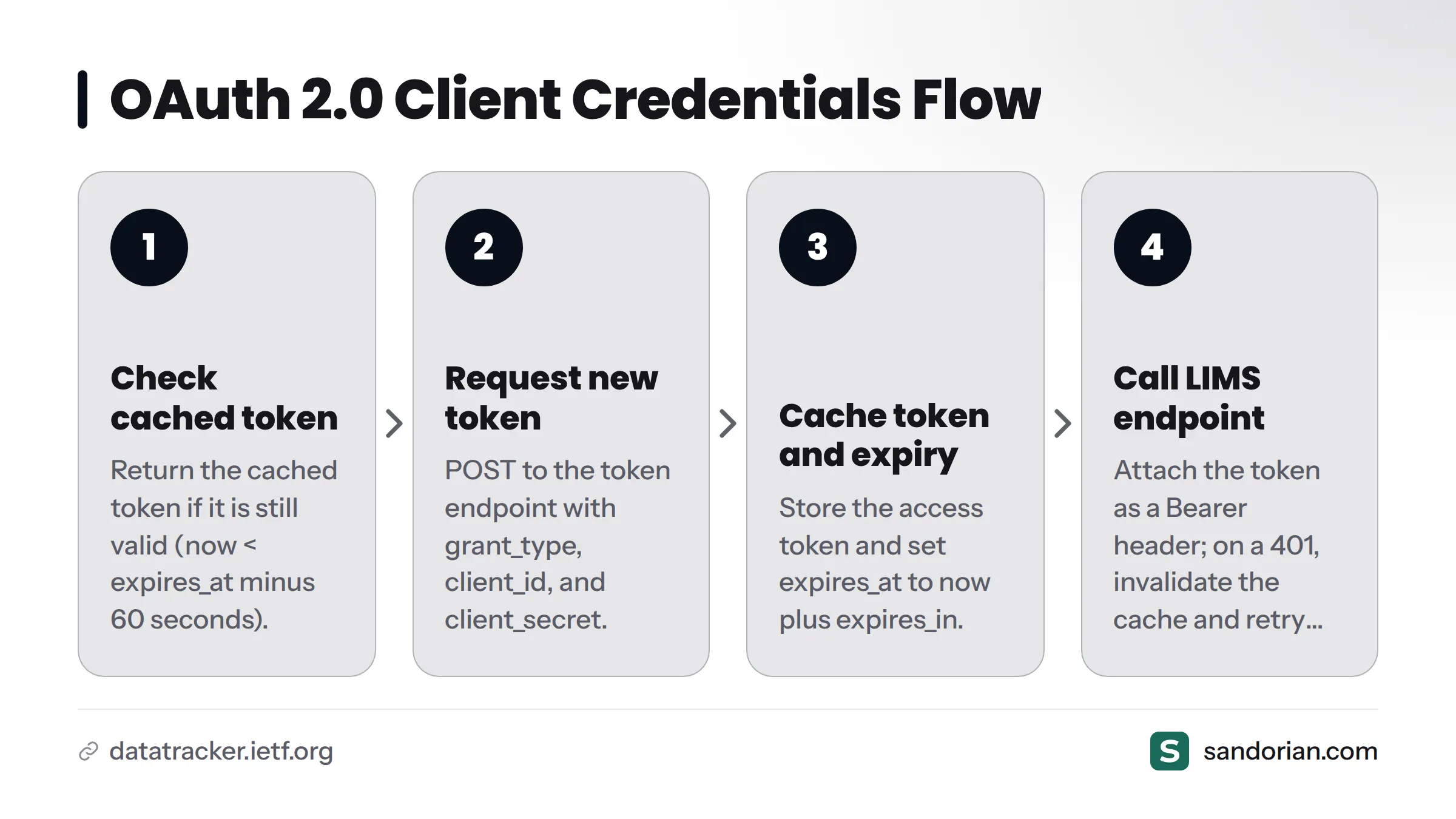
OAuth 2.0 client credentials flow (defined in RFC 6749, Section 4.4) requires a token acquisition step before every session. The pattern, in pseudocode:
function get_access_token():
    if cached_token is valid (now < expires_at - 60s):
        return cached_token
    response = POST token_endpoint {
        grant_type: "client_credentials",
        client_id: CLIENT_ID,
        client_secret: CLIENT_SECRET
    }
    cached_token = response.access_token
    expires_at = now + response.expires_in
    return cached_token

function call_lims(endpoint, payload):
    token = get_access_token()
    return POST endpoint with header "Authorization: Bearer {token}"
    if response.status == 401:
        invalidate cached_token
        token = get_access_token()
        return retry POST once
The 60-second buffer on expires_at prevents token expiry mid-request under clock skew - a failure mode we encounter regularly in JWT-based LIMS implementations.
Common auth failure patterns in LIMS integrations:
- Clock skew causing JWT tokens to appear expired before they are (fix: synchronise server clocks via NTP)
- IP allowlisting not set for your integration server's egress IP (fix: confirm with vendor before testing)
- TLS version mismatch - older LIMS servers may reject TLS 1.3 connections (fix: set your HTTP client's minimum TLS version to 1.2)
- 401 vs. 403 confusion - a 401 means unauthenticated (token problem); a 403 means authenticated but not authorised (permissions problem). These require different fixes and different escalation paths.
Step 4 - Implement idempotent writes and retry logic
This is the step most integrations skip, and the one that creates the most damage in regulated environments.
What is an idempotency key? An idempotency key is a unique identifier you attach to a write request so that if you send the same request twice - due to a network timeout, a retry, or a process restart - the LIMS creates one record, not two. In a lab context, a duplicate sample registration or a duplicate result entry is not just an inconvenience; it is a data integrity failure that can trigger an ISO 17025 non-conformance.
Generate idempotency keys from the natural business key: a hash of (external_sample_id + test_code + submission_timestamp_truncated_to_minute). Send it in the header or body depending on what the LIMS supports - check the docs, and if the docs are silent, test by sending the same POST twice and observing whether you get one record or two.
Our in-depth article on why idempotency matters in API integrations covers the concept in full.
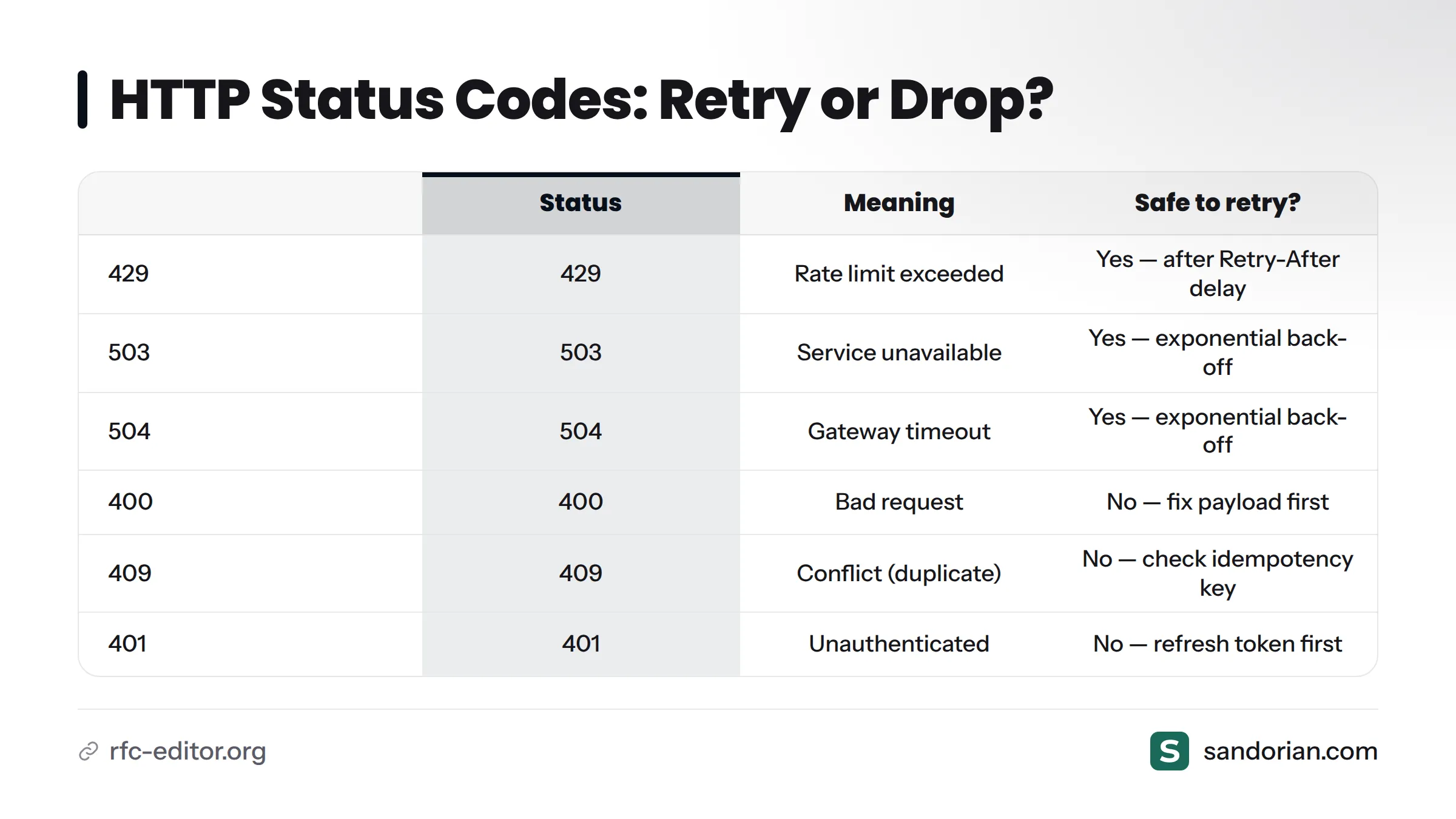
Retry logic: which status codes to retry and which to drop.
Per RFC 9110, the HTTP standard, status codes signal the nature of the failure:
| HTTP status | Meaning | Safe to retry? |
|---|---|---|
| 429 | Rate limit exceeded | Yes - after the Retry-After delay |
| 503 | Service unavailable | Yes - with exponential back-off |
| 504 | Gateway timeout | Yes - with exponential back-off |
| 400 | Bad request (malformed payload) | No - fix the payload first |
| 404 | Resource not found | No - check the endpoint or the ID |
| 409 | Conflict (duplicate detected) | No - check idempotency key logic |
| 401 | Unauthenticated | No for data retry - refresh token first |
Exponential back-off with jitter means waiting progressively longer between retries, with a small random offset added to prevent multiple integration clients from retrying in synchronised waves and hammering the LIMS together. A simple pattern: wait min(base * 2^attempt + random(0, 1000ms), max_wait). Start with base = 1s and cap at max_wait = 60s.
Set a maximum retry budget - typically 3 to 5 attempts. When all retries are exhausted, route the failed message to a dead-letter queue and trigger an alert. Never silently discard a failed write in a regulated lab.
Retry flow in plain terms: Send request. Success? Done. Failure with a retryable status code? Apply back-off, increment the retry counter, retry. Non-retryable status code? Route to the dead-letter queue and alert. Retry budget exhausted? Same dead-letter path.
Step 5 - Handle undocumented or incomplete API behaviour
Partial documentation is the norm, not the exception. In integrations we have delivered against LabWare and Clarity LIMS deployments, we have encountered endpoints that exist in the UI but nowhere in the documentation, field names in actual responses that differ from the schema, and rate limits we discovered only by triggering a 429 in a test tenant.
How to find undocumented endpoints: Open the LIMS web interface in a browser with the network inspector open (F12 - Network tab). Navigate through the screens that correspond to the data you need to exchange. The browser's HTTP calls to the LIMS backend often reveal endpoints and payload formats that are not in the official documentation. This is not a workaround - it is standard practice.
Defensive deserialization: When you parse a LIMS API response, do not assume every documented field will be present, and do not assume every present field will be documented. Treat absent fields as null, not as errors. Write your deserializer to ignore unknown fields rather than throwing on them.
When no sandbox exists: Some LIMS vendors do not provide a sandbox environment. Negotiate a dedicated test tenant - a separate LIMS instance with non-production data - before the project starts. Never use the production LIMS for integration testing. This is a hard requirement in any regulated lab.
Log raw responses during the discovery phase. Before you know what the API will return, log the full response body - but redact any patient identifiers or PHI before those logs reach storage.
Red flags in LIMS API documentation
- No versioning scheme documented (you cannot safely upgrade)
- No error code reference (you cannot classify failures programmatically)
- No rate limit documentation (you will discover limits in production)
- No sandbox or test environment offered
- Last updated date is more than three years ago
If you encounter multiple red flags, read our breakdown of why lab integrations fail before committing to an architecture - some failure modes are predictable and avoidable if you catch them early.
Step 6 - Set up structured logging for audit trails
Under ISO 17025:2017, software systems that generate, modify, or transmit test data must support traceability - the ability to reconstruct exactly what happened, when, and by whom. Your integration layer is one of those systems.
Structured logging is not the same as application logging. It is a machine-readable, tamper-evident record of every significant event your integration performs. Build it as a separate log stream from your application logs.
A compliant integration audit trail must record, at minimum:
| Field | Example value | Purpose | Required for ISO 17025 traceability |
|---|---|---|---|
timestamp |
2026-03-14T09:15:22.413Z |
When the action occurred (UTC) | Yes |
actor |
lims-integration-service@prod |
Service identity performing the action | Yes |
action |
POST /api/v2/samples |
HTTP method and endpoint called | Yes |
payload_hash |
sha256:a3f9... |
Hash of the request body (not the body itself) | Yes |
http_status |
201 |
Response status received | Yes |
external_sample_id |
EXT-20260314-001 |
Linking identifier from your system | Yes |
lims_sample_id |
LMS-98712 |
LIMS-assigned identifier returned | Yes |
retry_count |
0 |
Number of retries before success | Recommended |
correlation_id |
uuid-4a2b... |
Ties log entry to the LIMS-side audit record | Recommended |
Use JSON Lines format: one JSON object per line, one line per event. This makes logs queryable by any log aggregation tool (Elasticsearch, Loki, CloudWatch Logs) and machine-verifiable.
What not to log: Never log full payloads that contain patient data, personal health information, or any PHI. Log identifiers and hashes. The hash confirms the payload has not changed; the identifier lets you retrieve the record if needed.
Retention periods for integration logs should align with your accreditation requirements. ISO 17025 accredited labs typically retain technical records for a minimum period specified by the accreditation body - confirm this with your quality manager, not with this article. For deeper reading on ISO 17025 software requirements, see Sandorian's guide to ISO 17025 software requirements and LIMS validation and the ISO 17025 accreditation guide for testing labs.
The ALCOA+ principles - Attributable, Legible, Contemporaneous, Original, Accurate, plus Complete, Consistent, Enduring, and Available - provide a useful data integrity framework for structured log design. Each principle maps directly to one or more log fields in the table above.
Step 7 - Validate end-to-end in a staging environment
Unit tests and integration tests do not replace staging validation. Staging validation proves that your integration works against a real LIMS instance, with real authentication, real data constraints, and real network conditions.
Your staging LIMS environment should mirror production in three specific ways: same schema version, same authentication configuration, and representative test data that covers your full range of sample types and test panels.
End-to-end test scenarios to run before production cut-over:
- Happy path: write a sample record, read it back, verify all fields match the submitted values exactly
- Auth failure: present an expired token, confirm your code refreshes and retries correctly
- Duplicate write: submit the same request twice with the same idempotency key, confirm one record exists, not two
- Rate limit trigger: send requests above the documented rate, confirm your back-off logic activates and resolves without data loss
- Malformed payload: submit a request with a missing required field, confirm your field-level validation catches it before it reaches the LIMS, and that your error handling records it correctly
- Network timeout simulation: cut the connection mid-request, confirm the retry logic recovers and the audit trail records the retry count
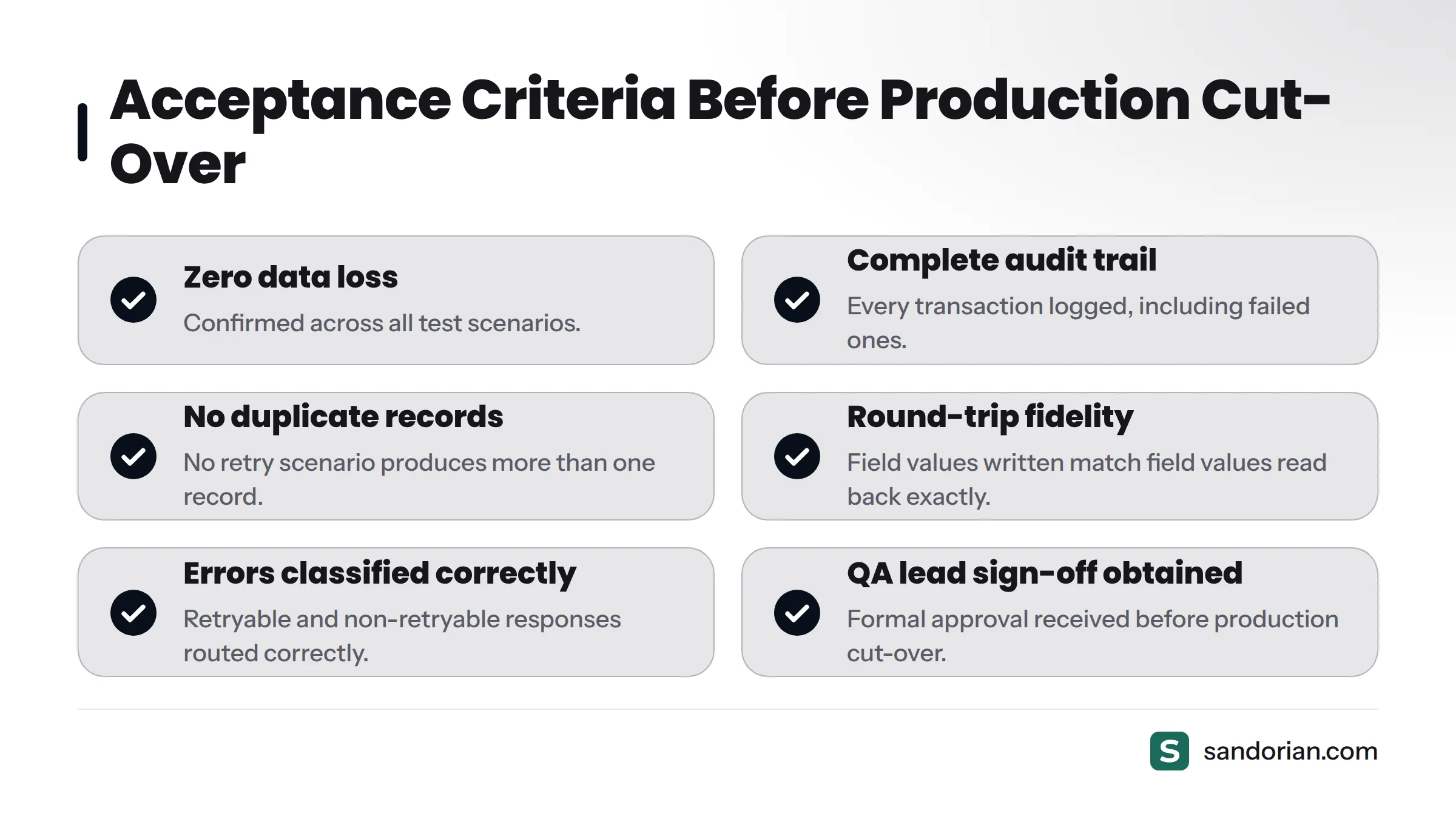
Acceptance criteria before production cut-over:
- Zero data loss across all test scenarios
- Correct audit trail entries for every transaction, including failed ones
- No duplicate records produced by any retry scenario
- All field values written match field values read back (round-trip fidelity)
- Error responses classified and routed correctly (retryable vs. non-retryable)
- Alert triggers fire correctly on dead-letter queue events
- QA lead sign-off obtained (required for regulated labs under software qualification frameworks)
For regulated labs, integration validation is part of your software qualification evidence. Involve your QA lead before the staging tests start, not after. When you are ready for a complete checklist covering integration requirements, look for the integration requirements checklist guide on this site - it is the companion document to this step.
Canary rollout: When you go live, start with a single low-volume sample type rather than switching all traffic at once. This limits the blast radius of any behaviour that only appears under production conditions.
When you are ready to go live
Production monitoring for a LIMS integration should track three metrics at minimum: HTTP error rate (4xx and 5xx separately), retry rate, and request latency (p50 and p95). Set alerting thresholds on sustained 5xx error rates above 1% and on dead-letter queue depth above zero - a non-empty dead-letter queue means data has stopped flowing.
API version changes are a reality of long-running integrations. Subscribe to your LIMS vendor's release notification channel and test every version upgrade in staging before applying it in production. Our guide to API versioning for long-lived B2B integrations covers the strategies that keep integrations stable across vendor releases.
If you would like a Sandorian engineer to review your specific LIMS API - map these steps to your environment, identify compliance gaps, and confirm your architecture before you build - we offer a no-commitment scoping call. Start with our LIMS integration services page to describe your setup and book a session.
Frequently asked questions
What is the difference between a LIMS API key and an OAuth token?
An API key is a static credential - a fixed string you include in a request header. An OAuth token is short-lived and obtained programmatically via a token endpoint using client credentials. API keys are simpler to implement but carry higher risk if exposed; OAuth tokens expire automatically and support rotation without changing the client configuration. Most enterprise LIMS platforms prefer OAuth 2.0 client credentials flow for server-to-server integrations.
How do I find out if my LIMS has a REST API?
Check the LIMS vendor's developer documentation or support portal. If documentation is not publicly available, raise a support ticket asking specifically for the REST API documentation and sandbox access. You can also check whether the LIMS web interface makes REST calls by opening your browser's network inspector while navigating the UI - if you see JSON responses over HTTPS, the platform has an HTTP API.
What is an idempotency key and do I need one for LIMS writes?
An idempotency key is a unique token you attach to a write request so that retrying the same request does not create duplicate records. You need one for any POST or PUT that creates or modifies a record in the LIMS. In regulated labs, duplicate sample or result records are a data integrity failure - idempotency keys are not optional.
How do I test a LIMS API integration before going live?
Run your tests against a staging LIMS environment that mirrors production in schema version and authentication configuration. Cover at minimum: happy-path write/read-back, duplicate write (idempotency check), auth failure recovery, rate limit trigger, malformed payload rejection, and network timeout retry. Obtain QA lead sign-off before cutting over.
What should a LIMS integration audit trail record for ISO 17025 compliance?
At minimum: UTC timestamp, service identity (actor), HTTP method and endpoint (action), a hash of the request payload, HTTP status received, external and LIMS-internal record identifiers, and retry count. Never log full payloads containing PHI - log hashes and identifiers. Retain logs for the period your accreditation body specifies.
How do I handle rate limiting from a LIMS API?
When you receive a 429 response, read the Retry-After header if present and wait that duration before retrying. If no header is present, apply exponential back-off with jitter. Never retry immediately in a tight loop - this will get your integration client blocked. Document the rate limit you discover empirically and use it to size your request queue.
What do I do when the LIMS API documentation is incomplete?
Use the browser network inspector on the LIMS web UI to discover actual endpoints and payload formats. Practice defensive deserialization - treat unknown fields as ignorable and absent fields as null. Log raw responses during the discovery phase (redacting PHI). Raise a support ticket for specific gaps that block your integration, and document any undocumented behaviour you rely on so you can re-test it after each vendor update.
Can I integrate with a LIMS using webhooks rather than polling?
Some LIMS platforms support outbound webhooks for LIMS webhook integration - the LIMS sends an HTTP POST to your endpoint when a record is created or updated. This eliminates polling and reduces latency. Check your LIMS vendor's documentation for webhook support. If webhooks are available, you still need all the same authentication and logging practices described in this guide on the receiving end, plus an endpoint that returns a 200 within the LIMS's timeout window to prevent duplicate delivery.
Sources
Let's talk
We build the systems that power your business. Let us know how we can help.
Book a 30-min Call