PAdES Digital Signature: How to Sign Lab PDF Reports
A PAdES digital signature embeds a cryptographic signature or eIDAS electronic seal directly inside a PDF file, in the format defined by ETSI EN 319 132 and EN 319 142. It is the required format for eIDAS-compliant signing of PDF documents. This guide walks every step - from PDF preparation to validated output - for a lab certificate or test report pipeline.
At Sandorian, we have shipped PAdES-sealed PDF reports for ISO 17025 and IVDR clients. What follows is what we learned the hard way.
What PAdES actually means for a lab PDF report
PAdES (PDF Advanced Electronic Signatures) is the ETSI-standardised format for embedding a cryptographic signature or electronic seal directly inside a PDF file. It is defined in ETSI EN 319 132 and ETSI EN 319 142. For a lab, this means every PDF report you dispatch carries a verifiable proof of origin and integrity that any recipient can check without calling you.
A plain Adobe PDF signature using the proprietary SubFilter value /adbe.pkcs7.detached is not PAdES-conformant. It may look identical on screen, but it will fail validation under EU law. PAdES uses SubFilter /ETSI.CAdES.detached, embedding a CAdES) (CMS Advanced Electronic Signatures) structure inside the PDF - a CMS container built to RFC 5652 with ETSI extensions.
The two deployment modes for a lab are:
- Signing certificate - identifies a named person (analyst, QP) and produces an advanced or qualified electronic signature.
- Seal certificate - identifies your legal entity (the lab) and produces an eIDAS electronic seal. For automated pipelines, this is almost always the right choice.
PAdES vs PDF signature - the key difference in one sentence: PAdES uses
SubFilter /ETSI.CAdES.detachedand an ETSI-conformant CMS structure; a plain Adobe signature uses/adbe.pkcs7.detachedand passes Adobe validation but fails EU DSS PAdES validation.
PAdES differs from the other ETSI advanced signature formats in that it is PDF-only. CAdES signs arbitrary binary data; XAdES signs XML. When your output is a PDF - as it is for lab test reports - PAdES is the correct choice.
Step 1 - Confirm your PDF is signing-ready
PAdES signing does not require PDF/A, but using PDF/A-1b or PDF/A-2b (defined in ISO 19005) is strongly recommended for lab reports that must survive long-term validation and regulatory audit. A malformed source file is the most common cause of pipeline failures before the first byte of signature data is even written.
PDF/A pre-signing checklist:
- No encryption or permissions lock on the file
- All fonts embedded (no system-font references)
- XMP metadata present and structurally valid
- No JavaScript actions
- No external resource references (URLs, remote images)
- File passes ISO 19005 conformance - verify with veraPDF
Run a preflight pass with veraPDF before your signing job. Signing a non-PDF/A file is technically possible, but revocation data embedded at B-LT level may cause conformance conflicts if the file later needs PDF/A re-validation. Fix the source; don't work around it.
Pitfall from production: We once traced an INDETERMINATE result back to a corrupt XMP metadata block generated by a reporting library. veraPDF caught it in preflight. The signing library did not.
Step 2 - Obtain a signing certificate or seal certificate from a QTSP
A signing certificate identifies a natural person; a seal certificate identifies a legal entity. Both must be issued by a Qualified Trust Service Provider (QTSP) under eIDAS Regulation (EU) 910/2014 to produce a legally recognised advanced or qualified signature or seal.
The practical difference matters for lab reports. See Electronic seal vs electronic signature for a full comparison. For the certificate type, see Qualified electronic seal: requirements and lab use.
Find accredited QTSPs on the EU Trust List browser. Every QTSP listed there has been audited against ETSI EN 319 411 and is accepted across all EU member states.
For automated lab pipelines, a seal certificate with an HSM-backed private key is the standard approach. The private key never leaves the hardware; your signing service sends the document hash to the HSM and receives a signed CMS token back. This is server-side, unattended signing - no user interaction required.
Step 3 - Choose the right PAdES profile
ETSI EN 319 132-1 defines four baseline profiles. Each adds a layer on top of the previous one.
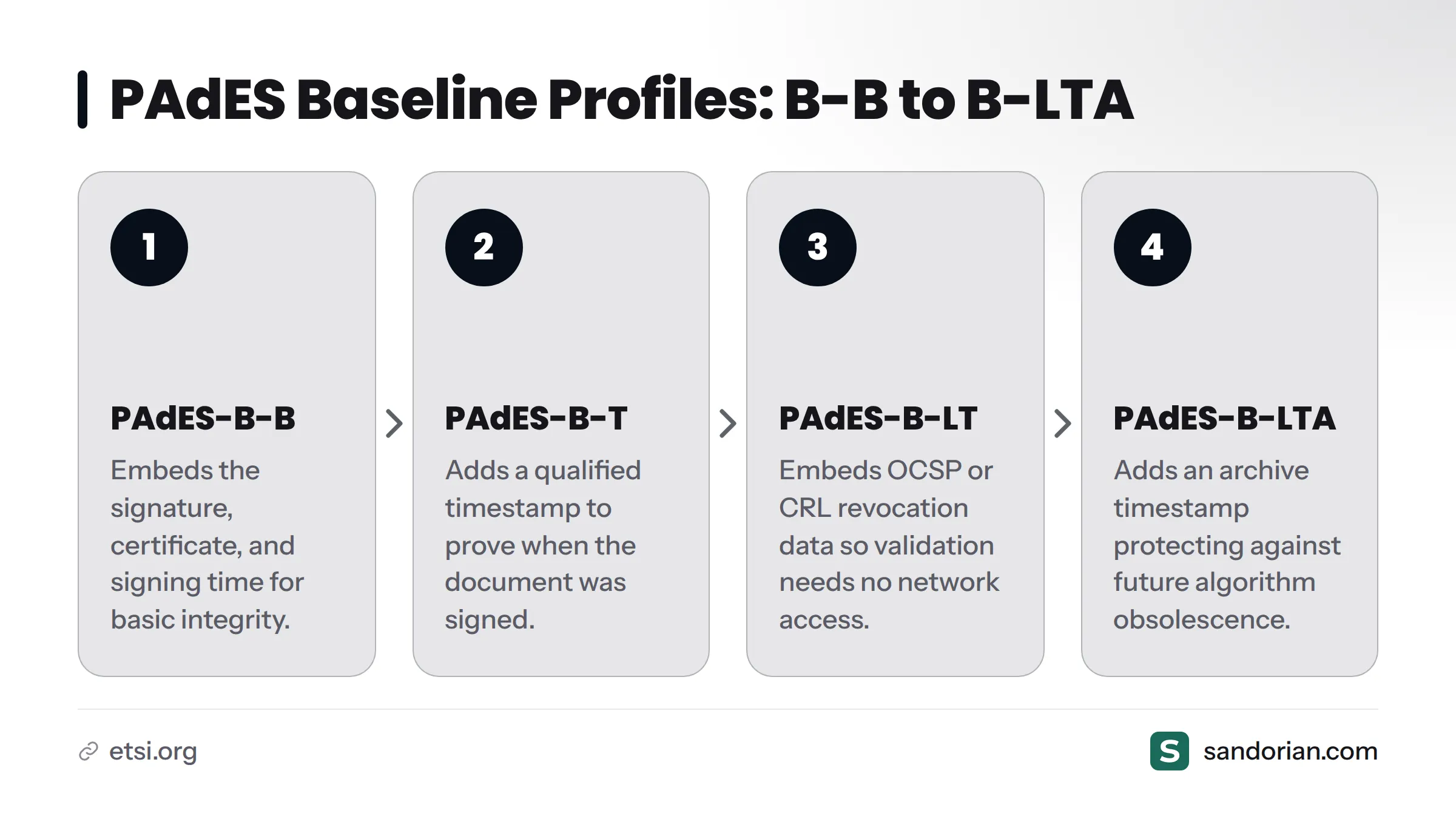
| Profile | What it includes | Minimum requirement for |
|---|---|---|
| PAdES-B-B | Signature + certificate + signing time | Basic integrity check |
| PAdES-B-T | B-B + qualified timestamp | Proof of signing time, short-term retention |
| PAdES-B-LT | B-T + revocation data embedded (OCSP/CRL) | Long-term validation without network access |
| PAdES-B-LTA | B-LT + archive timestamp | Multi-decade archival |
Use B-LT as the practical minimum for lab reports distributed externally. B-B alone cannot prove the certificate was valid at signing time without live network access to an OCSP responder - which a recipient in another country, or a future auditor, may not have. B-T adds a qualified timestamp (see our guide on qualified timestamps for PAdES-B-T), which locks in the signing time against a trusted time source. B-LT goes further by embedding the OCSP response or CRL directly in the PDF, so validation is self-contained.
B-LTA adds an archive timestamp that re-wraps the entire structure, protecting against future algorithm obsolescence. That level is covered in our guide on keeping signatures valid long term.
Step 4 - Apply the signature or seal to the PDF
Library options: iText, Apache PDFBox, and EU DSS
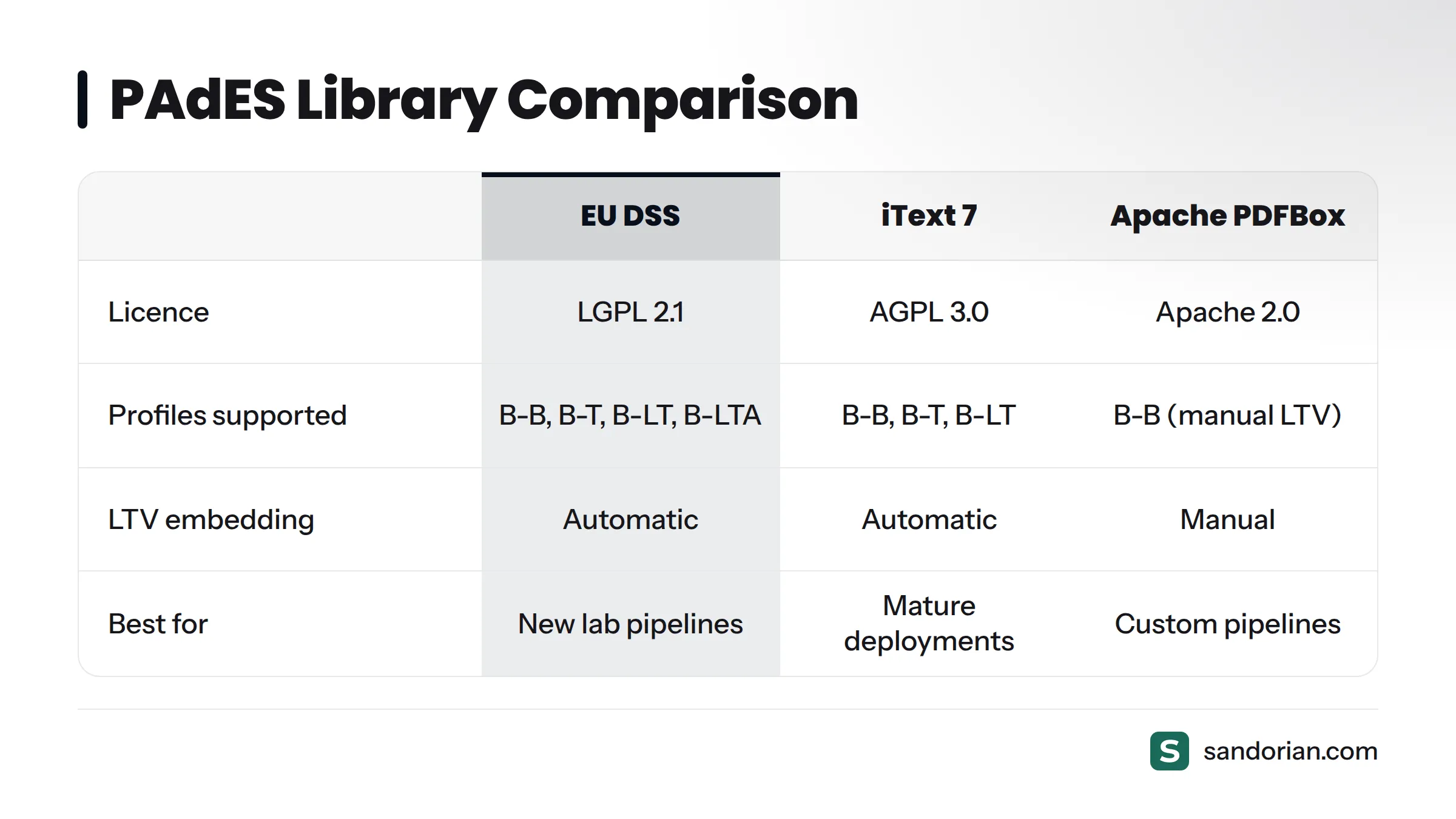
Three libraries dominate production PAdES pipelines in Europe:
| Library | Licence | PAdES profiles supported | Notes |
|---|---|---|---|
| EU DSS (ESIG) | LGPL 2.1 | B-B, B-T, B-LT, B-LTA | Reference implementation; most conformant |
| iText 7 (Community) | AGPL 3.0 | B-B, B-T, B-LT | Commercial licence required for proprietary use |
| Apache PDFBox | Apache 2.0 | B-B (manual LTV handling) | Most flexible for custom pipelines |
EU DSS - the European Commission's reference implementation, maintained by the ESIG consortium - is the safest choice for a new lab pipeline. It handles LTV embedding automatically and produces output that passes its own validation app. iText 7 is mature and widely deployed; check licensing carefully for commercial use. Apache PDFBox gives you the most control but requires you to construct the CAdES CMS structure yourself.
This video from iText's founder is a useful primer on why the underlying digital signature mechanics matter before you write any code:
https://www.youtube.com/watch?v=PiO5B-WVRrI
What happens during signing
The signing process follows a two-pass deferred model:
- Reserve a ByteRange placeholder - the library writes a signature dictionary with a
Contentsfield large enough to hold the final CMS token. TheByteRangearray marks the two byte ranges that will be hashed (everything except theContentsoctets themselves). - Hash the reserved content - a SHA-256 or SHA-512 digest is computed over the bytes defined by
ByteRange. - Sign the hash - the hash is sent to the HSM (or local private key). The HSM returns a DER-encoded RSA or ECDSA signature.
- Build the CMS/CAdES container - the signed hash, signer certificate, certificate chain, timestamp token, and revocation data (for B-LT) are assembled into a CMS structure per RFC 5652 and ETSI EN 319 132.
- Write the container into the placeholder - the
Contentsoctets are filled in; the file is written as an incremental update (append-only).
The incremental update rule is non-negotiable. Overwriting the file after signing invalidates every prior signature. All three libraries support append-only mode; make sure you have not configured them to rewrite.
Pitfall from production - the single most common mistake: Using
SubFilter /adbe.pkcs7.detachedinstead ofSubFilter /ETSI.CAdES.detached. Adobe Acrobat Reader will open and display both as valid signatures. EU DSS will reject the former as non-PAdES-conformant with a FORMAT_FAILURE. Check your library's signature profile setting explicitly - do not rely on a default.
Step 5 - Embed signature metadata and visual appearance
The signature dictionary can carry optional but useful metadata fields: signer name, signing reason, signing location, and contact info. For a lab report, we recommend:
- Signer name: lab entity name (or analyst name for personal signatures)
- Reason: "ISO 17025 test report certification" or equivalent
- Location: lab site city and country
- Contact info: lab email or report-query address
- Signing date: populated automatically from the timestamp token
The visual appearance layer is cosmetic - it has zero effect on the cryptographic signature. A well-designed appearance field that reads "Digitally signed by Lab X" does not make a weak signature stronger, and a valid B-LT signature is just as legally effective with no visible appearance at all.
Plan the appearance field before signing. Adding or modifying a visual appearance after signing requires a new incremental revision, which creates a second signature dictionary. Build the appearance template into your pre-signing step as part of the report generation (see our guide on automating lab report generation before signing).
Step 6 - Validate the signed PDF before distribution
Never assume a successful signing call means a valid PAdES output. Always validate before dispatching the report.
Three validation paths are available:
- EU DSS Demonstration App - free, externally hosted, validates against the EU Trust List. Upload the signed PDF and read the per-signature report. This is the reference tool.
- ETSI Signature Validation Service - ETSI's own conformance-testing endpoint, useful for profile-level conformance checks.
- Adobe Acrobat Reader - validates against Adobe's own trusted root store, which does not include all EU Trust List QTSPs. Use it for a secondary check only.
Expected EU DSS output for a correctly signed B-LT report: TOTAL-PASSED for both signature and certificate validation. If you see INDETERMINATE, that almost always means missing revocation data - the fix is to upgrade from B-T to B-LT and embed the OCSP response at signing time. TOTAL-FAILED points to a structural or cryptographic problem; check the sub-indication code in the report.
Automate this step. Run EU DSS validation as a post-signing job in your report-dispatch pipeline. If validation returns anything other than TOTAL-PASSED, hold the report and alert the pipeline operator.
Common PAdES validation failures and how to fix them
| Failure | Root cause | Fix |
|---|---|---|
| INDETERMINATE / NO_POE | Missing revocation data (OCSP/CRL) | Upgrade to B-LT; embed revocation data at signing time |
| SIG_CRYPTO_FAILURE | Wrong SubFilter value or malformed CMS | Change to /ETSI.CAdES.detached; verify CMS structure |
| FORMAT_FAILURE | Full file rewrite instead of incremental update | Use append-only signing mode in the library |
| CERTIFICATE_CHAIN_NOT_FOUND | Issuer cert not embedded in signature | Include full chain (leaf + intermediates + root) in CMS structure |
| PDF_LOCKED | Encryption or permissions lock present | Remove encryption before signing (PDF/A also forbids it) |
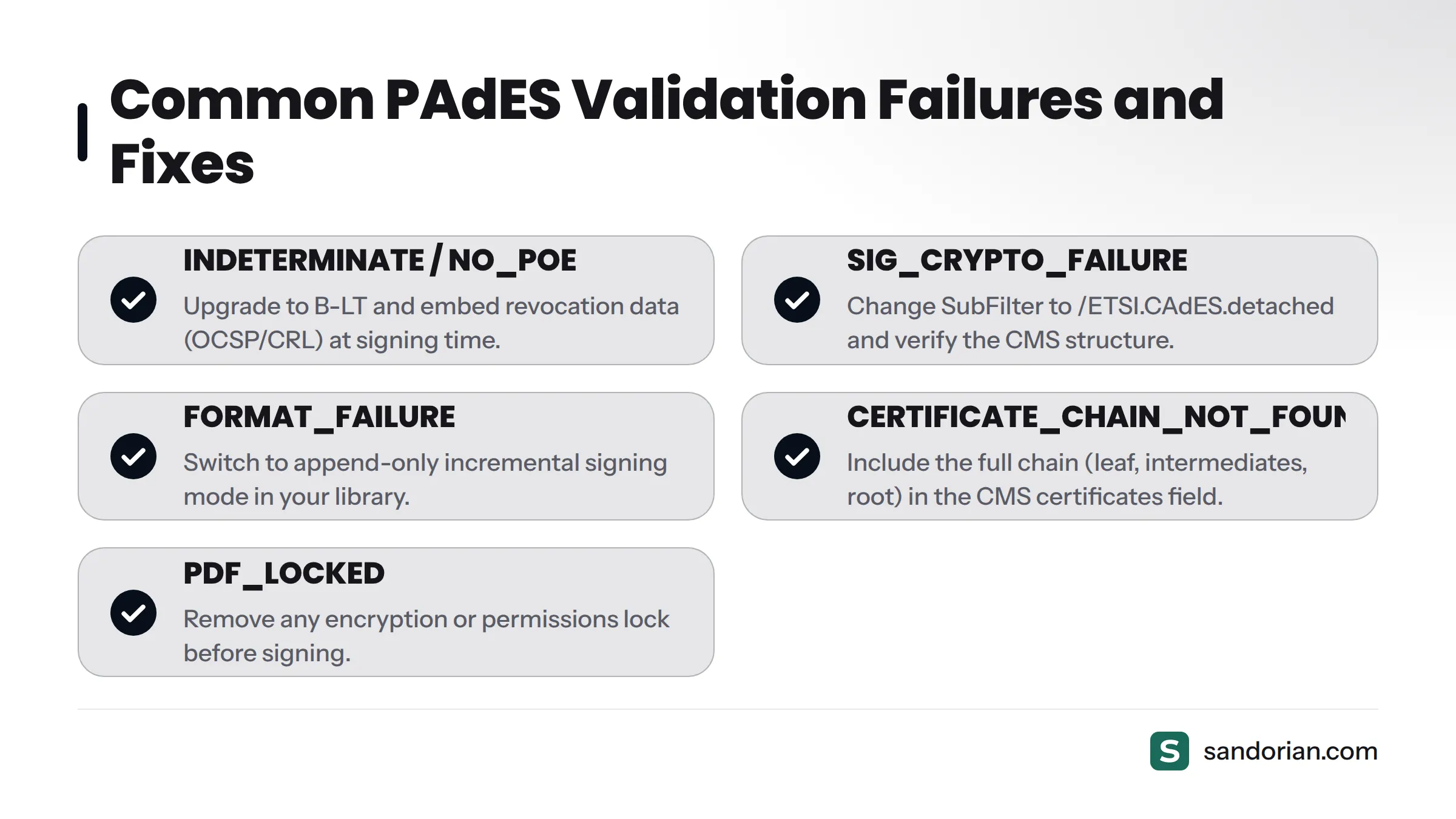
INDETERMINATE / NO_POE is the most common result in lab pipelines that start with B-T and forget to upgrade. The timestamp proves signing time, but without an embedded OCSP response, a validator that cannot reach the QTSP's OCSP server cannot confirm the certificate was unrevoked at signing time.
FORMAT_FAILURE is almost always a library misconfiguration. iText 7 and EU DSS default to incremental signing; PDFBox requires explicit configuration. Check the PdfSignatureAppearance or equivalent API flag.
CERTIFICATE_CHAIN_NOT_FOUND catches pipelines where the HSM returns only the leaf certificate signature without the intermediate CA chain. Build the full X.509 chain into the CMS certificates field explicitly.
For digital traceability in ISO 17025 labs, a validated PAdES-B-LT report is the minimum acceptable output for any externally distributed test certificate.
Frequently asked questions
What is the difference between PAdES-B-B and PAdES-B-T?
PAdES-B-B (defined in ETSI EN 319 132-1 §5.2) embeds the signature and signer certificate but relies on the system clock for signing time, which a validator can dispute. PAdES-B-T adds a qualified timestamp token that proves the document existed and was signed before a verifiable point in time. For lab reports with any retention requirement, B-T is the practical minimum - B-LT is better.
Can I use Apache PDFBox for PAdES signing?
Yes. PDFBox 3.x supports signing PDF files in incremental-update mode. You are responsible for constructing the CAdES-compliant CMS structure and setting SubFilter to /ETSI.CAdES.detached. EU DSS wraps PDFBox under the hood for a higher-level PAdES API and handles LTV embedding automatically - that is the easier path for most lab pipeline engineers.
Does PAdES work with PDF/A files?
Yes, PAdES is fully compatible with PDF/A-1b and PDF/A-2b. The signing process must use an incremental update and must not add encryption, so PDF/A conformance is preserved. PDF/A-3 profiles allow embedded files, which requires care to avoid invalidating archive conformance with the new revision.
What SubFilter value is required for PAdES conformance?
/ETSI.CAdES.detached, as defined in ETSI EN 319 132-1. The older /adbe.pkcs7.detached is an Adobe proprietary format; it will appear valid in Acrobat but will fail EU DSS PAdES validation with FORMAT_FAILURE.
Is a PAdES-signed lab report legally valid under eIDAS?
A PAdES signature created with a qualified certificate from a QTSP constitutes a qualified electronic signature or qualified electronic seal under eIDAS Regulation (EU) 910/2014 Articles 25 and 35, and carries the same legal effect as a handwritten signature across all EU member states.
If you want a review of your report signing pipeline - whether you are starting from scratch or troubleshooting a failing B-LT implementation - talk to a Sandorian engineer. We build and maintain eIDAS-sealed certificate portals for European labs, and we have seen most of these failure modes in production.
Sources
- ETSI EN 319 132-1: PAdES Baseline Profiles - ETSI
- ETSI EN 319 142-1: PDF Advanced Electronic Signatures - ETSI
- eIDAS Regulation (EU) 910/2014 - EUR-Lex
- EU Trust List Browser - European Commission
- Digital Signature Service (EU DSS) - European Commission
- veraPDF - PDF/A Validation - veraPDF.org
- Apache PDFBox - Apache Software Foundation
- iText 7 - iText Group
- RFC 5652: Cryptographic Message Syntax - IETF
Let's talk
We build the systems that power your business. Let us know how we can help.
Book a 30-min Call