eIDAS Electronic Seal: What It Is and How Labs Use It
Disclaimer: This article is a technical explanation of eIDAS electronic seals. It does not constitute legal advice.
An eIDAS electronic seal is a cryptographic mechanism defined in EU Regulation 910/2014 that a legal entity applies to a digital document to prove two things: the document's content has not been altered since sealing (integrity), and it originated from that specific organisation (origin authentication). Unlike an electronic signature - which belongs to an individual - an eIDAS seal is issued to a legal person: a company or institution.
This article walks through the technical mechanics of the eIDAS regulation seal, the three assurance levels, and exactly where sealing fits inside a lab's report delivery pipeline. It draws on Sandorian's engineering experience wiring eIDAS seals into lab report generation systems for clients such as ViroVet Diagnostik.
What is an eIDAS electronic seal?
Article 3(25) of the eIDAS Regulation (EU) No 910/2014 defines an electronic seal as data in electronic form that is attached to, or logically associated with, other data in electronic form to ensure the latter's origin and integrity. The electronic seal definition is precise on one point: seals belong to legal persons - registered organisations, companies, and institutions - not to natural persons.
Think of it as a cryptographic rubber stamp combined with a tamper-evident wrapper. Unlike a physical stamp, it is verifiable by anyone and cannot be forged.
What an eIDAS electronic seal is - in one sentence: An eIDAS seal for legal entities proves a document originated from a specific organisation and has not been altered since sealing - but it does not identify a named individual within that organisation.
A seal is not a handwritten stamp on a PDF, not a scanned company logo, and not a personal electronic signature. If you need to understand how seals and signatures differ in depth, that distinction is covered in a dedicated article on qualified electronic signatures under eIDAS.
What an electronic seal proves about a document
A seal makes exactly two guarantees. Both are worth stating precisely.
Integrity: Every byte of the document is hashed at the moment of sealing. If even a single character changes after the seal is applied - a corrected figure, a reformatted table, a metadata edit - the cryptographic hash no longer matches and any compliant viewer flags the document as altered.
Origin authentication: The seal certificate names the legal entity that holds the private key used to create the seal. A valid seal on a lab report tells the recipient: this document was produced by the organisation named in the certificate, and no one else could have applied this seal.
What a seal does not prove:
- The identity of the individual within the organisation who generated or approved the document
- Legal admissibility in any specific jurisdiction (consult a legal professional for that)
- That the factual content of the document is correct
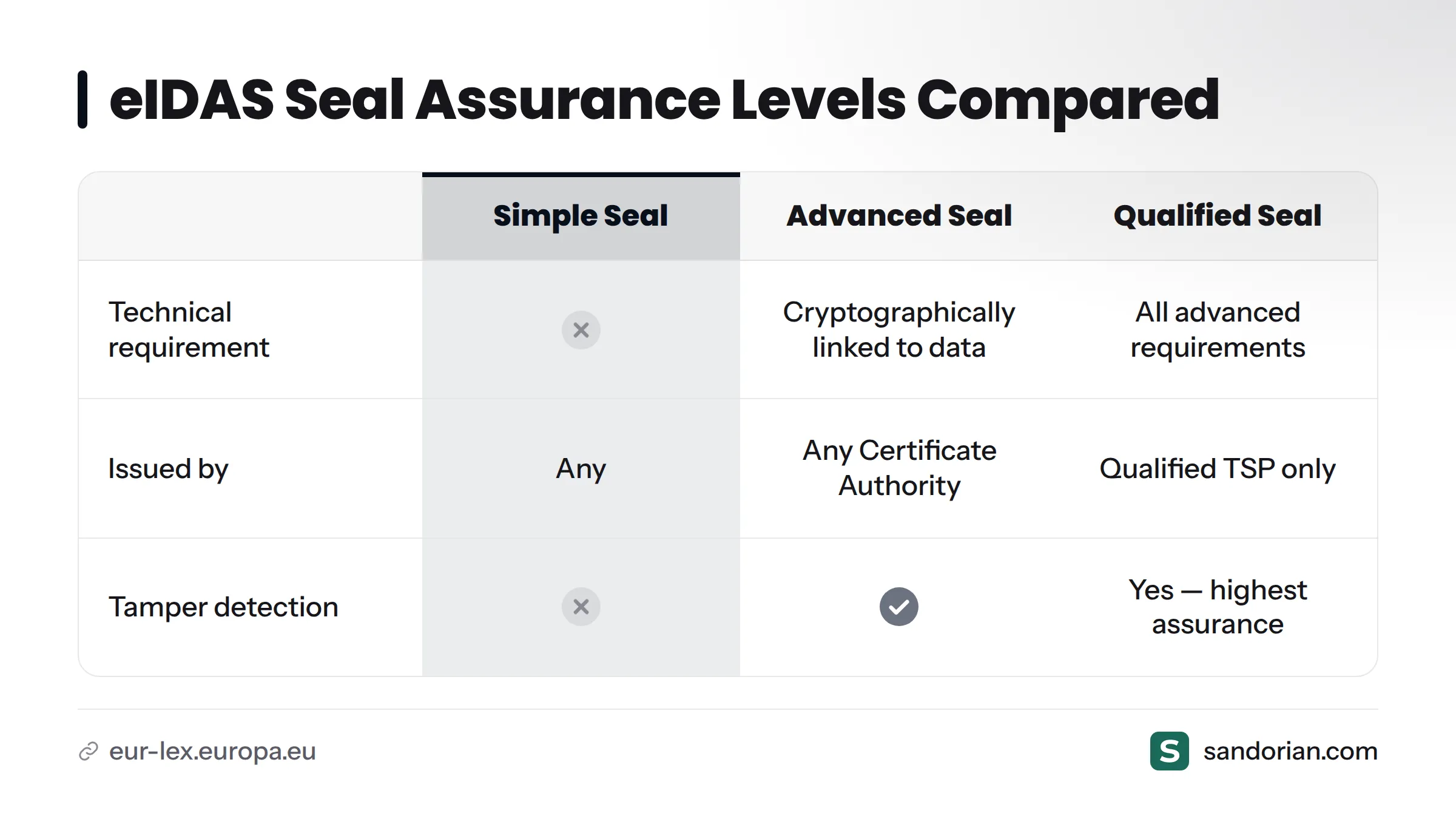
The three assurance levels sit on top of these core guarantees:
| Level | Technical requirement | Issued by | Tamper detection |
|---|---|---|---|
| Simple electronic seal | None | Any | No |
| Advanced electronic seal | Cryptographically linked to data; detectable if altered | Any Certificate Authority | Yes |
| Qualified electronic seal | All of the above, plus issued by a qualified TSP on the EU Trusted List | Qualified TSP only | Yes - highest assurance |
Deciding which level your lab needs is a separate question from understanding what a seal is. For the requirements and trade-offs, see what makes a seal qualified.
How eIDAS electronic seals work technically
The mechanism is asymmetric cryptography - a key pair where one key encrypts and the other decrypts, and neither can be derived from the other.
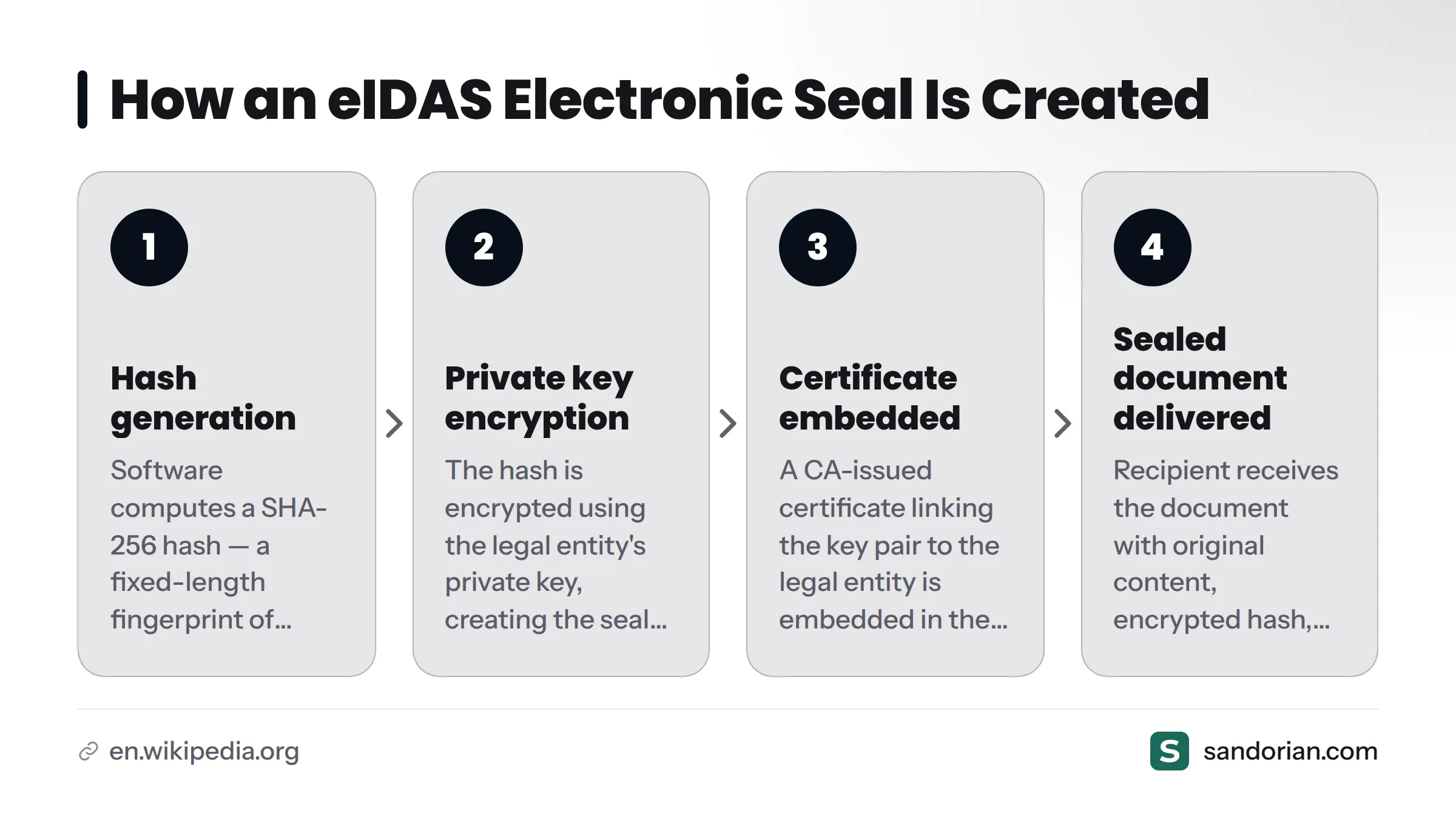
Here is how the sealing process works, step by step:
- Hash generation. The sealing software computes a cryptographic hash (typically SHA-256) of the document content. This hash is a fixed-length fingerprint of every byte in the document.
- Encryption with the private key. The hash is encrypted using the legal entity's private key - this is the "seal creation data" in eIDAS terminology. The legal entity, or a trust service acting on its behalf, holds this private key securely.
- Certificate embedding. A Certificate Authority (CA) has previously issued a public key certificate that cryptographically links the key pair to the legal entity's verified identity. This certificate is embedded in the sealed document alongside the encrypted hash.
- Sealed document delivered. The recipient receives a document containing the original content, the encrypted hash, and the certificate.
When a recipient verifies the seal, their PDF viewer reverses the process: it decrypts the embedded hash using the public key from the certificate, recomputes a fresh hash of the document content, and checks whether the two match.
The EU Trusted List browser is the European Commission's register of qualified trust service providers. For qualified seals, the CA that issued the certificate must appear on this list. For advanced electronic seals, any accredited CA is sufficient.
Where sealing sits in the lab report workflow
This is where theory meets practice. In my experience building report delivery pipelines for European testing labs, the placement of the sealing step is the question that catches most teams off guard.
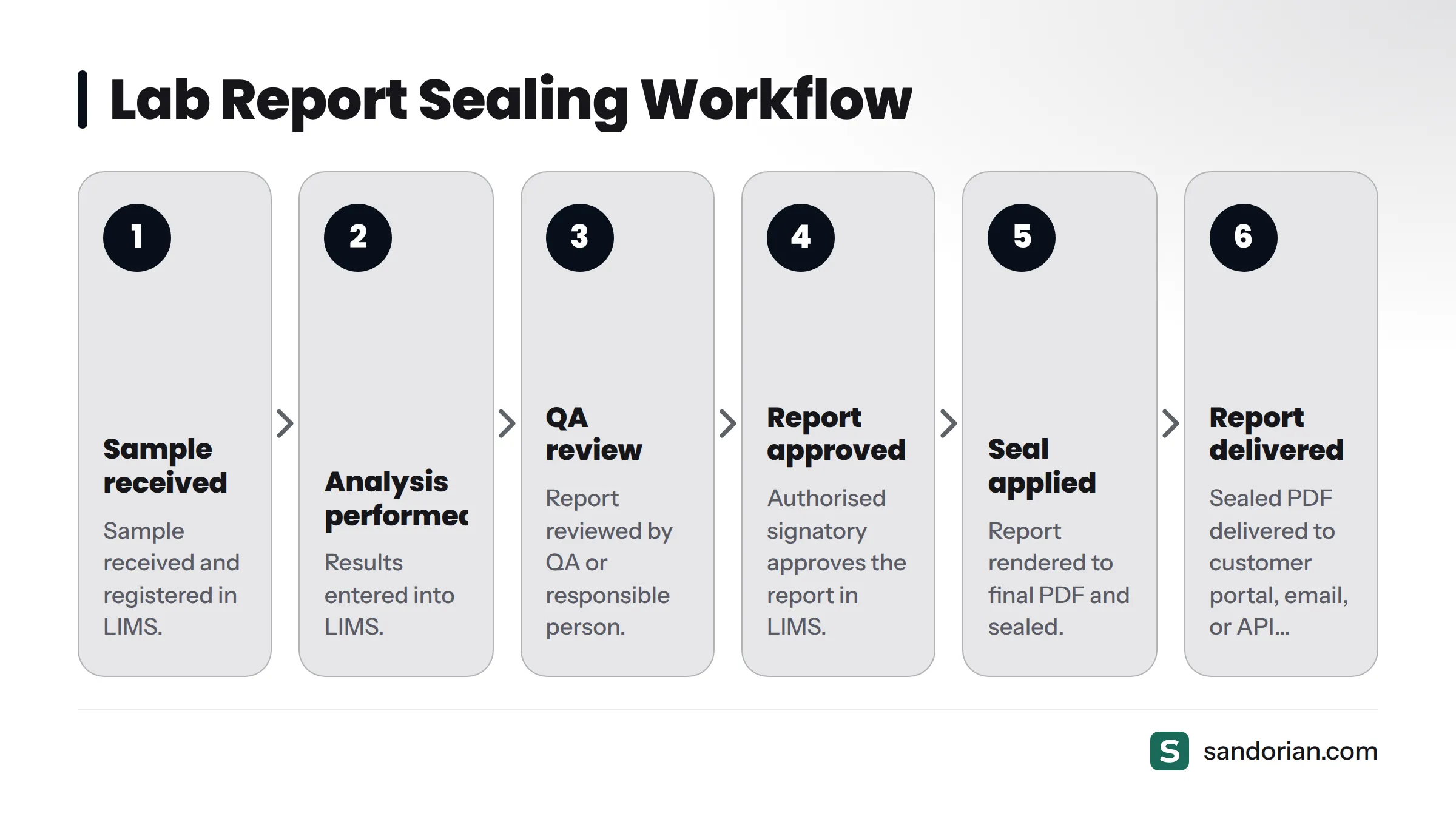
Sealing must happen after the LIMS approval step, not before. A seal freezes a document. Applying a seal to a draft or a pre-approval version locks content that has not yet been authorised - which directly undermines the integrity guarantee the seal is meant to provide. The seal should lock an already-approved, final document.
The correct sequence:
- Sample received and registered in LIMS
- Analysis performed; results entered into LIMS
- Report reviewed by QA or responsible person
- Authorised signatory approves the report in LIMS
- Sealing step: report rendered to final PDF and sealed
- Sealed PDF delivered to the customer portal, email, or API endpoint
Labs operating under ISO 17025 digital traceability requirements or ISO 15189 benefit directly from this ordering: the sealed document becomes the tamper-evident record of what was approved, not what was drafted.
Prerequisites before a lab document can be sealed:
- Results entered and reviewed in LIMS
- Report approved by authorised signatory in LIMS
- Report rendered to final PDF (no further edits permitted after this point)
- Seal creation data (private key) accessible to the sealing service
- Certificate valid and not revoked at time of sealing
How labs wire seals into report generation and delivery
Manual, workstation-based sealing is impractical for any lab issuing more than a handful of reports per day. A lab analyst opening each PDF, applying a seal through desktop software, and manually routing the file introduces human error at every step and does not scale.
The pattern we use at Sandorian - and the one that fits naturally alongside LIMS integration workflows - is automated server-side sealing:
- The LIMS fires an approval event when a report is authorised.
- A report renderer converts the approved data into a final PDF.
- A sealing service receives the PDF via API, accesses the seal creation data, applies the seal, and returns a sealed PDF.
- The sealed PDF is stored and published to the customer-facing delivery channel.
The sealing service is the component that holds or accesses the private key. This is typically provided either by a trust service provider or by server-side signing software that connects to a hardware security module (HSM). TSP selection guidance is a separate topic covered in a dedicated article on trust service providers.
On the regulatory horizon: eIDAS 2.0 - formally Regulation (EU) 2024/1183, which amends the original eIDAS framework - introduces changes to qualified trust service requirements and is expected to affect how qualified seal certificates are issued and managed. Labs running qualified seal pipelines should monitor ETSI standards updates as the technical specifications evolve.
Common seal formats used for lab reports
Most lab reports are delivered as PDF files, and the dominant container format for sealed PDFs is PAdES - PDF Advanced Electronic Signatures - standardised by ETSI as ETSI EN 319 132. PAdES embeds the seal directly inside the PDF file structure, making the sealed document fully self-contained and verifiable without any external file.
Here is why labs choose PAdES over alternatives:
- Visible seal widget: PDF readers such as Adobe Acrobat Reader display a seal panel showing the organisation name, certificate status, and integrity result - without any plugins.
- Self-contained format: The certificate and the encrypted hash travel inside the PDF, so the sealed file is the complete verification package.
- Free validation tools: Both Adobe Acrobat and the European Commission's free validators can verify a PAdES-sealed PDF.
XAdES (for XML documents) and CAdES (for binary formats) apply in other contexts but are not typical for standard lab certificates and test reports. PAdES implementation steps - including signature appearance options and container profile selection - are covered in a dedicated article on applying a seal to PDF reports with PAdES.
Verifying an eIDAS seal on a received report
Recipients of sealed lab reports do not need specialist software. Here is the practical verification flow:
- Open the sealed PDF in Adobe Acrobat Reader or a compliant free EU validator. A seal panel appears in the signatures pane.
- The viewer extracts the embedded certificate and decrypts the stored hash using the public key from that certificate.
- The viewer recomputes a fresh hash of the document content and compares it to the decrypted hash. Matching hashes confirm the document is intact.
- Certificate chain validation: The viewer checks whether the CA that issued the certificate appears on the EU Trusted List browser and whether the certificate was valid - not expired, not revoked - at the time of sealing.
The result tells you:
| What it confirms | What it does not confirm |
|---|---|
| Document content unchanged since sealing | Who within the organisation created the document |
| Document originated from named legal entity | Legal admissibility in a specific jurisdiction |
| Certificate was valid at time of sealing | That the content is factually correct |
A failed verification has two possible causes: the document was altered after the seal was applied, or the certificate was not issued by a CA that qualifies under the applicable trust framework. In either case, the recipient should treat the document as unverified and contact the issuing lab.
Next steps for labs adopting electronic seals
The decision path is straightforward once you know what a seal proves.
- Confirm what you need to prove - integrity and legal entity origin are the core guarantees. If you also need individual signatory identity, that is a signature question.
- Choose your assurance level - advanced or qualified, based on your compliance obligations under ISO 17025, ISO 15189, or IVDR. See what makes a seal qualified for the requirements.
- Identify a trust service provider - a dedicated article on TSP selection covers this without crossing into specific recommendations here.
- Wire sealing into your LIMS approval workflow - the automated server-side pattern described above is the right model for any lab at scale.
- Validate delivery via a certificate portal - sealed reports should travel through a channel that preserves the sealed file and provides a verifiable download to customers.
Sandorian builds the sealing and delivery layer around your LIMS - including automated seal application, server-side signing integration, and a customer-facing certificate portal that delivers verified, sealed reports. Learn about our eIDAS-sealed certificate portals or contact us to scope a sealed report delivery project for your lab.
Frequently asked questions about eIDAS electronic seals
What is the difference between an electronic seal and an electronic signature under eIDAS?
Both use asymmetric cryptography, but an eIDAS seal for legal entities is issued to an organisation while a signature is issued to an individual. The cryptographic mechanics are similar; the legal subject is different. The full distinction is covered in a dedicated article on how a seal differs from an electronic signature.
Can a lab apply an eIDAS seal to a PDF report without a qualified trust service provider?
Yes. Advanced electronic seals can be issued by any Certificate Authority - a qualified TSP is only required for qualified electronic seals. The right level depends on your compliance obligations under ISO 17025, ISO 15189, or IVDR.
Does an eIDAS electronic seal have legal effect across the EU?
The eIDAS Regulation establishes that a qualified electronic seal carries a presumption of integrity and correctness of origin across EU member states (Article 35). For jurisdiction-specific legal effect, consult a qualified legal professional - this article does not constitute legal advice.
How do I know if a seal certificate is from a trusted provider?
The EU Trusted List browser lists every qualified trust service provider in each EU member state. Compliant PDF viewers and seal validation tools check the certificate against this list automatically during verification.
What happens to a sealed report if the document is edited after sealing?
Seal verification fails immediately. Any change - even a single byte - produces a different cryptographic hash, which no longer matches the one stored in the seal. A compliant PDF viewer displays a clear warning that the document has been tampered with and the seal is invalid.
Sources
Let's talk
We build the systems that power your business. Let us know how we can help.
Book a 30-min Call