Zero-Downtime Migration for Regulated Lab Systems
You migrate a live regulated lab system with zero downtime by running the new environment in parallel, continuously syncing data from the source, validating read/write parity across samples, results, and signatures, then executing a controlled cutover that gates incoming requests while in-progress work completes - with a documented rollback gate and an intact audit trail throughout.
Why regulated labs cannot use a maintenance window
A clinical or testing laboratory accredited under ISO 17025 or ISO 15189 cannot simply schedule a Saturday night outage. Instruments log results around the clock. Samples registered on Friday afternoon may not receive a final sign-off until Monday morning. Certificates may be mid-signature under an eIDAS-compliant electronic signature workflow. Taking the system offline for even two hours creates orphaned records, interrupted workflows, and - worst of all - an audit trail that stops and restarts with a gap in the middle.
That gap is not a minor inconvenience. Under ALCOA+ data integrity principles, every record must be attributable, legible, contemporaneous, original, and accurate. A maintenance window that halts writes on the source system and resumes them on a new one, without documented continuity, fails the contemporaneous and accurate requirements. An inspector looking at that gap will ask questions you do not want to answer mid-audit.
The core pattern: parallel run, continuous sync, controlled cutover, rollback gate
The pattern that works in practice has four phases:
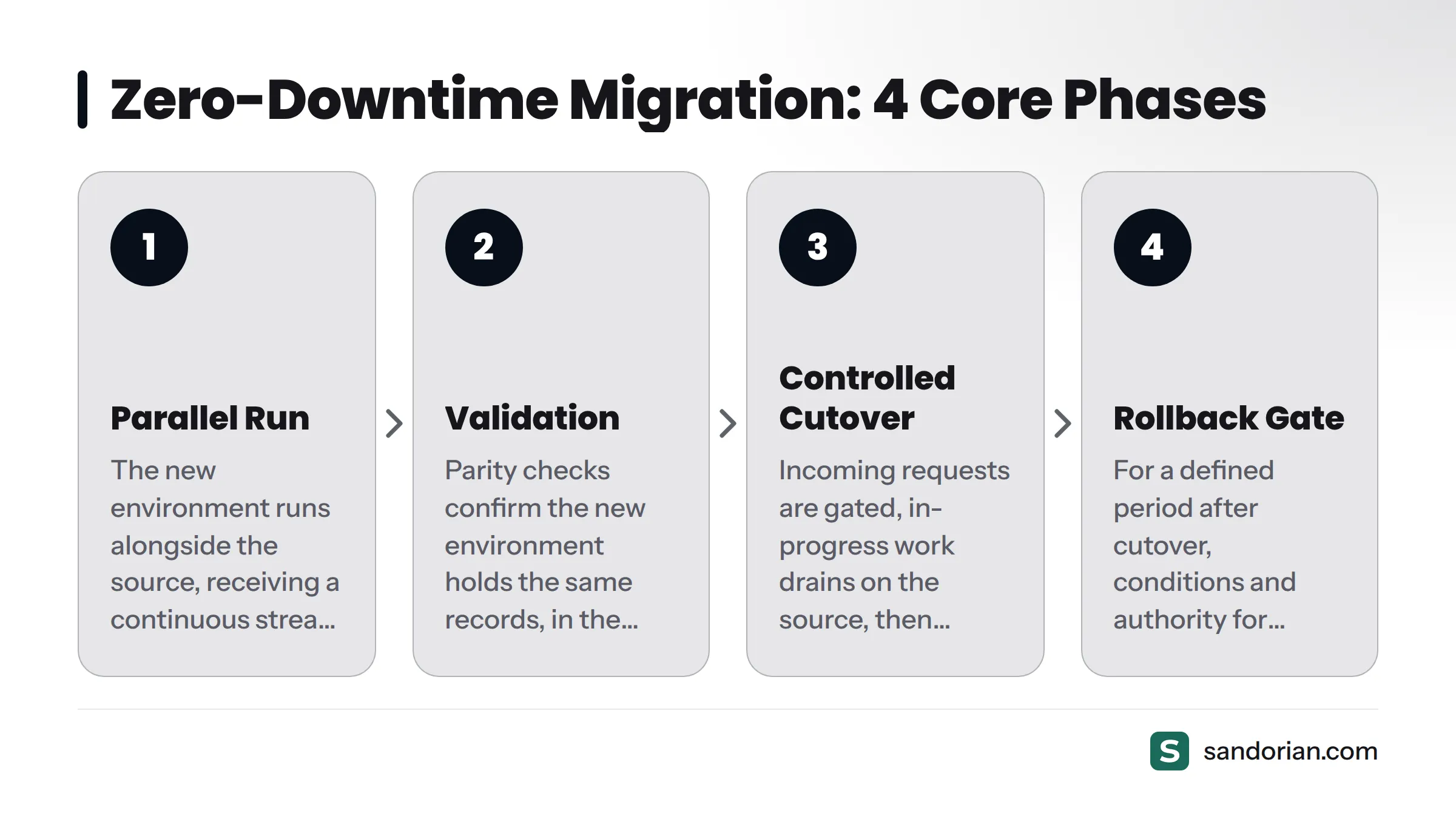
- Parallel run - the new environment runs alongside the source, receiving a continuous stream of data from it.
- Validation - parity checks confirm the new environment holds the same records, in the same state, with the same audit timestamps.
- Controlled cutover - incoming requests are gated, in-progress work drains to completion on the source, then traffic switches to the new environment.
- Rollback gate - for a defined period after cutover, the conditions and authority for reverting to the source remain live and documented.
This is structurally similar to a blue-green deployment, but it carries compliance requirements that a standard DevOps blue-green does not.
What makes regulated lab migration different from generic infrastructure migration
Generic migration guides treat this as a database infrastructure problem: move the bytes, verify row counts, switch the connection string. Done.
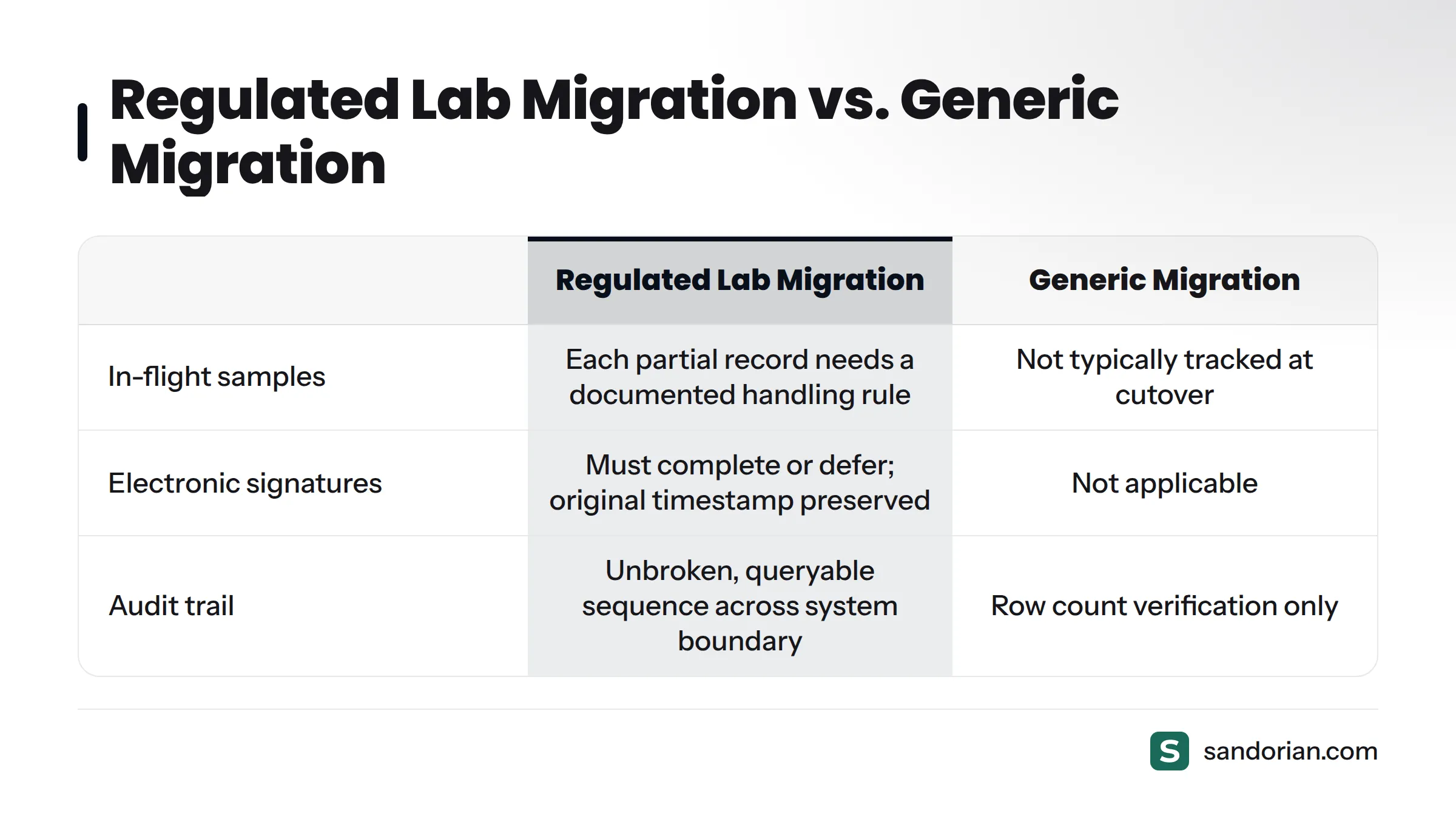
A regulated lab migration is a data integrity and evidence problem. Three factors make it fundamentally harder:
- In-flight samples and results. Specimens logged but not yet tested, assays running on instruments, results awaiting reviewer approval - all of these are partial records. At the moment of cutover, each one must be in a known, documented state with a handling rule assigned.
- Pending electronic signatures. A signature started on the source environment and not yet completed cannot simply be abandoned. If it completes on the source after the new environment goes live, it must be reflected on the new environment with the original timestamp intact.
- Audit trail continuity. Records written before cutover and records written after cutover must form a single, unbroken, queryable sequence. The audit trail requirements for regulated laboratories do not permit a logical break at the system boundary.
What this guide covers - and what it does not
This guide walks through the cutover execution sequence: boundary freeze, parallel environment, data sync, parity validation, cutover gate, monitoring, and decommission. For overall migration planning and validation strategy, see the full regulated cloud migration plan. For rollback safety through backup architecture, see the article on backup and restore design for rollback safety. For decisions about replacing or rewriting a legacy system before migration, see the article on migrating off a legacy lab system.
Step 1 - Freeze the migration boundary and classify in-flight work
The migration boundary defines exactly what moves: which LIMS instance, which integrations, which data stores, which document repositories. Before the parallel environment starts, freeze that boundary in writing and register it as a change control record. From this point, no schema changes, no new integrations, and no feature deployments reach the source system. That is the change freeze.
Classify all work currently in the source system into the following categories, and assign each a handling rule before proceeding:
| Work type | Handling rule | Responsible role | Evidence required |
|---|---|---|---|
| Samples registered, not yet tested | Carry forward via data sync; confirm on new environment before cutover | Lab coordinator | Sync confirmation log |
| Tests in progress (instrument running) | Allow to reach end-of-run before gate opens; do not interrupt | Instrument operator | Run completion record |
| Results awaiting review or approval | Complete on source before gate opens, or formally defer under change control | QA reviewer | Approval record or deferral notice |
| Pending electronic signatures | Complete on source before gate opens, or document as deferred with justification | Signatory / QA lead | Signature record or deferral record |
| Completed, fully signed records | Migrate via continuous sync; confirm parity before cutover | Migration engineer | Parity validation log |
This classification step is not optional. In live lab cutovers we have executed, the longest delay at the cutover gate was caused by a batch of results that entered review unexpectedly at hour eleven of a twelve-hour parallel run window. Having a handling rule written down in advance is what kept that situation from becoming a rollback event.
Document the boundary freeze and the work classification matrix as part of the change control record. This is the evidence a QA officer or auditor will inspect first.
Step 2 - Stand up the parallel environment and begin continuous data sync
Provision the new environment to functional parity with the source: same LIMS version, same configuration, same integration endpoints - connected to the source for data, not to live traffic.
Select the data sync mechanism appropriate to your stack:
- Change data capture (CDC) for database-level sync - captures every insert, update, and delete at the transaction log level and replays it on the new environment. Tools following the CDC pattern (such as the open-source Debezium pattern) give you low-latency replication with minimal application-layer changes.
- Application-level event replay for workflow state - useful when the LIMS exposes an event stream that captures state transitions (sample received, test started, result approved) independently of the underlying database.
- File and object sync for documents, certificate PDFs, and instrument output attachments - typically handled by a dedicated object sync job running on a defined schedule with lag monitoring.
Before moving to validation, confirm that sync lag is within an acceptable bound - typically under sixty seconds for transactional records, with a documented tolerance written into the change control. Do not route any live traffic to the new environment during this phase. LIMS integrations - instrument middleware, order management systems, certificate portals - remain pointed at the source.
Parallel environment readiness checklist before beginning validation:
- New environment provisioned and accessible
- CDC or equivalent sync confirmed running with lag within tolerance
- File and document sync confirmed running
- No live traffic routed to new environment
- LIMS integrations confirmed pointing to source
- Sync lag monitoring dashboard active
- Rollback procedure documented and rehearsed
Step 3 - Validate parity: samples, results, signatures, and audit trails
Validation is the gate between parallel run and cutover. It must pass in full, with documented evidence, before QA sign-off opens the cutover gate. This is not an engineering judgment call alone - the lab's own QA team holds sign-off authority here.
Read parity
Query the same sample record, result record, and certificate on both environments. The returned data - including field values, status flags, and timestamps - must be identical. Run this check across a statistically representative sample of record types, not just the most recent entries.
Write parity
Write a test record to the source environment (using a clearly marked test identifier that will be excluded from live reporting). Confirm it appears on the new environment within the sync SLA. Record the exact lag time as evidence.
Sequence number gap check
Extract the full sequence of sample IDs, result IDs, and certificate numbers from both environments. Confirm no gaps exist. A sequence gap means a record was written to the source but not yet replicated to the new environment - or was lost in transit. Any gap is a blocker; the cutover gate does not open until the gap is explained and resolved.
Audit trail check
Every write-event on the source must have a corresponding entry on the new environment carrying the original event timestamp, not the sync timestamp. This is the most common implementation error we encounter in lab migration projects, and it creates a direct ALCOA+ finding. The ALCOA+ requirement for contemporaneous records means the timestamp on the new environment must reflect when the event occurred, not when it was replicated. Configure your CDC pipeline to preserve the source transaction timestamp as a dedicated field - separate from the replication metadata timestamp - and confirm this in the audit trail check.
For further context on what a compliant audit trail looks like across system boundaries, see audit trails for regulated software: what good looks like.
Electronic signature check
Confirm that every electronic signature completed on the source during the parallel run period is reflected on the new environment with the original signer identity, timestamp, and signature hash intact. No pending signatures should be stranded - if a signature is in progress at validation time, it must complete before the check is marked as passed.
ALCOA+ in this context: Contemporaneous means the new environment must carry the original event timestamp, not the sync timestamp. Storing the sync timestamp as the record timestamp is a common implementation error that creates an audit finding. Treat original-timestamp preservation as a mandatory CDC configuration requirement, not an optional feature.
Parity validation checklist:
| Check | Method | Pass criterion | Evidence artifact |
|---|---|---|---|
| Read parity | Query matching records on both environments | Field-for-field match including timestamps | Comparison log with record IDs |
| Write parity | Write test record to source; confirm on new environment | Appears within sync SLA | Lag measurement log |
| Sequence number gaps | Extract and diff full ID sequences | Zero gaps | Gap analysis report |
| Audit trail timestamps | Compare event timestamps on both environments | Original timestamps preserved | Audit trail comparison report |
| Electronic signatures | Confirm completed signatures on new environment | All completed signatures present with original metadata | Signature verification log |
Step 4 - Gate incoming requests and complete in-progress work on the source
Enable the cutover gate: new requests are queued or held at the entry point (DNS, load balancer, or application gateway), not yet routed to either environment. This is the moment of maximum operational focus.
Allow all in-progress work on the source to reach a terminal state:
- Samples: reach a reviewable result, a final approved status, or a formally defined hold state.
- Pending signatures: complete on the source, or are formally deferred in writing under the change control record.
- Instrument runs: reach end-of-run or a defined checkpoint agreed in advance with the instrument operator.
Do not force-terminate in-progress work. Any work that cannot complete naturally within the planned gate window must be handled under a documented exception procedure - recorded in the change control, with the responsible role named. In our experience, most labs reach a drained source write queue within fifteen to ninety minutes of opening the gate, depending on the longest active workflow. Plan the gate window accordingly and communicate it to the lab team in advance.
Confirm the source system write queue is drained and no new writes are occurring on the source. Only then proceed to Step 5.
Is it safe to proceed to hard cutover? Decision logic:
- Are any instrument runs still in progress? → Wait for end-of-run.
- Are any results pending review with a reviewer actively working? → Wait for completion or formal deferral.
- Are any electronic signatures in progress? → Wait for completion or formal deferral.
- Is the source write queue drained (zero active writes)? → Yes → Proceed.
- Has QA sign-off been obtained for the validation results from Step 3? → Yes → Proceed.
- If any answer above is "No" → Do not proceed; re-evaluate gate timing.
Step 5 - Execute the hard cutover and re-point all integrations
Switch the feature flag or DNS/proxy entry to route all new requests to the new environment. This is a single atomic action - not a gradual canary rollout - because a regulated LIMS cannot operate in a split-write state where some requests land on the source and some on the new environment.
Re-point all LIMS integrations in this order:
- Instrument middleware (the highest-priority connection - instrument data must resume logging immediately)
- Order management and sample registration upstream systems
- Result review and approval interfaces
- Certificate generation and signing workflows
- Customer-facing portals and API consumers
- Automated reporting and downstream data exports
For integration-specific guidance, see keeping LIMS integrations running during a move.
Confirm the first live request on the new environment is logged correctly with a full audit entry - signer identity, timestamp, and action - before declaring cutover complete. Keep the source system running in read-only mode. Do not shut it down. Record the exact cutover timestamp in the change control record; this timestamp is the boundary between pre-cutover records (on source) and post-cutover records (on new environment).
Cutover go-live verification checklist:
- First live request received and logged on new environment
- Audit entry for first request is complete and correctly timestamped
- All instrument middleware connections confirmed on new environment
- All upstream and downstream integrations confirmed re-pointed
- Source system confirmed in read-only mode
- Cutover timestamp recorded in change control record
Step 6 - Monitor the new environment and confirm audit trail continuity
The first 24 to 72 hours after cutover are the highest-risk window. Monitor actively:
- Error rates on the new environment (application logs, integration error queues)
- Sync confirmation - the CDC pipeline should now be idle; confirm it has stopped writing to the new environment and is not creating spurious replication events
- Write latency on the new environment compared to the baseline from the parallel run
- Instrument data ingestion - confirm all instruments are logging to the new environment at the expected cadence
- Sequence number continuity - the first sample ID, result ID, and certificate number issued on the new environment should follow directly from the last one issued on the source, with no gap
Confirm that records created before the cutover timestamp (held on the source, now read-only) and records created after (held on the new environment) form a single queryable sequence. A QA officer or auditor must be able to retrieve any record by its ID without knowing which physical system it lives on. This is what audit trail continuity for regulated laboratories requires in practice.
Rollback gate definition: A rollback is triggered when any of the following conditions are met: (1) audit trail continuity cannot be confirmed within the monitoring window; (2) a sequence number gap is detected that cannot be explained and remediated within four hours; (3) instrument data ingestion fails and cannot be restored within two hours; (4) an electronic signature workflow is confirmed broken on the new environment. The authority to call a rollback rests jointly with the migration lead engineer and the lab's QA lead - both must agree, or the more conservative position (rollback) takes precedence. The rollback decision, the condition that triggered it, and the time of the decision are recorded in the change control record as a formal entry.
The rollback gate remains open for the full 72-hour monitoring window. After that window closes without a trigger event, the rollback gate is formally closed and documented in the change control record.
Step 7 - Decommission the source system only after a verified quiet period
The quiet period is a minimum duration - typically 30 days, or as specified in the change control - during which the source system remains accessible in read-only mode. This is not bureaucratic caution. It is the time window during which:
- Queries against pre-cutover records may need to be satisfied from the source
- Any anomaly discovered in the new environment that traces to a pre-cutover record can be verified against the original
- The lab's QA team can confirm the audit trail is complete and queryable end-to-end without needing to access the source
Before decommissioning, confirm all of the following:
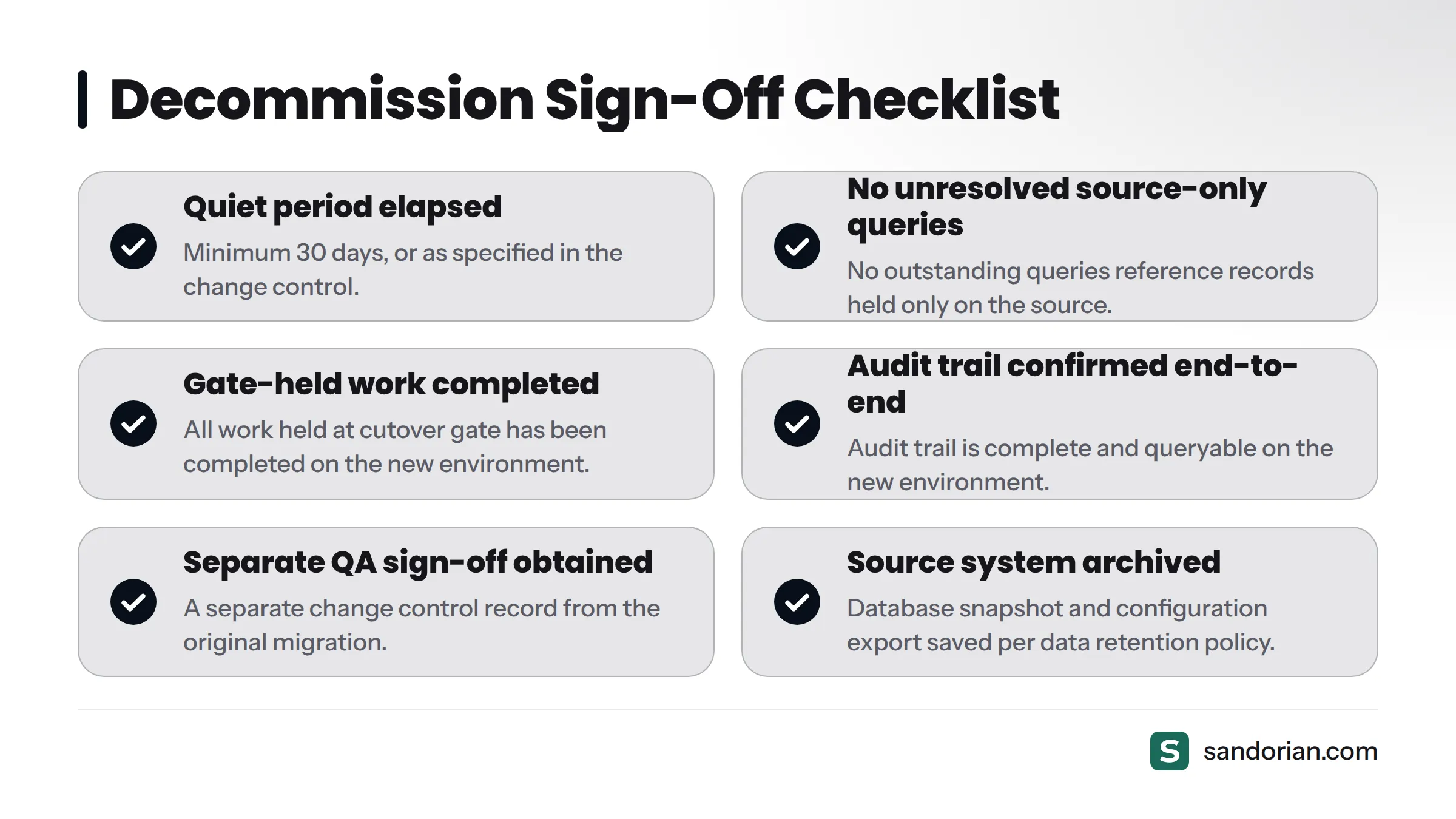
Decommission sign-off checklist:
- Quiet period duration has elapsed (minimum 30 days or as specified in change control)
- No unresolved queries reference source-only records
- All work held at the cutover gate has been completed on the new environment
- Audit trail is confirmed complete and queryable end-to-end on the new environment
- QA sign-off obtained - this is a separate change control record from the original migration
- Source system state archived (database snapshot, configuration export) per the data retention policy
The backup and disaster recovery architecture for the source system archive is covered in the article on backup and restore design for rollback safety. Do not decommission without an archived snapshot - if the new environment audit trail is later found to have a gap, you will need the source to reconstruct it.
Frequently asked questions
What happens to samples that are mid-process when the cutover executes?
Mid-process samples are classified at the boundary freeze step (Step 1) and assigned a handling rule before the parallel run begins. At the cutover gate (Step 4), the source write queue must be drained before the hard switch executes - meaning all instrument runs have reached end-of-run or a defined checkpoint, and all in-progress results have reached a reviewable or formally deferred state. No sample is mid-process at the moment the traffic switch fires.
How do you prevent audit trail gaps at the cutover boundary?
By configuring the CDC pipeline to preserve original event timestamps (not sync timestamps) and by assigning a formal cutover timestamp in the change control record. Records before that timestamp live on the source (read-only); records after it live on the new environment. The two form a continuous sequence when queried by ID. The sequence number gap check in Step 3 and Step 6 confirms no records were lost in transit.
When should we trigger the rollback, and who decides?
The rollback gate definition in Step 6 lists the trigger conditions: unconfirmed audit trail continuity, an unexplained sequence number gap, instrument data ingestion failure, or a broken electronic signature workflow. The decision rests jointly with the migration lead engineer and the lab's QA lead. If they disagree, the conservative position - rollback - takes precedence. The decision and its rationale are recorded as a change control entry.
How long should the parallel run last before cutover?
Long enough to validate read parity, write parity, sequence number integrity, audit trail timestamps, and electronic signature completeness - and to get QA sign-off on those validation results. In practice, that is a minimum of 24 hours of live sync, often 48 to 72 hours for systems with complex workflows. The duration should be specified in the change control plan, not decided on the day.
Does the source system need to stay online after cutover?
Yes, in read-only mode, for the entire quiet period - typically 30 days. This is not optional for a regulated lab. The source is the evidence base for all pre-cutover records. Decommissioning it immediately after cutover removes your ability to verify those records against the originals, which creates an ALCOA+ risk.
How are electronic signatures handled if they are in progress at cutover?
Pending signatures must either complete on the source before the gate opens (the preferred path) or be formally deferred in writing under the change control record. A deferred signature is not abandoned - it is documented, the reason for deferral is stated, and it is completed on the new environment with a reference to the deferral record. The signatory identity, the original signing context, and the deferral justification must all be preserved in the audit trail.
What is a rollback gate and how is it documented?
A rollback gate is a formally defined decision point that remains open for a specified window after cutover, during which the migration can be reversed if defined trigger conditions are met. It is documented in the change control record with: the trigger conditions, the authority who can call it, the window duration, and - if it fires - the condition observed, the decision time, and the reversal actions taken. If the gate closes without firing, that closure is also recorded as a change control entry.
Does this migration approach satisfy ISO 17025 change management requirements?
ISO 17025:2017 clause 8.9 requires laboratories to manage changes that affect their activities, including verifying that changes are effective and do not adversely affect laboratory operations. The approach described here - boundary freeze as a change control record, parallel run validation as documented evidence, QA sign-off as a formal gate, and decommission as a separate change control - generates the evidence record that clause 8.9 requires. That said, validation strategy and accreditation decisions rest with the lab's own QA team. The steps in this guide reflect engineering execution; compliance interpretation is the lab's responsibility.
Get the cutover runbook template
We have built and refined this process across live lab cutovers - LIMS migrations, middleware re-points, and certificate workflow transitions - in regulated environments across Europe. The result is a cutover runbook template that maps every step above to a timed action, an owner, a pass/fail criterion, and an evidence artifact field.
If you are planning a live-system migration and want the template, or if you want to talk through the scope of your own cutover, our EU cloud migration service is the right starting point. We scope, engineer, and execute live cutovers for regulated labs - including system integration in regulated industries and IVD-compliant software environments. Book a scoping call and we will walk through your in-flight work classification and boundary freeze together.
Sources
Let's talk
We build the systems that power your business. Let us know how we can help.
Book a 30-min Call