Sample Barcode Labeling: How to Set Up a Lab System
Sample barcode labeling works by assigning every incoming sample a unique, machine-readable ID printed on a durable label at the moment of receipt. The setup sequence runs like this: design your ID scheme, choose the right barcode symbology, select labels that survive your storage conditions, configure your printer and print templates, wire scanning into your intake workflow, then validate every scan resolves to the correct record before you go live.
Getting that sequence right matters more than it might seem. A mislabeled sample that has already moved through processing is expensive to trace. A barcode that falls off a frozen tube three weeks in is a traceability gap with no clean fix. An ID collision that makes two specimens indistinguishable can compromise results in ways no audit trail can recover. This guide walks through each setup step in sequence, drawn from Sandorian's experience wiring barcode-based intake into regulated labs operating under ISO 17025 and ISO 15189.
What sample barcode labeling actually solves at intake
Before the first label is printed, it helps to be precise about the problem. Manual transcription - a technician writing a sample ID by hand, typing it from a requisition form, or reading a number off a tube - introduces errors at every transfer. Those errors compound: a digit transposed at intake follows the sample through every downstream step.
Barcode labeling breaks that chain. The printed label becomes the single source of truth for the sample's identity, and the scanner replaces human transcription entirely. When this is wired correctly into a Laboratory Information Management System (LIMS), no one types a sample ID by hand after the moment of receipt. Every record, every result, and every storage location traces back to the scan.
For the full picture of how this fits into registration, see the sample registration process on the Sandorian knowledge base.
Step 1 - Design your sample ID scheme
The ID scheme is the foundation. Every other decision - symbology, label size, printer settings - depends on what the ID looks like and how long it is.
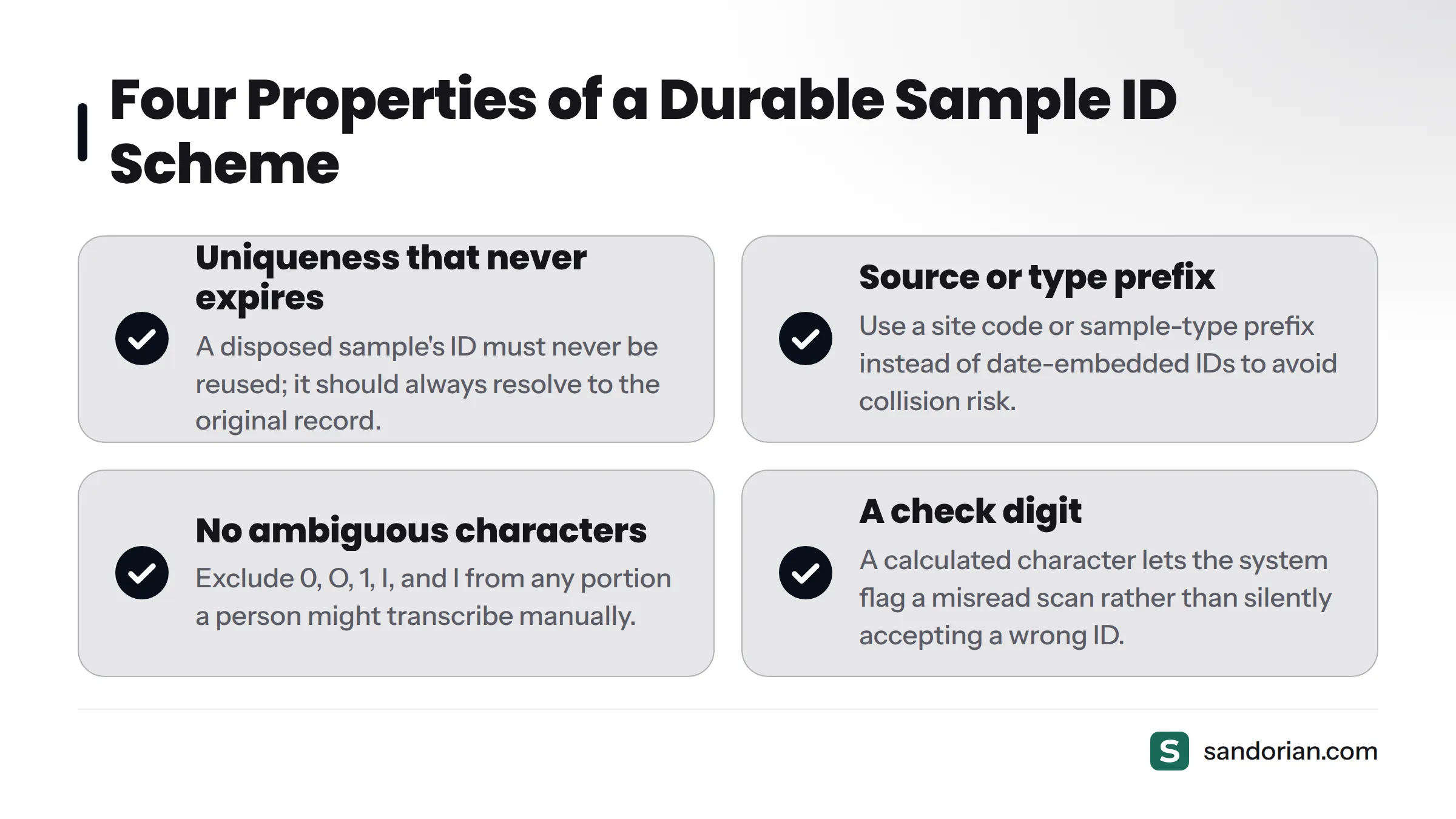
A durable sample ID scheme has four properties:
- Uniqueness that never expires. An ID assigned to a disposed sample must never be reused. Even years later, that ID should resolve to the original sample record, showing its disposal date. Reuse creates ambiguity in audit trails that no scanning system can resolve.
- A prefix that identifies source or type without encoding the date. A site code or sample-type prefix (e.g.,
BLD-for blood,URN-for urine) adds human-readable context without making the ID date-dependent. Date-embedded IDs like20261023-0042create collision risk when intake volume grows and counter resets are mismanaged. Use an opaque sequential counter or a UUID-derived counter instead. - No ambiguous characters in the human-readable portion. The characters
0,O,1,I, andllook identical when handwritten or read from a low-contrast printout. Exclude them from any portion of the ID that a person might transcribe manually. - A check digit. A check digit is a calculated character appended to an ID that allows a scanner or system to confirm the preceding digits were read correctly. A single-character scan error - a
3read as an8- produces a check digit that does not match, and the system flags the scan rather than silently accepting a wrong ID. The Luhn algorithm and Modulo 43 are common check digit schemes used in laboratory and healthcare barcode systems.
Keep IDs short enough to encode in the label area you have available - typically 8 to 14 characters for a standard tube label. Longer IDs require either a larger label or a 2D symbology to maintain scan reliability.
The unique sample ID scheme connects directly to data integrity obligations in regulated labs. Sandorian's guide on lab data integrity and ALCOA+ principles is worth reading alongside this step.
Step 2 - Choose the right barcode symbology
Symbology is the encoding format - the rules that determine how data maps to the printed pattern. Three symbologies cover nearly every lab use case.
Code 128 - the default for most labs
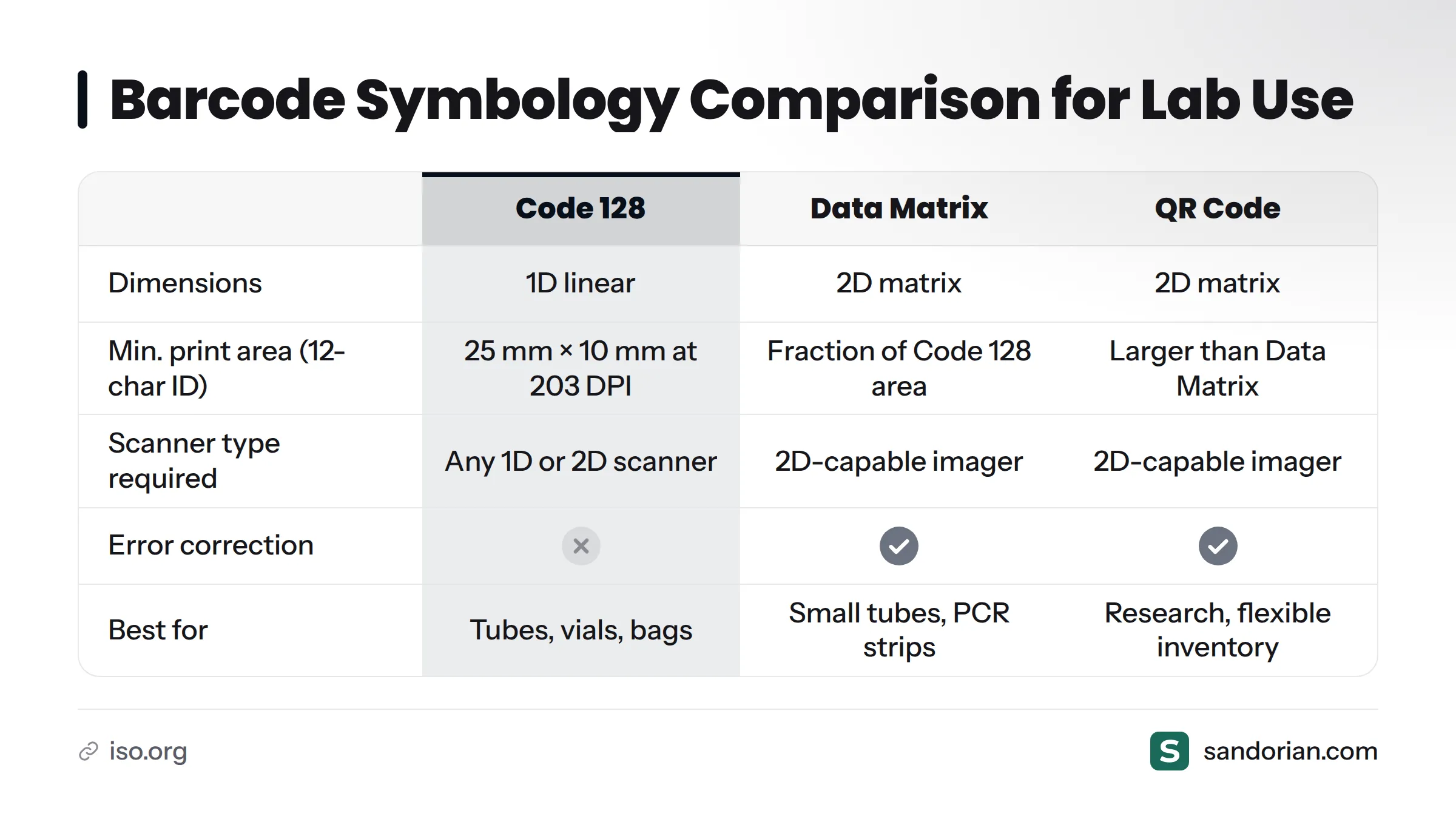
Code 128 is a one-dimensional (1D) linear barcode that encodes the full ASCII character set. Every barcode scanner on the market reads it. For tube side-walls, vial caps, and specimen bags with enough print area, Code 128 is the safe, scanner-agnostic choice. Its limitation is space: a Code 128 barcode encoding a 12-character ID needs a minimum print area of roughly 25 mm × 10 mm at 203 DPI to scan reliably.
Data Matrix - when space or damage tolerance matters
Data Matrix is a two-dimensional (2D) matrix code standardized under ISO/IEC 16022. It encodes the same data as Code 128 in a fraction of the area and reads from any angle - no orientation required. More usefully for labs, Data Matrix includes error correction: a partially obscured or physically damaged code can still be decoded as long as enough of the matrix survives. This makes it the preferred choice for small-diameter tubes, PCR strips, and microplate wells where label real estate is measured in millimeters. The trade-off is scanner compatibility: 2D data matrix tubes require a 2D-capable imager, not a 1D laser scanner.
QR code - data-rich but scanner-dependent
QR codes hold more data than Data Matrix and are instantly recognizable, but they are less common in regulated clinical and environmental labs. A QR code needs a 2D imager, and its larger minimum print size makes it impractical for the smallest labware. The barcode vs QR code samples question comes up often in research settings: labs with flexible scanner inventories sometimes use QR codes when they want to encode URLs or structured data alongside the sample ID. For regulated intake workflows, Data Matrix is generally the better 2D choice.
| Feature | Code 128 | Data Matrix | QR code |
|---|---|---|---|
| Dimensions | 1D linear | 2D matrix | 2D matrix |
| Min. print area (typical) | ~25 × 10 mm | ~5 × 5 mm | ~10 × 10 mm |
| Scan angle | Linear only | Any angle | Any angle |
| Damage tolerance | None | High (ECC 200) | High |
| Scanner compatibility | All scanners | 2D imager required | 2D imager required |
| Typical lab use case | Tubes, vials, bags with space | Small tubes, PCR strips, microplates | Research labs, data-rich encoding |
Step 3 - Select labels that survive your storage conditions
Label material failure is the most common physical point of failure in a lab barcode system. The right label for a refrigerated serum tube is the wrong label for a liquid nitrogen biobank vial. Here is a decision framework by storage condition.
| Storage condition | Label face stock | Adhesive | Print method |
|---|---|---|---|
| Room temperature / +4 °C | Standard polyester or polypropylene | Acrylic permanent | Thermal transfer or direct thermal |
| Freezer: −20 °C to −80 °C | Cryogenic-rated polyester | Aggressive cold-temperature permanent | Thermal transfer only |
| Liquid nitrogen: −196 °C | LN2-rated cryogenic polyester | Cryogenic-rated permanent (LN2-specified) | Thermal transfer only |
| Wet or chemically exposed surfaces | Waterproof polyester | Waterproof, solvent-resistant | Thermal transfer with overlaminate |
Why direct thermal fails in cold storage. A direct thermal label forms its barcode image using a heat-sensitive coating on the label face: the print head applies heat, and the coating darkens. That same coating is sensitive to sustained low temperatures, frost, and condensation - it degrades over weeks in a −20 °C freezer and becomes unreadable. Thermal transfer printing works differently: a heated ribbon physically bonds pigment onto the label surface, producing an image that is chemically inert and stable at sub-zero temperatures. For any sample going into cold storage, thermal transfer is not optional.
Standard paper or office labels have no place in a laboratory sample labeling workflow. They absorb moisture, the adhesive fails under condensation, and the face stock tears under the handling a lab tube receives.
This short video from Electronic Imaging Materials (EIM) shows cryogenic lab sample labels in practice on laboratory containers:
https://www.youtube.com/watch?v=DmOcfYBQYwo
Step 4 - Set up your label printer and print templates
Thermal transfer vs. direct thermal - choose at purchase
A direct thermal printer requires no ribbon and costs less per label. It works for short-lived, room-temperature labels - short-term specimen tracking before processing, for example. A thermal transfer printer requires a ribbon cartridge matched to the label material, but it produces prints that remain stable across temperatures and chemical exposures. For any lab storing samples beyond same-day processing, thermal transfer is the correct investment.
Print template essentials
A print template defines what appears on the label and where. Every label printing laboratory template should include:
- Barcode symbology set explicitly to match your Step 2 choice (Code 128 or Data Matrix, at the correct version)
- Quiet zone - a blank margin on all four sides of the barcode with no print. For Code 128, GS1 General Specifications require a quiet zone of at least 10× the narrow bar width. For Data Matrix, the quiet zone is at least one module on all sides. A missing quiet zone is a leading cause of scan failures at intake.
- Human-readable ID printed below or beside the barcode - this is the fallback when a scan fails, and it is a requirement for any label used in a regulated chain of custody
- Sample type or site prefix as human-readable text
- Font size of 6 pt minimum for all human-readable fields
- Print density matched to barcode size - 203 DPI is the minimum for Code 128 on standard tubes; 300 DPI is strongly recommended for Data Matrix codes on tubes smaller than 12 mm diameter. At 203 DPI, a Data Matrix module is physically too small for reliable decoding on most 2D imagers.
Step 5 - Wire barcode scanning into the intake workflow
The scan has to happen at the right moment or the whole system loses its value. Here is the intake scan sequence that works:
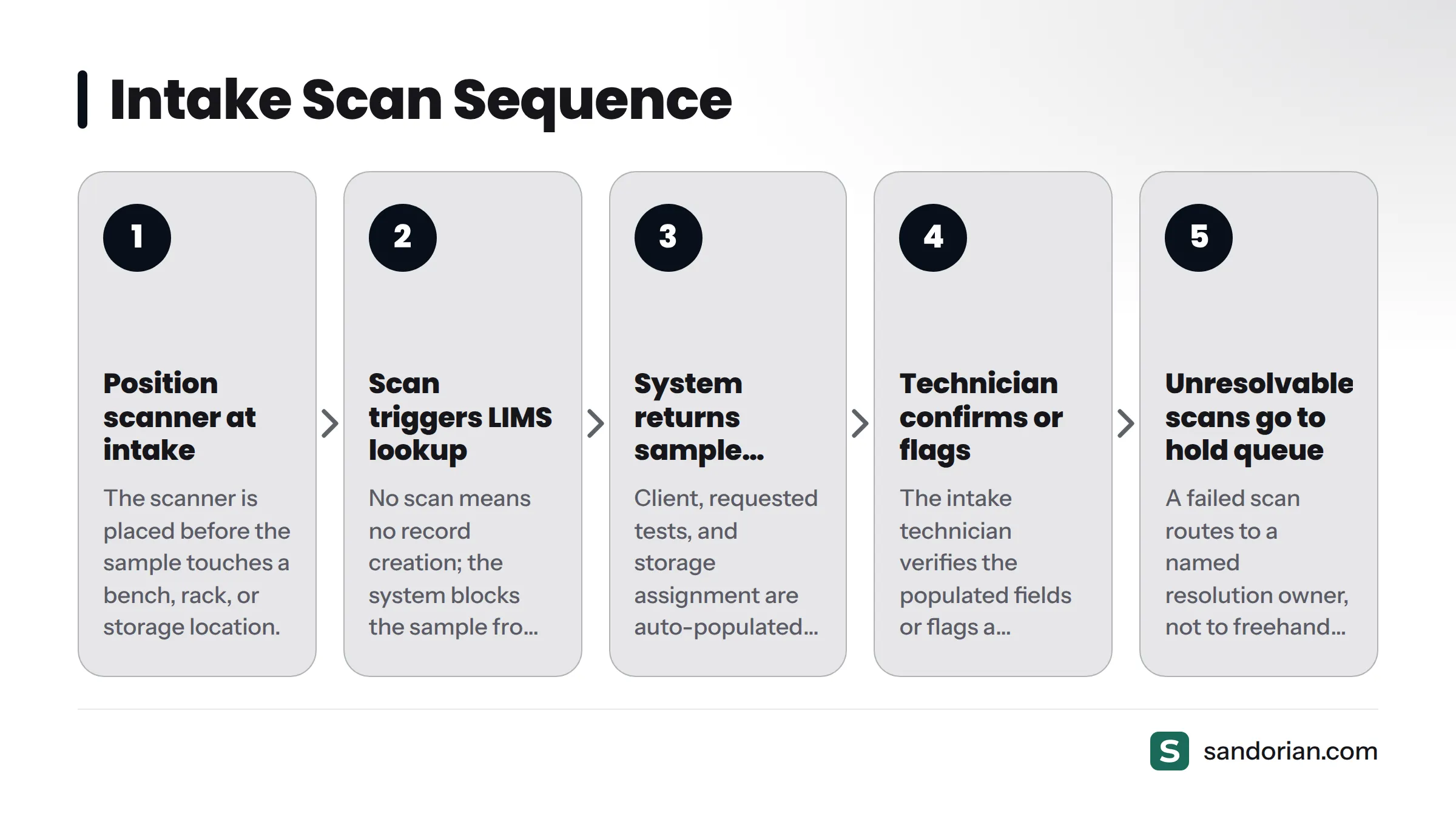
- The scanner is positioned at the intake station - before the sample touches a bench, a rack, or a storage location.
- The scan triggers a lookup in the LIMS or intake system. No scan means no record creation; the system does not allow a sample to proceed without a resolved scan.
- The system returns the matching sample record and auto-populates fields: client, requested tests, and storage assignment.
- The intake technician confirms the populated fields or flags a discrepancy before the sample proceeds.
- An unresolvable scan - no matching record returned - routes to a hold queue with a named resolution owner. It does not route to freehand manual entry, which would break the traceable chain.
Scan at receipt - not after. Scanning a sample after it has been moved, centrifuged, or aliquoted defeats the purpose of scan-at-intake. The scan must happen at the door, before any processing step.
For downstream tracking after intake, see how a sample tracking system uses barcodes at each processing stage. Sandorian's sample registration software with barcode scanning covers the full intake-to-LIMS wiring in a regulated lab context. For a broader view of which parts of the lab workflow to automate first, the Sandorian guide on lab workflow automation is worth reading alongside this step.
Step 6 - Validate that every scan resolves to the right record
Validation is what separates a working system from an assumed one. Before going live, run a structured test: print a representative set of labels covering every label format, tube type, and storage condition in scope. Scan each label and confirm a 100% match rate between the scanned ID and the expected LIMS record.
Test specifically for:
- Labels that have been through the target storage condition (freeze a set of labeled tubes overnight, then scan them)
- Labels on both sides of any tube where the barcode wraps around
- Both handheld and fixed-mount scanners if your intake station uses both
- Edge cases: a label with a small wrinkle, a tube with condensation on the surface, a partially obscured barcode
Document your pass/fail criteria and retain the validation records. ISO 17025 requires that each sample carry a unique identity throughout its time in the laboratory (see ISO 17025:2017, clause 7.4 - handling of test or calibration items); scan validation records are evidence that your sample identification labeling system reliably delivers that uniqueness. The sample intake checklist on the Sandorian blog covers the full validation sequence.
Common failure points and how to avoid them
Every failure mode below comes from real intake implementations. None of them are hypothetical.
Failure 1 - Label adhesive fails on frost-covered tubes. Applying a room-temperature label to a tube pulled directly from a −80 °C freezer means the adhesive never bonds to the condensation-covered surface. The label lifts within minutes. Fix: warm tubes to room temperature before labeling, or use cryogenic labels rated for low-temperature application.
Failure 2 - Direct thermal barcodes fade in cold rooms. This failure appears weeks after go-live, when labels that were perfectly readable at printing are no longer scannable after time in a −20 °C room. Fix: switch to thermal transfer printing for every sample that will be stored cold.
Failure 3 - ID scheme collisions from reused prefixes. Two samples share an ID because a batch prefix was recycled after the previous batch closed. Fix: enforce globally unique IDs using a non-recyclable sequential counter and a check digit. Never allow counter resets that could revisit previously issued numbers.
Failure 4 - Scanner cannot read Data Matrix printed at 203 DPI on a 6 mm tube. The print density is too low for the module size at that tube diameter. Fix: use 300 DPI or higher for any 2D code on labware smaller than 12 mm in diameter.
Failure 5 - Labels placed over existing manufacturer markings. The label adheres to raised text or an embossed graduation mark, creating a surface texture that causes the edge to lift and the barcode to deform. Fix: specify clear label placement zones on labware at onboarding; use pre-validated labware formats wherever possible.
Failure 6 - No fallback when a scan fails at intake. When an unresolvable scan has no defined resolution path, technicians default to manual entry. That manual entry bypasses the scan system entirely and breaks sample traceability. Fix: define a hold/exception queue in the intake workflow before go-live. Every unresolvable scan routes to a named resolution step with a time limit, not to freehand entry.
For what traceability loss means downstream, see Sandorian's guide on keeping chain of custody with scanned IDs.
Need to connect label printing and scanning to your LIMS?
Sandorian engineers have wired barcode-based sample intake into regulated labs working under ISO 17025 and ISO 15189 - from ID scheme design through scan validation and LIMS record creation. If you are setting up or overhauling your intake workflow, talk to an engineer about your specific setup.
Sources
- ISO 17025:2017 - General requirements for the competence of testing and calibration laboratories, ISO
- ISO 15189:2022 - Medical laboratories: requirements for quality and competence, ISO
- ISO/IEC 16022:2006 - Information technology: Data Matrix bar code symbology specification, ISO
- GS1 General Specifications - Barcode symbology specifications and quiet zone requirements, GS1
- Laboratory information management system - Wikipedia
- Luhn algorithm - Wikipedia
Let's talk
We build the systems that power your business. Let us know how we can help.
Book a 30-min Call