Lab Workflow Automation: What to Automate First
Lab workflow automation is the use of software rules, workflow engines, LIMS integrations, and middleware to move samples, data, and decisions through a laboratory with minimal manual intervention. For most testing and calibration labs, the steps to automate first are sample intake and accession logging, then worklist routing, then result transfer, then review-and-release triggers - in that order, because each step feeds the next.
What is lab workflow automation?
Lab workflow automation replaces manual, error-prone steps in a laboratory's data and sample-handling chain with rule-driven software processes. A Laboratory Information Management System (LIMS), a workflow engine, or middleware executes those rules automatically: assigning accession numbers, routing worklists, transferring results, and triggering review queues - without a person retyping data between systems.
Software-layer vs. hardware automation - why the distinction matters for compliance labs
Physical automation - robotic liquid handlers, automated sample sorters, conveyor-fed analysers - gets most of the attention. But for ISO 17025 and ISO 15189 accredited labs, the majority of errors do not happen on the bench. They happen at keyboards.
Every time a technician copies a sample ID from a paper request form into a LIMS, or reads an instrument result off a screen and types it into a spreadsheet, there is a transcription opportunity for error. That is the software layer: the data pathways that connect intake forms, LIMS records, instrument worklists, and result reports. Software-layer automation closes those pathways by replacing retyping with direct data exchange.
Lab workflow automation is not the same as lab robotics. For ISO 17025 and ISO 15189 labs, the highest-value automation targets are in the data layer - not on the bench.
The State of Lab Digitization 2026, Sandorian found that manual data re-entry between disconnected systems remains one of the leading sources of non-conformances in European testing and calibration labs. If your lab already has a LIMS, you almost certainly have software-layer automation opportunities that do not require a single new instrument.
Which lab steps generate the most re-keying errors?
A re-keying hotspot is any point in a laboratory workflow where a person manually copies data from one system, format, or medium into another. These are where transcription errors concentrate, where audit trails break, and where lab process automation delivers the fastest compliance return.
Sequencing automation decisions by hotspot severity - not by what seems easiest - is the principle that separates a strategic automation rollout from one that improves throughput without reducing risk.
The table below maps the four highest-frequency hotspots in a typical testing or diagnostic lab workflow.
| Step | Error type | Frequency risk | Compliance impact |
|---|---|---|---|
| Sample intake / accession logging | Sample ID mismatch, missing fields, duplicate records | High - occurs at every sample arrival | Chain of custody breaks; ISO 17025 §7.4 traceability failure |
| Worklist creation and instrument routing | Wrong test assigned, sample omitted from queue | High - manual every shift | Invalid results released; repeat testing cost |
| Manual result transcription (instrument to LIMS) | Transposed digits, wrong unit, wrong sample row | Very high - repeated per result per instrument | Critical data integrity breach; audit finding |
| Manual review-and-release decisions | Result reviewed out of order, release not logged | Medium - human scheduling dependent | ISO 17025 §7.8 compliance gap; untracked release |
These four steps formed the error profile for ViroVet before they automated their workflow - and they map precisely to the four-step sequence below.
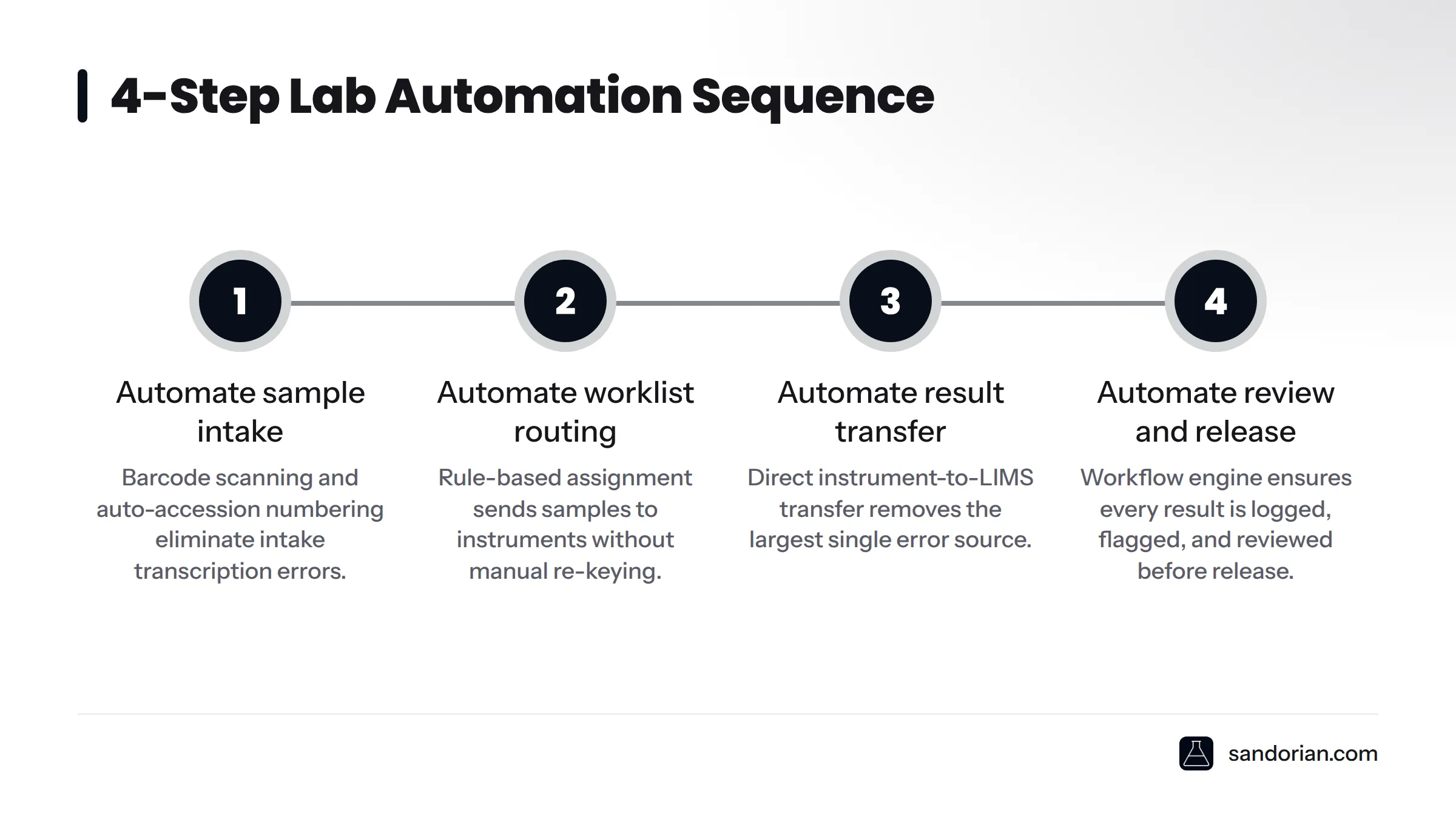
Step 1 - Automate sample intake and accession logging
Sample intake is the entry point for every downstream data record in your lab. An error introduced here - a misread sample ID, a missing test request field, a duplicate accession number - does not stay at intake. It propagates through worklist routing, result transfer, and the final report.
What to automate at this step:
- Barcode scanning at the point of receipt, with the scanner directly populating the LIMS record
- Automatic generation of unique accession numbers by the LIMS, removing the manual numbering step entirely
- Auto-population of sample metadata (client ID, test panel, priority flag) from the incoming request, whether that arrives by electronic order, form, or API
The compliance relevance is direct. ISO 17025:2017 clause 7.4 requires labs to review requests and confirm they have the capability and resources to meet them before work begins. Automated intake can enforce that check at the point of registration - flagging incomplete or out-of-scope requests before they enter the workflow, not after.
Sandorian's sample registration software builds this accession automation for ISO 17025 labs, with configurable intake rules and automatic field validation included.
Step 2 - Automate worklist routing between instruments and LIMS
Once a sample is accessioned, the next manual hotspot is worklist creation: deciding which samples go to which instruments, in which order, with which test parameters. In many labs, a technician checks the LIMS, writes a paper worklist, and then manually enters it into the instrument's software. That is two re-keying steps in a row.
Automated worklist routing replaces this with rule-based assignment. The LIMS applies test-type rules to each accession record and generates an instrument queue automatically. The instrument receives its worklist directly, either through a direct interface or through middleware.
Middleware is the bridging layer that makes this possible. It sits between the LIMS and the instrument's own software, translating data formats and managing bidirectional communication. Without middleware, direct integration requires custom development for every instrument model. With it, a single integration layer can serve multiple instrument types. Sandorian's knowledge base on lab middleware and instrument integration covers the integration patterns in detail.
For the detailed mechanics of how instrument data flows from analyser to LIMS, see Sandorian's guide on automating instrument data capture - that topic goes beyond the scope of this sequencing guide.
Step 3 - Automate result transfer and flagging
Manual result transcription - reading a number off an instrument printout or screen and typing it into the LIMS - is the single largest source of transcription errors in most testing and diagnostic labs. A transposed digit in a quantitative result, a misread unit, a value entered in the wrong sample row: each is a potential non-conformance, and each is entirely preventable with direct result transfer.
What to automate at this step:
- Direct instrument-to-LIMS result transfer via middleware or a direct interface, so no human touches the result value in transit
- Automatic out-of-range flagging: the LIMS compares each incoming result against predefined acceptance criteria and applies a flag (hold, alert, pass) without manual interpretation
- Logging of the original instrument result alongside any system-applied transformation, so the audit trail records both the raw value and any derived value
The data integrity requirement here is non-negotiable. ALCOA+ principles - Attributable, Legible, Contemporaneous, Original, Accurate, plus Complete, Consistent, Enduring, and Available - require that automated result transfer preserves the original value and that any processing is traceable. The system must never silently overwrite an instrument result.
For practical techniques to reduce manual data entry beyond result transfer, see the Sandorian guide on reducing manual data entry in the lab.
Step 4 - Automate review-and-release triggers
The review-and-release step is the last human gate before a result leaves your lab. The goal of automating this step is not to remove the human reviewer - it is to confirm that no result bypasses review, and that every review action is captured with a timestamp and user ID.
Here is how an automated review-and-release trigger works: when an instrument result transfers into the LIMS, the workflow engine evaluates it against the flagging rules set in Step 3. Flagged results route automatically to the responsible reviewer's queue. The reviewer sees exactly the flagged results they need to act on, in priority order. When they approve or reject, the LIMS records the action - who, when, and what decision - and the result either releases or holds accordingly.
ISO 17025:2017 clause 7.8 requires that results be reviewed before issue. An automated trigger enforces that requirement structurally, not procedurally. The workflow cannot release a result that has not passed through the review queue. That is a stronger control than a paper-based SOP that relies on a technician remembering to check a box.
For what comes after release - automated report generation and delivery - see the Sandorian guide on automated lab report generation.
Controls every automated lab workflow must include
Automating steps 1 through 4 reduces errors sharply. But automation without controls creates new risks: unvalidated logic, missing audit evidence, collapsed role separation. The three controls below are non-negotiable before any automated workflow goes live.
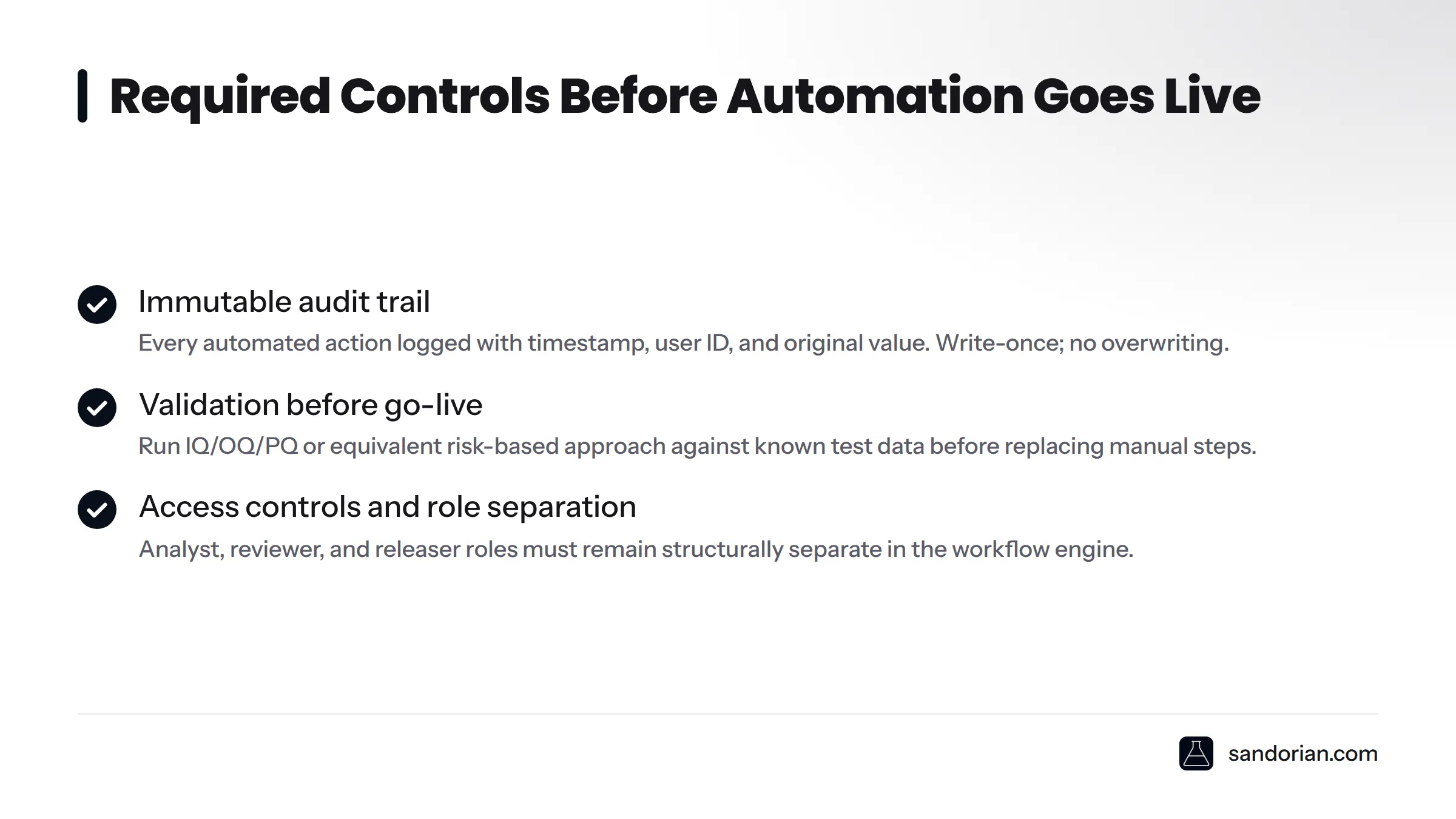
Immutable audit trail
Every automated action - accession creation, worklist assignment, result transfer, flag application, review decision - must be logged with a timestamp, the user or system ID that triggered it, and the original value before any change. ISO 17025:2017 clause 8.4 requires records to be protected from amendment and loss. The audit trail must be write-once: no record can be deleted or overwritten, only appended with a dated correction and reason.
Read more about what this requires in practice in Sandorian's guide to audit-ready lab software.
Validation before go-live
Automated workflows must be validated before they replace manual steps. This means documenting acceptance criteria, running the workflow against known test data, verifying that outputs match expectations (Installation Qualification, Operational Qualification, Performance Qualification - IQ/OQ/PQ, or an equivalent risk-based approach), and signing off the validation report. ISO 15189:2022 requires that software used in the examination process be validated for its intended use before deployment.
Access controls and role separation
Automation must not collapse the separation between the analyst who generates a result, the reviewer who approves it, and the releaser who issues the report. Role-based access in the workflow engine enforces this separation structurally. The analyst account cannot release; the reviewer account cannot modify instrument results. ILAC guidelines for accredited laboratory operations consistently require this kind of control separation as a condition of accreditation.
Pre-automation controls checklist:
- Audit trail captures all automated actions (timestamp, actor, original value)
- Validation protocol documented, executed, and signed off
- Role-based access configured and tested for analyst / reviewer / releaser separation
- Rollback procedure defined and documented for automation failures
- Data integrity verified at each automated transfer point before go-live
How ViroVet used this order to remove errors
ViroVet, a veterinary diagnostic laboratory, came to Sandorian with a recognisable problem: their workflow ran across disconnected systems, with technicians manually transcribing sample IDs at intake, retyping worklists for each analyser, and copying instrument results into their reporting system by hand. Error rates were high enough to generate repeat testing and audit findings.
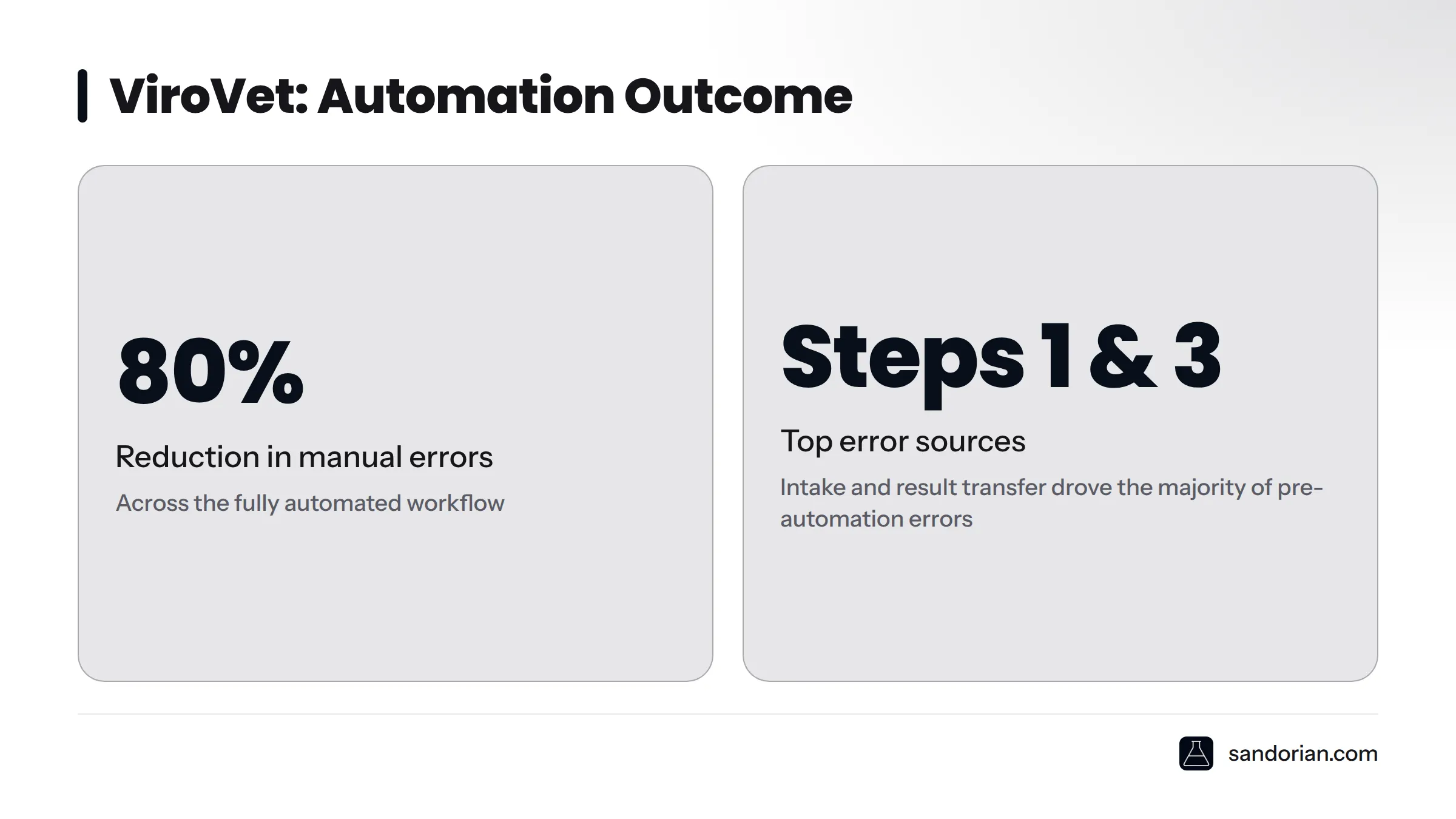
Sandorian worked with ViroVet to apply the four-step sequence above, starting at intake. The rationale was straightforward: fixing intake first meant every downstream step received clean, validated data. Automating worklist routing second eliminated the highest-frequency daily re-keying task. Direct result transfer third closed the largest single error source. Review-and-release automation fourth confirmed that every result had a logged, timestamped review action before it left the system.
The outcome was an 80% reduction in manual errors across the automated workflow. The largest individual gains came from Steps 1 and 3 - intake and result transfer - which together accounted for the majority of the pre-automation error volume. Report generation was not part of the initial scope; ViroVet addressed it in a subsequent phase, after the data entering that step was already clean.
"By automating in hotspot order - intake first, result transfer third - ViroVet removed 80% of manual errors before touching report generation."
See the full ViroVet automation case study for the detailed breakdown of steps, timeline, and outcomes.
If you are not sure where your own lab's re-keying hotspots are, the best starting point is a structured workflow review - mapping each step where data crosses a system boundary and counting how many times a person types something a system could transfer automatically.
Sandorian builds custom laboratory workflow software designed around your existing workflow and compliance requirements. If you want to identify your highest-impact automation target before committing to a full rollout, where to start with lab digitization is a practical first read - and we offer workflow reviews for labs at any stage of automation maturity.
Frequently asked questions
What is lab workflow automation in simple terms?
Lab workflow automation is the use of software - a LIMS, middleware, or a workflow engine - to move data and tasks through a laboratory without manual re-entry. Instead of a person copying a sample ID from a form into a system, or transcribing a result from an instrument screen into a spreadsheet, the software does the transfer automatically and logs every action.
What is the difference between lab workflow automation and lab robotics?
Lab robotics handles physical tasks: pipetting, sample sorting, plate handling. Lab workflow automation handles data tasks: transferring records between systems, routing worklists, flagging results, and triggering review queues. For most ISO 17025 and ISO 15189 labs, data-layer automation has a greater immediate impact on error rates and audit readiness than adding new instruments.
Which lab step should I automate first?
Automate sample intake and accession logging first. It is the entry point for all downstream data, so errors here propagate through every subsequent step. Fixing it first means every step after it receives cleaner data.
Does automating a lab workflow satisfy ISO 17025 requirements?
Automation alone does not satisfy ISO 17025 - the controls around it do. You need a validated workflow, an immutable audit trail, role-based access, and documented acceptance criteria. When those controls are in place, automated workflows actively support compliance with clauses 7.4 (request review), 7.8 (result reporting), and 8.4 (records management).
What is a re-keying hotspot in a lab workflow?
A re-keying hotspot is any step where a person manually copies data from one system or format into another. These are the points where transcription errors accumulate most frequently. Identifying and sequencing automation by hotspot severity - not by convenience - is the fastest path to meaningful error reduction.
What is middleware in lab automation?
Middleware is a software layer that sits between laboratory instruments and the LIMS. It translates data formats, manages bidirectional communication, and allows one integration layer to serve multiple instrument types. Without middleware, connecting each instrument to the LIMS requires separate custom development.
Do I need a new LIMS to automate my lab workflow?
Not necessarily. Many labs can automate their highest-impact re-keying hotspots by adding workflow rules and middleware to their existing LIMS, rather than replacing it. See Sandorian's guide on whether your lab needs a new LIMS or a better workflow for a structured way to make that decision.
How do I keep an automated workflow audit-ready?
Configure your workflow engine to log every automated action with a timestamp, a system or user ID, and the original data value. Use a write-once audit log that cannot be amended without a dated correction record. Validate the workflow before go-live and document the validation. Review access controls at least annually to confirm role separation is intact.
Sources
- ISO 17025:2017 - General requirements for the competence of testing and calibration laboratories, ISO
- ISO 15189:2022 - Medical laboratories: requirements for quality and competence, ISO
- ILAC - International Laboratory Accreditation Cooperation
- State of Lab Digitization 2026, Sandorian
- ViroVet automation case study, Sandorian
Let's talk
We build the systems that power your business. Let us know how we can help.
Book a 30-min Call