How to Integrate the Moneybird API in Your Application
The Moneybird API is a REST interface that gives your application read and write access to every resource inside a Moneybird administration - contacts, sales invoices, products, payments, bank transactions, and more. It speaks JSON (and optionally XML), authenticates over HTTPS using OAuth 2.0 or a personal access token, and organizes every resource under a predictable URL structure rooted at https://moneybird.com/api/v2/.
If you want to automate invoicing, synchronize contacts, reconcile bank feeds, or trigger accounting workflows from your own product, this guide walks you through the entire path - from your first token to a production-grade integration. It covers what the official Moneybird developer documentation does not: end-to-end workflow examples, webhook idempotency, error handling, and a production readiness checklist.
This guide is accurate as of October 2026. Code examples are illustrative starting points; review them against your own security requirements before deploying to production.
What the Moneybird API can do for your application
Moneybird is a Dutch SaaS accounting platform owned by Exact Software, widely used by freelancers, small businesses, and growing companies across the Netherlands and Belgium. Its API gives your application full programmatic control over an administration's financial data.
Common use cases include:
- Invoicing automation - create, send, and monitor sales invoices without manual data entry.
- Contact synchronization - keep your CRM aligned with Moneybird's contact records so customer data lives in one place.
- Bank reconciliation - push bank transaction imports, match mutations to invoices, and update settlement states automatically.
- Financial reporting - pull ledger account balances, tax rate summaries, and financial statements for dashboards or ERP exports.
- Product catalog management - maintain a shared product and pricing catalog that feeds both your storefront and your invoices.
Supported resource types at a glance
The API organizes data into resource groups. The table below maps each group to its primary purpose and the HTTP methods available on the collection endpoint:
| Resource group | Primary purpose | Typical HTTP methods |
|---|---|---|
| Contacts | Customer and supplier records | GET, POST, PATCH, DELETE |
| Sales invoices | Client invoicing and payment tracking | GET, POST, PATCH, DELETE, POST (send) |
| Purchase invoices | Supplier bill management | GET, POST, PATCH, DELETE |
| Products | Reusable line-item catalog | GET, POST, PATCH, DELETE |
| Financial accounts | Bank and cash account definitions | GET, POST, PATCH |
| Financial statements | Bank statement imports | GET, PATCH, DELETE |
| Financial mutations | Individual bank transaction lines | GET, PATCH |
| Payments | Invoice payment records | GET, POST, DELETE |
| Ledger accounts | Chart of accounts | GET, POST, PATCH, DELETE |
| Tax rates | VAT rate definitions | GET, POST, PATCH |
| Webhooks | Event subscription management | GET, POST, PATCH, DELETE |
| Projects | Time and expense grouping | GET, POST, PATCH, DELETE |
| Reports | Financial overviews | GET |
Direct integration vs. a unified API layer
Tools like Merge.dev offer a unified API layer that abstracts Moneybird - and dozens of other accounting platforms - behind a single generic schema. That approach makes sense when you need to support multiple accounting backends from one codebase. Direct integration makes more sense when:
- You need access to Moneybird-specific fields (SEPA mutation data,
settlement_state, Dutch VAT structures) that a unified layer flattens away. - Your team can maintain a single, well-tested integration rather than a generalized abstraction.
- You want real-time webhook events from Moneybird without a polling proxy in between.
For teams that have built open banking API integrations or payment-processor connections before, direct Moneybird integration follows the same patterns and is straightforward to maintain.
How Moneybird API authentication works
Every request to the Moneybird API must carry a valid Bearer token in the Authorization HTTP header. There are two ways to obtain one.
Personal access tokens (fastest way to get started)
A personal access token is a long-lived credential tied to a single Moneybird user account. Generate one in the Moneybird dashboard:
- Log in to moneybird.com.
- Click your profile avatar in the top-right corner and choose Settings.
- Navigate to API > OAuth applications.
- Under the Personal access tokens section, click New token, give it a name, and save the generated string immediately - Moneybird will not show it again.
Personal access tokens carry full account permissions. Use them for server-side scripts, internal tooling, or quick proof-of-concepts where multi-tenant access is not needed. Do not embed them in client-side code or mobile apps.
OAuth 2.0 for multi-tenant applications
When your application acts on behalf of multiple Moneybird users - a SaaS product, an accounting integration, a marketplace - you need OAuth 2.0 (RFC 6749). Moneybird implements the Authorization Code grant:
- Register your app. In the Moneybird dashboard, go to Settings > API > OAuth applications and create a new application. You receive a
client_idandclient_secret. - Redirect the user. Send the user to:
https://moneybird.com/oauth/authorize ?client_id=YOUR_CLIENT_ID &redirect_uri=https://yourapp.com/callback &response_type=code &scope=sales_invoices+contacts - Exchange the code. After the user authorizes your app, Moneybird redirects to your
redirect_uriwith acodeparameter. POST it tohttps://moneybird.com/oauth/tokenalong with yourclient_id,client_secret, andgrant_type=authorization_code. - Store and refresh. The response includes an
access_tokenand arefresh_token. Use the refresh token to obtain a new access token before expiry without prompting the user again.
Choosing the right OAuth scopes
Scopes control which parts of the Moneybird API your token can reach. Requesting broader scopes than you need creates unnecessary risk. The table below lists the scopes Moneybird defines, what they grant, and which integration use cases they serve:
| Scope | What it grants | Typical use case |
|---|---|---|
sales_invoices |
Read and write sales invoices, products, contacts in invoice context | Invoicing automation |
bank |
Read and write financial accounts, statements, mutations | Bank reconciliation |
purchases |
Read and write purchase invoices | Accounts payable automation |
settings |
Read and write administration settings, ledger accounts, tax rates | Initial setup, chart of accounts sync |
openid |
Basic profile information for user identification | Multi-tenant user identification |
administration |
Access administration metadata (e.g., list available administrations) | Discovering administration_id |
Request the minimum set your integration requires. An invoicing bot needs sales_invoices and contacts; a bank reconciliation service needs bank. Avoid requesting settings unless your app genuinely manages account configuration.
Constructing the authorization header
Once you have a token, every API request carries:
Authorization: Bearer YOUR_ACCESS_TOKEN
Content-Type: application/json
Here is a minimal cURL call to confirm the token works:
curl -H "Authorization: Bearer YOUR_ACCESS_TOKEN" \
     https://moneybird.com/api/v2/administrations.json
Security checklist - token storage and rotation
- Store tokens in environment variables or a secrets manager (HashiCorp Vault, AWS Secrets Manager), never in source code or version control.
- Rotate personal access tokens on a schedule (every 90 days is a sensible baseline).
- Scope OAuth tokens to the minimum permissions the integration needs.
- Enforce HTTPS on all inbound webhook endpoints - reject any plaintext HTTP request immediately.
- Never log raw Bearer tokens in application logs.
Personal access token vs. OAuth 2.0: how to decide
| Criterion | Personal access token | OAuth 2.0 |
|---|---|---|
| Setup time | Minutes | Hours (app registration + flow) |
| Multi-user support | No - single account only | Yes - any Moneybird user |
| Token lifespan | Long-lived (until revoked) | Short-lived (refreshable) |
| Revocation control | Manual, in dashboard | Programmatic via token endpoint |
| Best for | Internal scripts, single-tenant tools | SaaS products, marketplaces |
| Security risk | Higher (no expiry by default) | Lower (short-lived + refresh) |
Core concepts you need before writing any code
The administration_id - what it is and how to get it
The administration_id is the numeric identifier for a specific Moneybird financial administration. Every API endpoint URL includes it as the second path segment. One Moneybird user account can belong to multiple administrations (for example, separate legal entities), so the administration_id tells the API which set of books to operate on.
Finding it in the UI: After logging in, the URL in your browser reads https://moneybird.com/{administration_id}/... - the long number in that path is your administration ID.
Retrieving it programmatically: Call the Administrations endpoint:
curl -H "Authorization: Bearer YOUR_ACCESS_TOKEN" \
     https://moneybird.com/api/v2/administrations.json
The response is an array of administration objects, each containing an id field. Pick the id that matches the administration name you want to work with, then store it alongside your token for all subsequent requests.
The API URL structure and format suffix (.json vs. .xml)
Every Moneybird API v2 endpoint follows this pattern:
https://moneybird.com/api/v2/{administration_id}/{resource}/{id}{format}
| URL segment | Example | Notes |
|---|---|---|
v2 |
v2 |
Current API version - always use v2 |
{administration_id} |
123456789012345678 |
18-digit numeric ID |
{resource} |
sales_invoices |
Plural snake_case resource name |
{id} |
987654321098765432 |
Optional - omit for collection endpoints |
{format} |
.json |
.json or .xml - defaults to JSON when omitted but be explicit |
The .json format suffix is easy to forget, particularly when constructing URLs dynamically. Always append it explicitly - omitting it can cause unexpected 406 Not Acceptable responses in some edge cases. The XML format is available but rarely useful for new integrations; JSON is the standard across all official code examples and has better library support in every language.
API versioning and how to track changes
The Moneybird REST API is on version 2, which has been stable for several years. Moneybird publishes breaking and non-breaking changes to the official API changelog. Bookmark it and check it when upgrading your integration - Moneybird does not currently offer email or webhook-based changelog notifications. For strategies on protecting your integration against version changes, our guide to API versioning for long-lived B2B integrations covers the patterns that work in practice.
Key endpoints and what they're for
The table below gives you an integration map at a glance. All paths are relative to https://moneybird.com/api/v2/{administration_id}/.
| Resource | Methods | Required scope | Primary use case |
|---|---|---|---|
contacts |
GET, POST, PATCH, DELETE | sales_invoices |
Create and sync customer records |
sales_invoices |
GET, POST, PATCH, DELETE | sales_invoices |
Invoice creation and status tracking |
external_sales_invoices |
GET, POST, PATCH, DELETE | sales_invoices |
Import invoices from other systems |
products |
GET, POST, PATCH, DELETE | sales_invoices |
Reusable catalog items |
financial_accounts |
GET, POST, PATCH | bank |
Bank/cash account setup |
financial_statements |
GET, PATCH, DELETE | bank |
Bank statement imports |
financial_mutations |
GET, PATCH | bank |
Individual transaction lines |
payments |
GET, POST, DELETE | sales_invoices |
Record invoice payments |
ledger_accounts |
GET, POST, PATCH, DELETE | settings |
Chart of accounts management |
tax_rates |
GET, POST, PATCH | settings |
VAT rate definitions |
webhooks |
GET, POST, PATCH, DELETE | settings |
Event subscriptions |
projects |
GET, POST, PATCH, DELETE | sales_invoices |
Project grouping for invoices |
Contacts
The Contacts resource stores customers, suppliers, and any other party your administration transacts with. To find an existing contact before creating a duplicate, use the query filter parameter:
curl -H "Authorization: Bearer YOUR_TOKEN" \
  "https://moneybird.com/api/v2/{admin_id}/contacts.json?query=acme"
Creating a contact requires at minimum a company_name or firstname/lastname. The response includes an id that you store and use as contact_id on subsequent invoice objects.
Sales invoices and external sales invoices
Sales invoices are the core of most Moneybird integrations. A sales invoice object contains a reference, issue date, due date, a contact_id, and an array of details_attributes (line items). Each line item links to a ledger_account_id, carries a tax_rate_id, and holds price and amount fields.
For invoices that originate in another system - a POS, an e-commerce platform - use the external_sales_invoices endpoint instead. It accepts the same structure but signals to Moneybird that the source of truth lives outside.
Products
The Products resource stores reusable catalog items with fixed pricing, tax rates, and ledger account assignments. When you POST a sales invoice with a product_id on a line item, Moneybird pre-fills price, description, and tax rate from the catalog - which reduces the payload you need to send and enforces consistency.
Financial accounts, statements, and mutations
These three resources form a hierarchy. A financial account represents a bank or cash account (for example, an ING business account). A financial statement represents an imported bank statement - a batch of transactions for a date range. Financial mutations are the individual transaction lines within a statement; each one has an amount, date, message, and SEPA fields like contra_account_number and batch_reference.
A financial mutation starts life in an unprocessed state. Once matched to an invoice or booked against a ledger account, its settlement_state moves to settled. Automating this matching pipeline is one of the highest-value use cases for the Moneybird API.
Payments
The Payments resource records that money was received against an invoice. POST a payment with an invoice_id, date, price, and financial_account_id. Moneybird will update the invoice's payment status accordingly and, if the amount matches, mark it as fully paid.
Webhooks
Webhooks let Moneybird push events to your server instead of your app polling for changes. The next section covers webhook setup in full.
Reports
The Reports endpoint returns aggregated financial data - profit/loss statements, VAT return summaries, balance sheets. These are read-only GET requests that return JSON snapshots of the administration's financials at a point in time.
Working with Moneybird API pagination
How Moneybird paginates results
The Moneybird REST API returns paginated responses for collection endpoints. Two query parameters control pagination:
page- the page number, starting at1.per_page- records per page, maximum100.
The API does not return a total_pages count in the response body or headers. You detect the last page by checking whether the response array is empty or contains fewer items than per_page. A common gotcha: do not assume page N+1 is empty just because page N was full - always request page N+1 and check.
Iterating all pages in PHP
<?php

function fetchAllContacts(string $adminId, string $token): array {
    $allContacts = [];
    $page = 1;
    $perPage = 100;

    do {
        $url = "https://moneybird.com/api/v2/{$adminId}/contacts.json"
             . "?page={$page}&per_page={$perPage}";

        $ch = curl_init($url);
        curl_setopt_array($ch, [
            CURLOPT_RETURNTRANSFER => true,
            CURLOPT_HTTPHEADER => [
                "Authorization: Bearer {$token}",
                "Content-Type: application/json",
            ],
        ]);

        $response = curl_exec($ch);
        $httpCode = curl_getinfo($ch, CURLINFO_HTTP_CODE);
        curl_close($ch);

        if ($httpCode !== 200) {
            throw new RuntimeException("API error: HTTP {$httpCode}");
        }

        $batch = json_decode($response, true);
        $allContacts = array_merge($allContacts, $batch);
        $page++;
    } while (count($batch) === $perPage);

    return $allContacts;
}
Iterating all pages in Python
The moneybird-python library wraps some of this boilerplate, but here is the raw approach using requests for teams that prefer minimal dependencies:
import requests

def fetch_all_contacts(admin_id: str, token: str) -> list:
    all_contacts = []
    page = 1
    per_page = 100
    base_url = f"https://moneybird.com/api/v2/{admin_id}/contacts.json"
    headers = {"Authorization": f"Bearer {token}"}

    while True:
        response = requests.get(
            base_url,
            headers=headers,
            params={"page": page, "per_page": per_page},
            timeout=10,
        )
        response.raise_for_status()
        batch = response.json()
        all_contacts.extend(batch)

        if len(batch) < per_page:
            break
        page += 1

    return all_contacts
Performance tips for large datasets
- Use the
filterquery parameter (where available) to narrow results before paginating - for example, filter contacts bycreated_afterto sync only recent records. - Cache results locally and sync incrementally using
updated_afterfilters rather than fetching all pages on every run. - Avoid requesting
per_page=100when you only need a few records - smaller pages reduce latency on endpoints that serialize large JSON objects.
A real-world integration workflow
This section shows the complete sequence that most invoicing integrations need to execute: discover the administration, find or create a contact, build a sales invoice, register a payment, and confirm reconciliation through the financial statement layer.
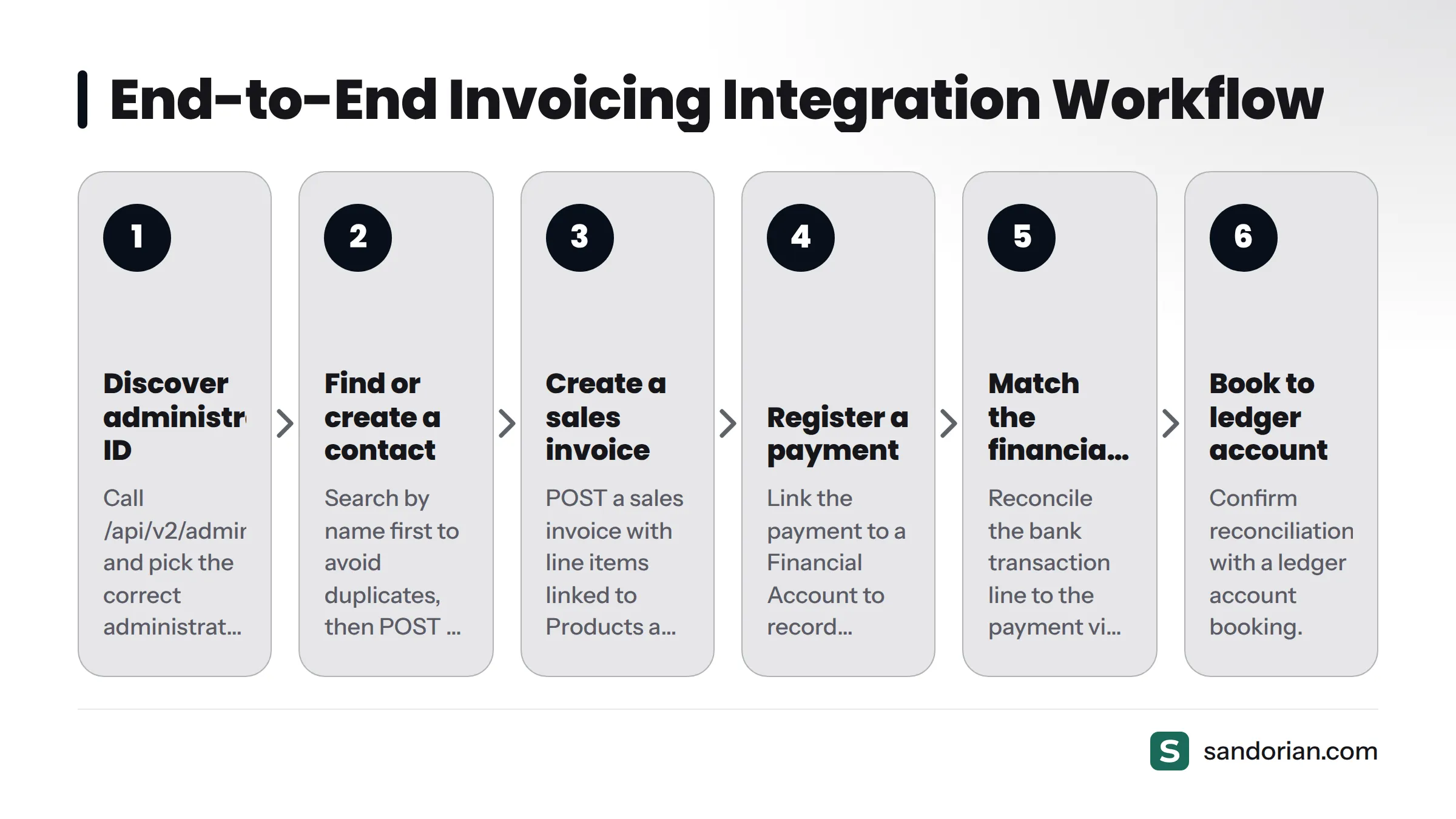
The data flows like this:
Administration → Contact → Sales invoice (with line items linked to Products and Tax Rates) → Payment (linked to a Financial Account) → Financial mutation (matching the payment) → Ledger account booking
Step 1 - Discover your administration ID
$adminList = apiGet('/api/v2/administrations.json', $token);
$adminId = $adminList[0]['id']; // Pick the correct administration by name
Step 2 - Create or find a contact
function findOrCreateContact(string $adminId, string $token, array $contactData): string {
    // Search first to avoid duplicates
    $search = apiGet("/api/v2/{$adminId}/contacts.json?query=" . urlencode($contactData['company_name']), $token);

    if (!empty($search)) {
        return $search[0]['id'];
    }

    $contact = apiPost("/api/v2/{$adminId}/contacts.json", $token, ['contact' => $contactData]);
    return $contact['id'];
}
Step 3 - Create a sales invoice with line items
$invoicePayload = [
    'sales_invoice' => [
        'contact_id'     => $contactId,
        'invoice_date'   => date('Y-m-d'),
        'due_date'       => date('Y-m-d', strtotime('+30 days')),
        'reference'      => 'INV-2026-001',
        'details_attributes' => [
            [
                'description'      => 'API integration consulting',
                'price'            => '1500.00',
                'amount'           => '1',
                'tax_rate_id'      => $taxRateId,       // Fetch from /tax_rates.json
                'ledger_account_id'=> $ledgerAccountId, // Fetch from /ledger_accounts.json
            ],
        ],
    ],
];

$invoice = apiPost("/api/v2/{$adminId}/sales_invoices.json", $token, $invoicePayload);
$invoiceId = $invoice['id'];
In my experience, the most common source of 422 errors on invoice creation is a missing or invalid tax_rate_id. Always fetch and cache the available tax rates at startup rather than hard-coding IDs that may differ between administrations.
Step 4 - Register a payment
$paymentPayload = [
    'payment' => [
        'invoice_type'       => 'SalesInvoice',
        'invoice_id'         => $invoiceId,
        'financial_account_id'=> $financialAccountId,
        'price'              => '1815.00', // Including VAT
        'payment_date'       => date('Y-m-d'),
    ],
];

apiPost("/api/v2/{$adminId}/payments.json", $token, $paymentPayload);
Step 5 - Reconcile via financial statements
Once the bank statement import arrives (either via the UI or a bank feed), PATCH the financial mutation to link it to the invoice payment:
$mutationPayload = [
    'financial_mutation' => [
        'ledger_account_bookings' => [
            [
                'ledger_account_id' => $ledgerAccountId,
                'price'             => '1815.00',
            ],
        ],
    ],
];

apiPatch("/api/v2/{$adminId}/financial_mutations/{$mutationId}.json", $token, $mutationPayload);
After this step, the mutation's settlement_state moves to settled and the invoice shows as fully paid and reconciled.
The full helper functions (apiGet, apiPost, apiPatch) follow the same pattern: set the Bearer header, encode the body as JSON, handle the HTTP status code, and decode the response. The error handling section below shows how to make them resilient.
Setting up and handling Moneybird API webhooks
Registering a webhook endpoint
POST to the Webhooks resource to register your listener URL:
curl -X POST \
  -H "Authorization: Bearer YOUR_TOKEN" \
  -H "Content-Type: application/json" \
  -d '{
    "webhook": {
      "url": "https://yourapp.com/hooks/moneybird",
      "events": ["sales_invoice_created", "payment_created", "contact_updated"]
    }
  }' \
  "https://moneybird.com/api/v2/{admin_id}/webhooks.json"
The response includes a token field - this is the shared secret Moneybird uses to sign webhook payloads. Store it securely alongside your API token.
Available webhook events
Moneybird triggers webhooks for changes across its major resources. Common events include:
sales_invoice_created,sales_invoice_updated,sales_invoice_deletedexternal_sales_invoice_created,external_sales_invoice_updatedcontact_created,contact_updated,contact_deletedpayment_created,payment_deletedfinancial_statement_created,financial_statement_updatedfinancial_mutation_updated
Check the Moneybird API documentation for the complete and current event list, as Moneybird adds events when they release new resource types.
Verifying the webhook payload
Moneybird signs each webhook request with an X-Moneybird-Webhook-Token header containing the shared secret you received at registration. Verify it before processing:
function verifyWebhookToken(string $receivedToken, string $storedSecret): bool {
    return hash_equals($storedSecret, $receivedToken);
}

$receivedToken = $_SERVER['HTTP_X_MONEYBIRD_WEBHOOK_TOKEN'] ?? '';

if (!verifyWebhookToken($receivedToken, getenv('MONEYBIRD_WEBHOOK_SECRET'))) {
    http_response_code(401);
    exit('Unauthorized');
}
Use hash_equals rather than === to prevent timing attacks.
Designing an idempotent webhook handler
Moneybird may deliver the same webhook event more than once - network retries and delivery guarantees mean duplicate delivery is normal, not exceptional. Your handler must be idempotent: processing the same event twice must produce the same result as processing it once.
The standard approach is to store the payload_identifier (or a hash of the event type + resource ID + timestamp) in a database table the first time you process an event, and skip processing if the identifier already exists.
function handleWebhook(array $payload): void {
    $eventKey = $payload['action'] . ':' . $payload['object']['id'];

    if (WebhookLog::alreadyProcessed($eventKey)) {
        http_response_code(200); // Acknowledge without reprocessing
        return;
    }

    // Process the event
    match ($payload['action']) {
        'contact_created'       => ContactSync::create($payload['object']),
        'sales_invoice_created' => InvoiceSync::create($payload['object']),
        'payment_created'       => PaymentSync::record($payload['object']),
        default                 => null,
    };

    WebhookLog::markProcessed($eventKey);
    http_response_code(200);
}
For a deeper look at why idempotency matters in financial contexts, our article on idempotency in API integrations covers the theoretical and practical angles. This pattern comes directly from production integrations we have built at Sandorian - the same design we apply to Mollie payment webhooks and open banking event streams. You can see how we apply it in our guide to Mollie API integration patterns.
Why idempotency matters for financial webhooks: A duplicate
payment_createdevent that triggers a second payment record creates a false double-payment in your books. A duplicatesales_invoice_createdevent that creates a second invoice charges your customer twice. The cost of getting this wrong is not a minor bug - it is a financial error that requires manual reconciliation to undo.
Moneybird API error handling and rate limits
HTTP status codes the API returns
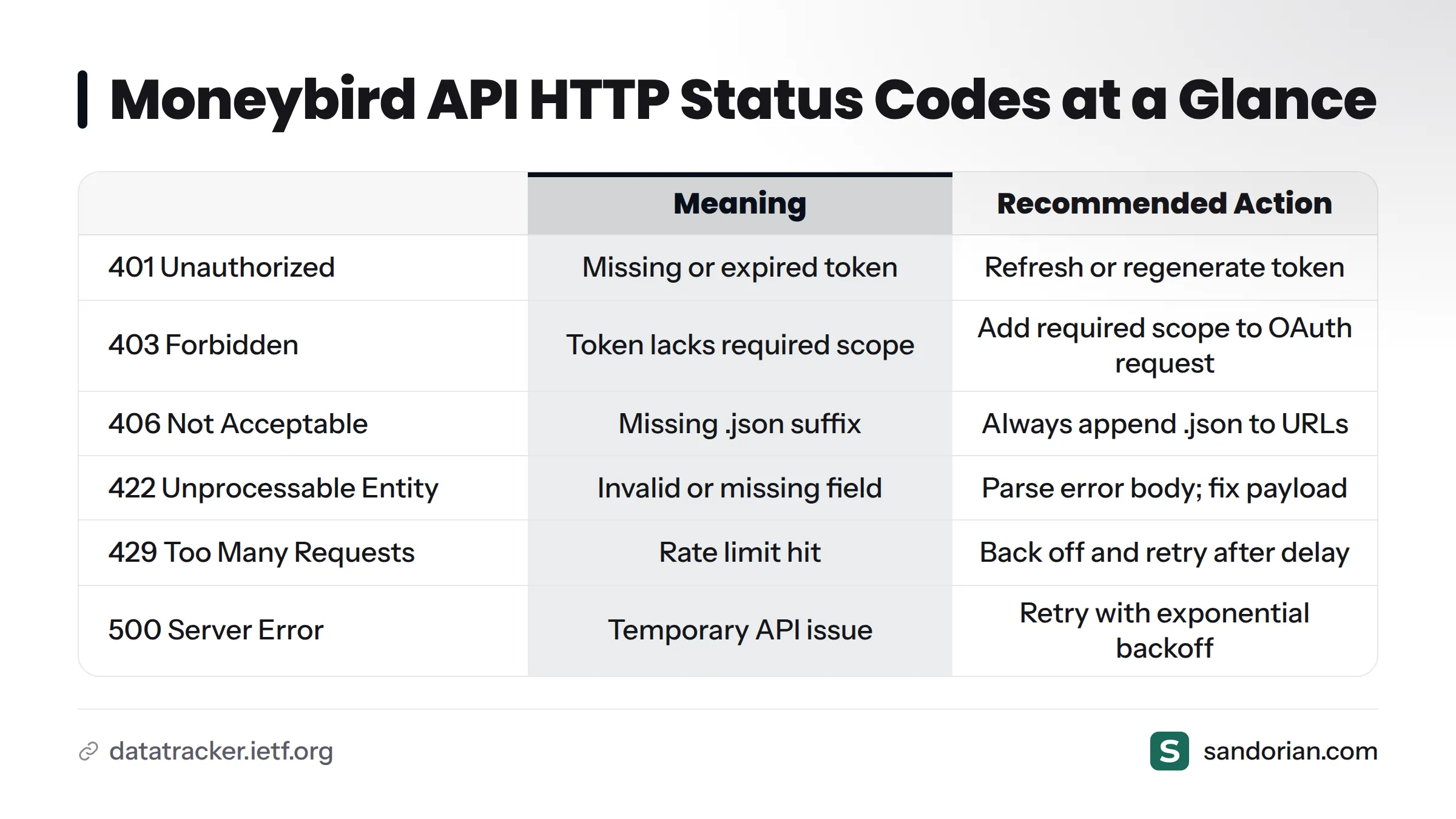
The Moneybird REST API uses standard HTTP status codes as defined in RFC 7231. Here is the complete reference for codes you will encounter in practice:
| Code | Meaning | Common cause | Recommended action |
|---|---|---|---|
200 OK |
Request succeeded | Successful GET or PATCH | Parse and use the response body |
201 Created |
Resource created | Successful POST | Read the id from the response |
204 No Content |
Resource deleted | Successful DELETE | No body to parse |
401 Unauthorized |
Authentication failed | Missing or expired token | Refresh token or regenerate |
403 Forbidden |
Scope insufficient | Token lacks required scope | Add the required scope to your OAuth request |
404 Not Found |
Resource does not exist | Wrong ID or administration_id | Check IDs; log the request URL for debugging |
406 Not Acceptable |
Format not supported | Missing .json suffix |
Always append .json to endpoint URLs |
422 Unprocessable Entity |
Validation failed | Invalid field value or missing required field | Parse the error body; fix the payload |
429 Too Many Requests |
Rate limit hit | Too many requests in a short window | Back off and retry after the indicated delay |
500 Internal Server Error |
Moneybird server error | Temporary API issue | Retry with exponential backoff |
Parsing 422 validation error bodies
A 422 response includes a JSON body that names the failing fields. Always log and surface this body during development:
{
  "error": "Validation failed: Tax rate can't be blank, Price is not a number"
}
In PHP:
if ($httpCode === 422) {
    $errorBody = json_decode($response, true);
    throw new ValidationException($errorBody['error'] ?? 'Validation failed');
}
The three most common 422 causes I see in Moneybird integrations:
- Missing or invalid
tax_rate_idon invoice line items. contact_idpointing to a contact in a different administration.- Date fields sent in the wrong format (use
Y-m-d, not timestamps).
Rate limits and retry strategy
Moneybird does not publish its exact rate limit thresholds in the public documentation, but the API enforces limits and returns 429 Too Many Requests when you exceed them. The Retry-After response header tells you how many seconds to wait before the next attempt. Always read this header rather than guessing a delay.
For integrations that push large batches - bulk contact sync, mass invoice creation - add a deliberate delay of at least 100-200 ms between requests during bulk operations to stay well below the threshold.
Exponential backoff implementation
For transient errors (429, 500, 503), retry with exponential backoff and jitter rather than retrying immediately:
function apiRequestWithRetry(string $url, string $token, int $maxRetries = 5): array {
    $attempt = 0;

    while ($attempt < $maxRetries) {
        [$httpCode, $body] = makeApiRequest($url, $token);

        if ($httpCode === 200 || $httpCode === 201) {
            return json_decode($body, true);
        }

        if ($httpCode === 422 || $httpCode === 404) {
            // Non-retryable client errors
            throw new ApiException("Client error {$httpCode}: {$body}");
        }

        $waitSeconds = (2 ** $attempt) + (random_int(0, 1000) / 1000);
        sleep((int) $waitSeconds);
        $attempt++;
    }

    throw new ApiException("API request failed after {$maxRetries} attempts");
}
The jitter (random_int) prevents multiple concurrent workers from hitting the API simultaneously after a shared retry interval - a pattern we also apply in our Mollie API client work and any integration where fan-out retries could cause a thundering-herd problem.
Production readiness checklist
Before you ship a Moneybird integration to production, work through this checklist:
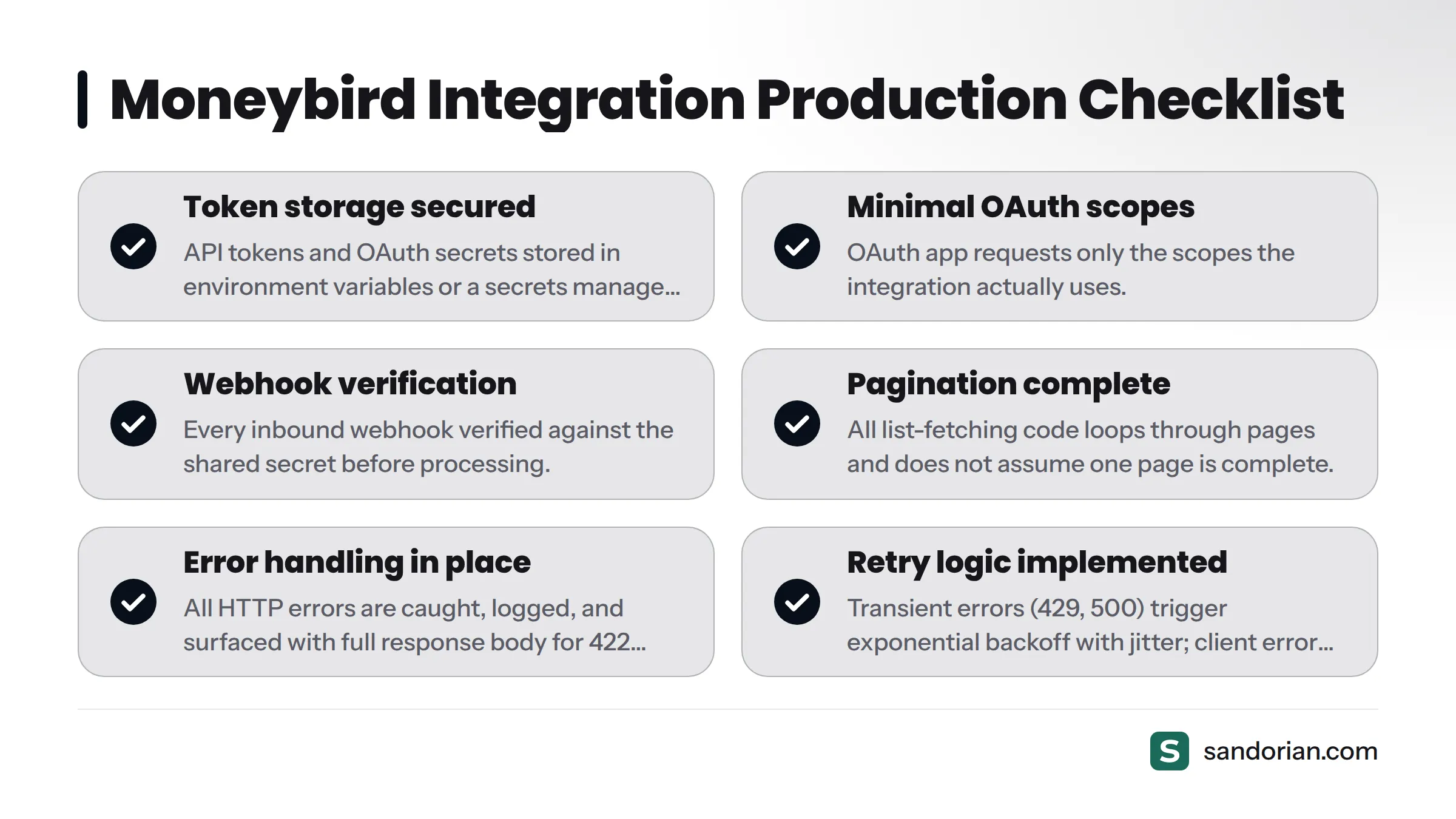
- Token storage - API tokens and OAuth secrets are in environment variables or a secrets manager, not in source code.
- Minimal scope - OAuth app requests only the scopes the integration actually uses.
- Token rotation - a process exists to rotate personal access tokens every 90 days.
- HTTPS enforcement - all webhook listener URLs use HTTPS; plaintext requests are rejected with
400. - Webhook verification - every inbound webhook is verified against the shared secret before processing.
- Idempotent handlers - webhook handlers check for already-processed event IDs and skip duplicates.
- Pagination complete - all list-fetching code uses a loop and does not assume a single page is complete.
- Error handling - all HTTP error codes are caught, logged, and surfaced with the full response body for
422errors. - Retry logic - transient errors (
429,500) trigger exponential backoff with jitter; client errors (422,404) are not retried. - administration_id scoped - all requests use the correct
administration_idfor the target user; multi-administration setups store the ID per-user, not globally. - Rate limit headroom - bulk operations include deliberate inter-request delays.
- Logging and observability - request/response logs (without Bearer tokens) are written to a structured log store with at least 30-day retention.
Logging and observability
Log every outbound API call with at minimum: the request URL (without the token), the HTTP method, the response code, and the response time. Log the full response body for non-2xx responses. A structured log entry lets you replay what happened when a contact failed to sync or an invoice bounced with a 422 three weeks ago.
Secret management and token rotation
Treat Moneybird tokens with the same care as database credentials. If a token leaks, revoke it in the Moneybird dashboard immediately and generate a replacement. For OAuth applications, build a token refresh flow so that access token expiry does not cause silent integration failures - a failed silent refresh should alert your engineering team, not silently drop data.
Our approach to API design patterns for production applications covers secret management and circuit-breaker patterns that apply equally well to Moneybird integrations.
Handling multi-administration setups
If you are building a multi-tenant SaaS product, each of your customers may have multiple Moneybird administrations (for example, multiple legal entities). Store the administration_id at the user-administration level, not at the user level. When a user adds a new administration, re-run the administration discovery call and prompt them to select which administration your integration should operate on.
Frequently asked questions
What is the Moneybird API and what can I build with it?
The Moneybird API is a REST interface to the Moneybird Dutch accounting platform. It gives applications programmatic access to contacts, invoices, products, financial accounts, bank transactions, payments, and reports. You can build invoicing automation, contact synchronization, bank reconciliation pipelines, financial dashboards, and multi-administration accounting tools against it.
Does Moneybird have a sandbox or test environment?
As of October 2026, Moneybird does not offer a dedicated sandbox environment separate from production. The recommended approach is to create a free Moneybird trial account specifically for testing, use it to run all development and integration tests, and never run write operations against a live production administration during development.
What is the difference between a personal access token and OAuth 2.0?
A personal access token is a long-lived credential tied to a single Moneybird user. It is fast to set up and suited for server-side scripts and internal tools, but it cannot act on behalf of other users. OAuth 2.0 is the right choice for any application that connects multiple different Moneybird accounts - it gives each user a scoped, short-lived access token that your app can refresh without their involvement.
What is the administration_id, and where do I find it?
The administration_id is the 18-digit numeric identifier for a Moneybird financial administration. You can read it from the browser URL bar when logged in to Moneybird (https://moneybird.com/{administration_id}/...), or retrieve it programmatically by calling GET https://moneybird.com/api/v2/administrations.json with your Bearer token.
What OAuth scopes does the Moneybird API support?
The main scopes are: sales_invoices (invoices and contacts), bank (financial accounts and statements), purchases (purchase invoices), settings (ledger accounts, tax rates, administration config), openid (user identity), and administration (administration listing). Request only the scopes your integration actually uses.
What is a financial mutation in Moneybird?
A financial mutation is a single transaction line within a bank statement import in Moneybird. It carries fields like amount, date, message, and SEPA payment details (contra account number, batch reference). Mutations start in an unprocessed state and move to settled once matched to an invoice payment or booked against a ledger account. Automating this matching is one of the primary use cases for the financial accounts and statements API.
How do I handle 422 validation errors from the Moneybird API?
A 422 response body contains an error string that names which fields failed and why. Always parse and log this body. The three most common causes are: a missing or invalid tax_rate_id on invoice line items, a contact_id from a different administration, and date fields not formatted as Y-m-d. Fix the payload based on the error message and retry.
Does the Moneybird API have rate limits?
Yes. The API returns 429 Too Many Requests when you exceed the rate limit. The Retry-After header in the 429 response tells you how many seconds to wait. Implement exponential backoff with jitter for all retryable error codes, and add deliberate inter-request delays (100-200 ms) during bulk operations to stay within the limit.
How do I verify that a Moneybird webhook is authentic?
Moneybird sends an X-Moneybird-Webhook-Token header with every webhook request. The value is the secret token that Moneybird returned when you registered the webhook. Compare it against your stored secret using a constant-time comparison function (such as hash_equals in PHP) to prevent timing attacks. Reject any request where the tokens do not match.
What is the correct API URL format for Moneybird?
The full pattern is: https://moneybird.com/api/v2/{administration_id}/{resource}.json for collections and https://moneybird.com/api/v2/{administration_id}/{resource}/{id}.json for individual resources. Always append .json to avoid potential format negotiation issues.
Sources
Let's talk
We build the systems that power your business. Let us know how we can help.
Book a 30-min Call